prw2101a0600p_01
38 / 105
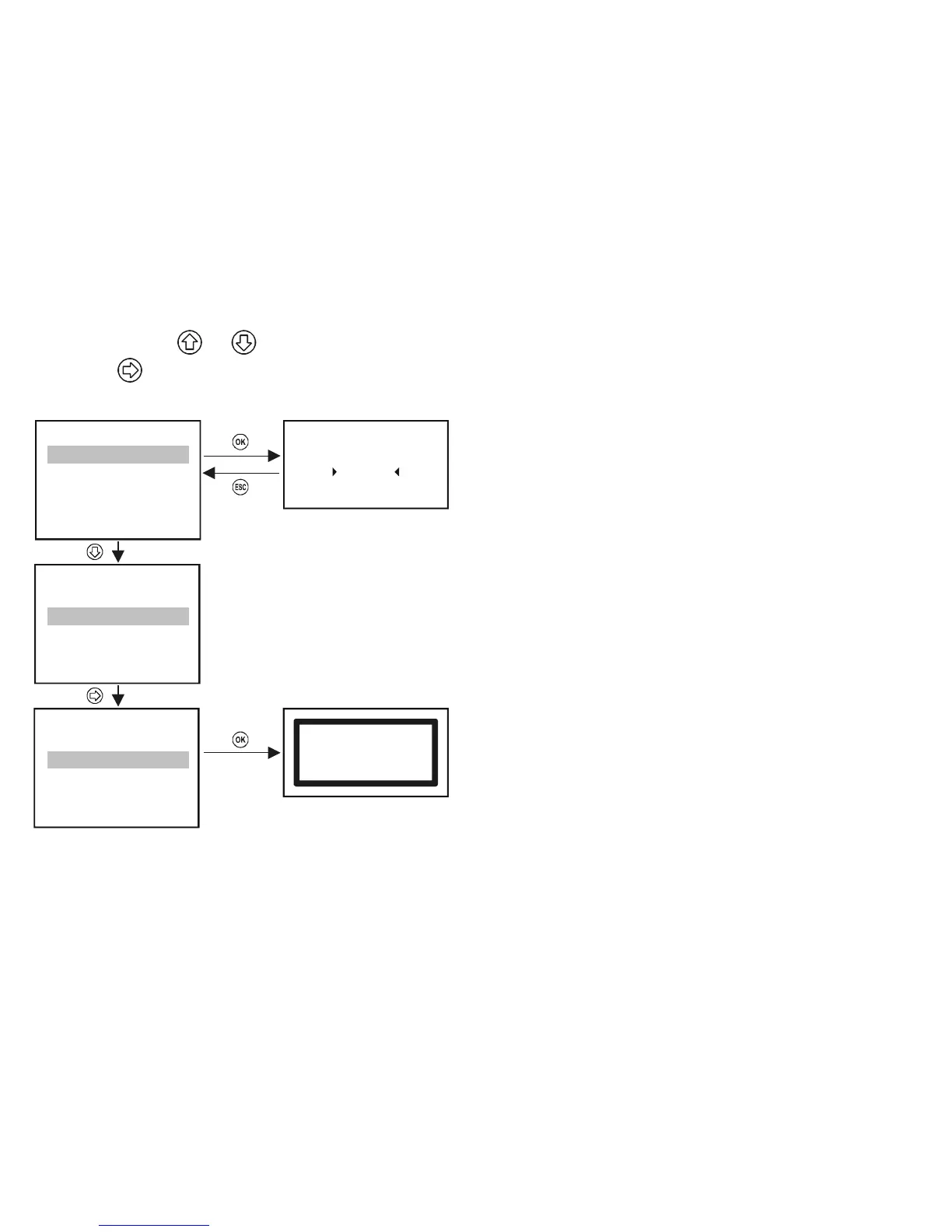
Reorganising the list can be done in the following manner:
Select the unit using
and buttons
Press the
button to move the unit to the end of the list at the other side of the line
Selecting the SAVE line saves the list above the SAVE line.
„Short TAG” can be modified
Note:
When pressing button does not move the selected device above
the --- SAVE --- line it means that the list above the --- SAVE --- line is full
and you cannot add more devices. The lenght of the list depends on the
type of the MultiCONT (1, 2, 4, 8, 15, see order code)
DEV detect
37
- - - -
>
SAVE
<
- - - -
2: SEA-360 (- -)
3: SEA-360 (07)
4: SPA-380 (08)
1: ST-300 (01)
DEV detect
37
- - - -
>
SAVE
<
- - - -
2: SEA-360 (- -)
3: SEA-360 (07)
4: SPA-380 (08)
1: ST-300 (01)
DEV detect
37
- - - -
>
SAVE
<
- - - -
2: SEA-360 (07)
3: SPA-380 (08)
4: SEA-360 (- -)
1: ST-300 (01)
2: SEA-360
38
ST300
List saved
Press OK
Saving the list above the ----> SAVE <---- line
The units in the saved list automatically become active!!


 To Next Page