FX / RVE
Functioning
EN - 17
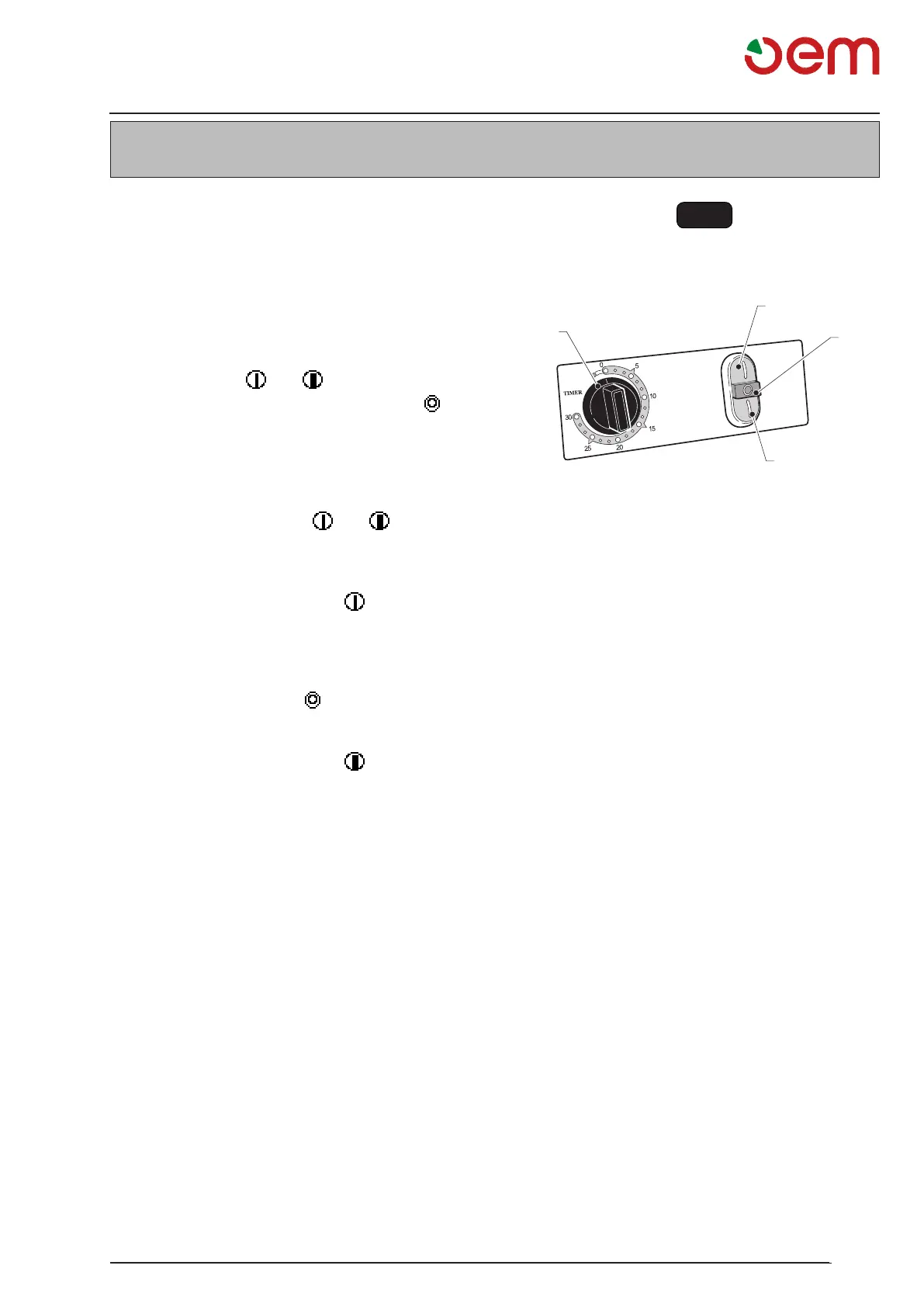
Fig. 1
2
3
4
1
5.1 - CONTROL BOARD AND SIGNALLING
LAMPS (Fig 1)
Onthemachineyoucanndfollowingcontrol
elements:
1. Timer
The timer has three positions:
"TIMER"
allows the machine manually to function, to start
thecyclepress" "or" ",dependingonthe
concernedmodel,tostopthecyclepress" ".
"0"
the machine functioning is disabled.
"Minute counter (1a)"
It is possible to set the machine functioning minu-
tes (from 0 to 30 minutes) by turning the timer knob
(1)clockwise,thenpress" "or" ",depending
on the concerned model, to start the cycle; the
latter ends when the timer knob (1) reaches “0”.
2. Green starting push-button " " 1st speed.
enabledbyturningthetimerknob(1)on"TIMER"
or onto the minute counter.
If you press it, the machine starts.
3. Red stop push-button " "
If you press it, the machine stops.
4. Green starting push-button " " 2. speed.
(If any)
Enabled by positioning the timer knob (1) on
"TIMER"orontheminutecounter.
If you press it, the machine starts.
Chapter 5


 To Next Page