Chapter 4 Reprocessing Operations
143
ENDOSCOPE REPROCESSOR OER-Pro Operation Manual
• The print function can print completed reprocessing cycles or
error codes that occur during the reprocessing cycle. It
cannot print the record of completed/incomplete
sub-independent processes and the record of error occurred
during the standby operation. For details on the print function
of error result, see Table 4.12.
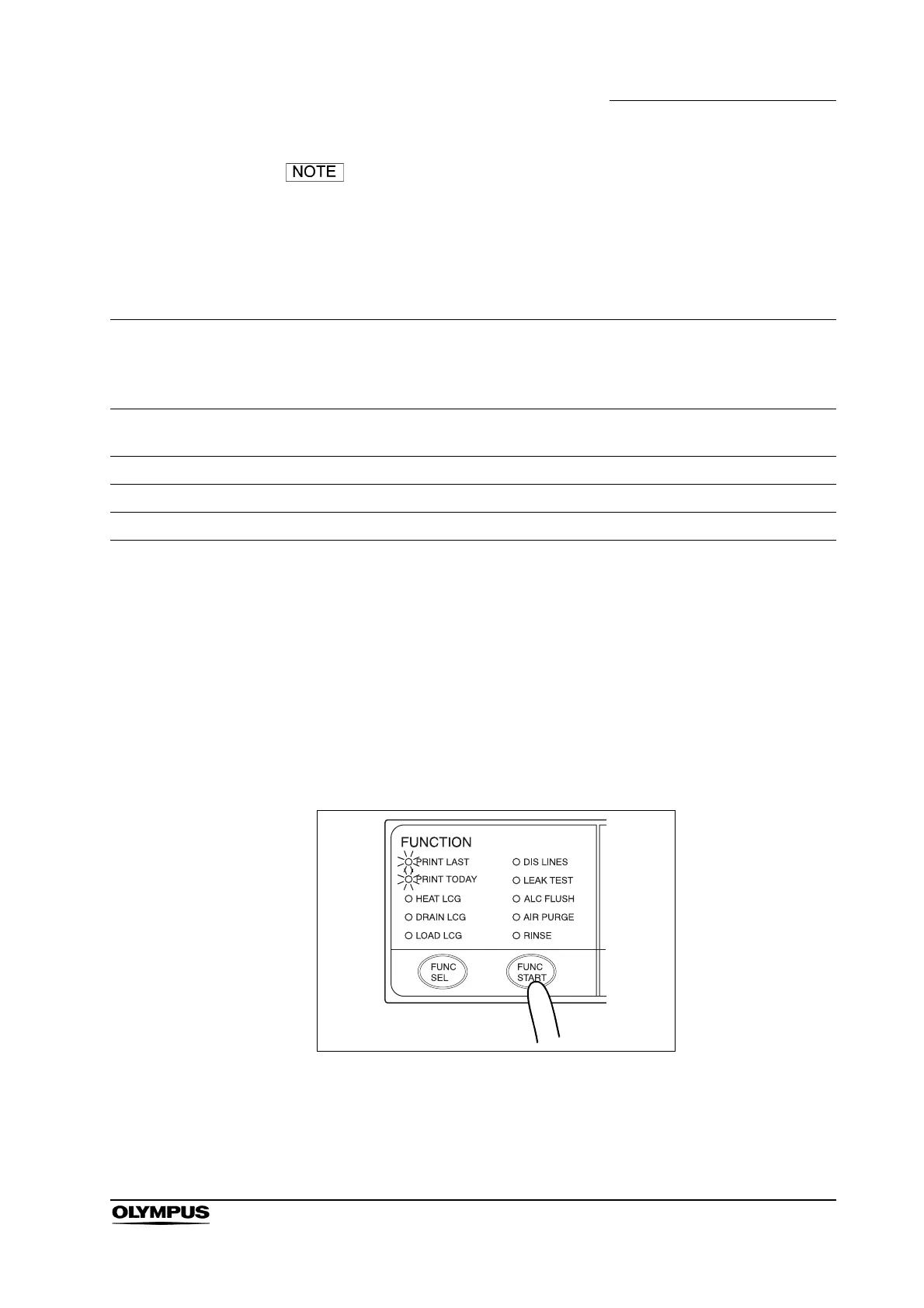
1. Press the FUNC SEL button on the subcontrol panel so that both the PRINT
LAST and PRINT TODAY indicators light up.
2. Press the FUNC START button on the subcontrol panel. The printer prints
the results of all of the reprocessing events stored in memory in reverse
order, beginning with the most recent.
Figure 4.56
3. The buzzer beeps and paper feed stops when printing is finished. Cut the
printed part of paper and ensure that the information is printed correctly.
Print Option
Error occurred
during reprocessing
cycle
Error occurred when
starting
reprocessing cycle
(ex. E12, E31, E91)
Error occurred when
in standby
Error occurred
during
sub-independent
process
AUTOMATIC
PRINTING
–––
PRINT LAST
––
PRINT TODAY
–––
PRINT ALL
–––
Print option can print out the
subject error result
–
Print option cannot print out the
subject error result
Table 4.12


 To Next Page