Chapter 6 Other Functions
157
ENDOSCOPE REPROCESSOR OER-Pro Operation Manual
1. Close the lid.
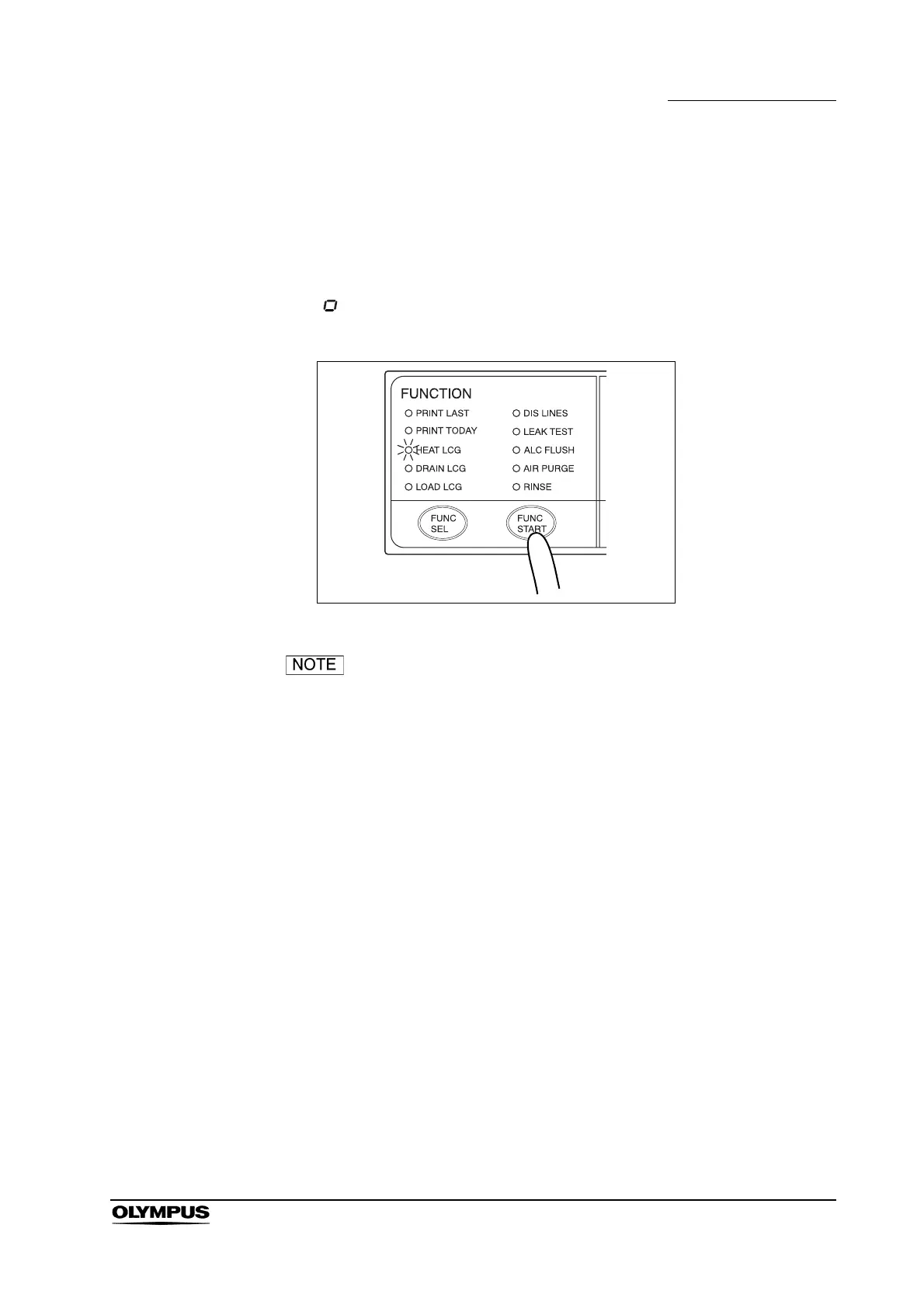
2. Press the FUNC SEL button on the subcontrol panel to select “HEAT LCG”.
3. Press the FUNC START button on the subcontrol panel. The heat
disinfectant indicator will light to indicate that the operation is in progress
and the TIME/CODE display on the main control panel shows a spinning
[ ] mark as shown below. Disinfectant solution is then poured into the
reprocessing basin and the heating process starts.
Figure 6.3
• The disinfectant solution temperature takes about 4 minutes
for each 1C increase.
• The disinfectant solution is heated to slightly above 20C
(68F) to compensate for the decrease in temperature inside
the equipment.
4. When the disinfectant solution temperature reaches the specified level, the
disinfectant solution is automatically collected and the reprocessing basin is
rinsed.


 To Next Page