File Dates in Range lets you specify two dates and will only match files with one or
more timestamps on or between the two given dates.
Dates are entered by typing them into the text boxes in YYY-MM-DD format. Dates
will match the rule if any of the TX1 supported timestamps for that filesystem match
the File Date setting.
Note: Some filesystem types, particularly FAT, do not support time zone
independent timestamps. There is no way to determine the time zone used for FAT
time stamps created by Windows. TX1 treats these timestamps as if created with a
UTC+0000 timestamp.
4.5.3 About the logical imaging process
4.5.3.1 Logical image job status
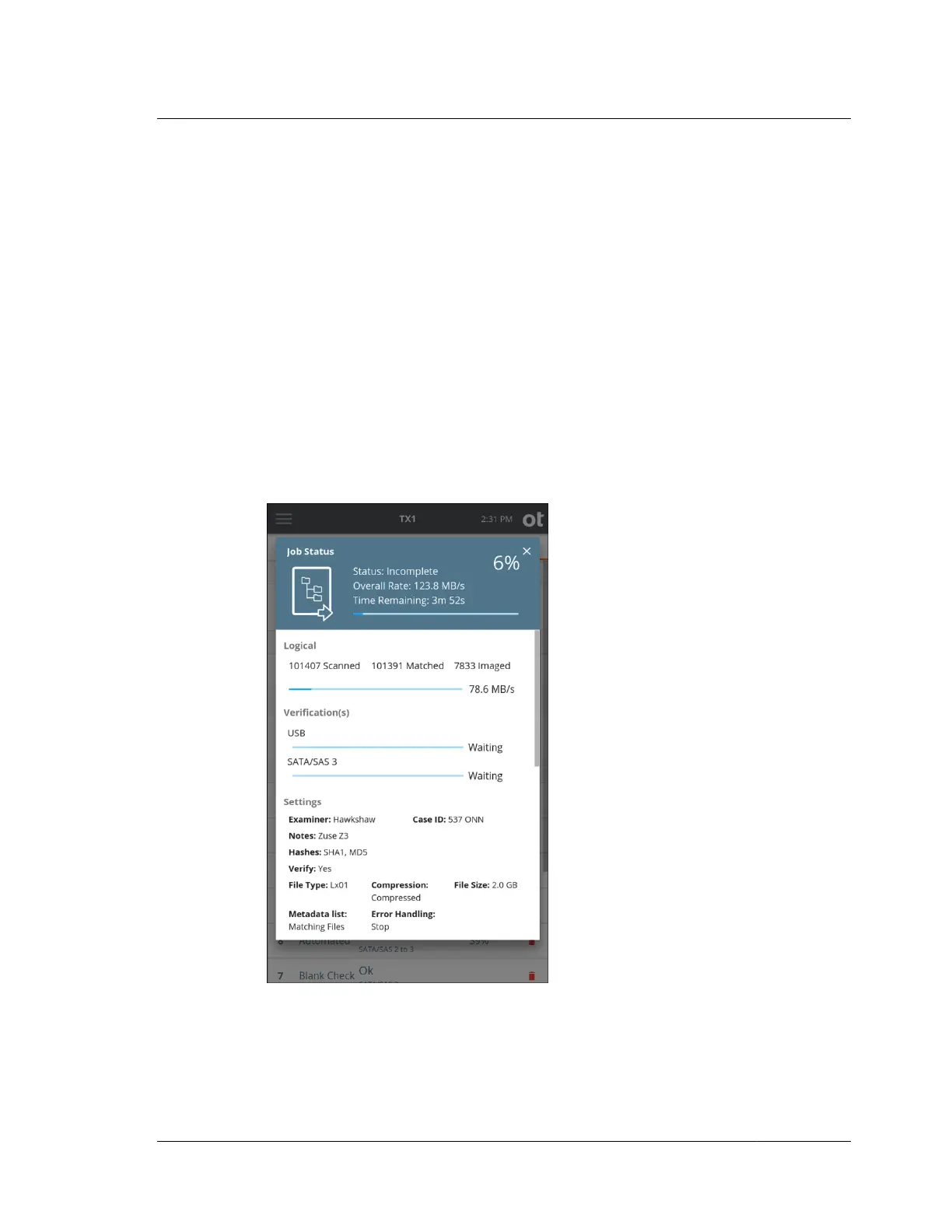
Once a logical image job has been started, the Job Status screen will automatically
be displayed, as shown below.
This status screen is similar to other TX1 job types, with the following notable
differences:
• While the operation is scanning for more files to acquire, the progress bar is
displayed as an indeterminate bar (throbbing/pulsing bar with no data rate
4.5. Logical imaging
ISTX240300-UGD-EN-1
User Guide
135



 To Next Page