3.3.6.2 Non-volatile HPA/DCO/AMA removal
The HPA/DCO/AMA Disable media utility permanently disables the HPA, DCO, or
AMA configurations on the source drive. Note that for HPA/DCO, you cannot
remove a DCO-protected region on a drive without also removing any HPA-
protected region, as defined by the ATA specification.
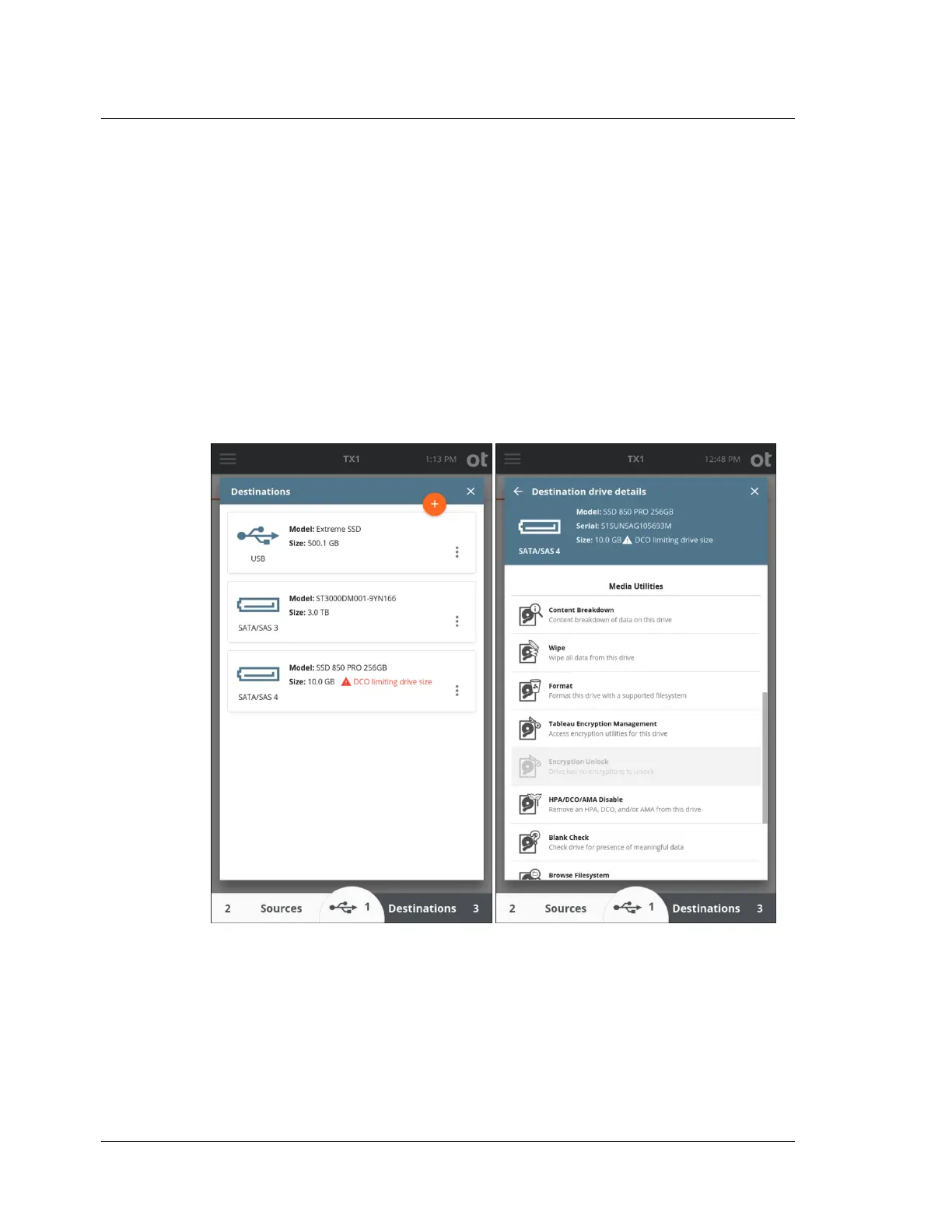
If a drive has a DCO or ACA configured, a red warning message is displayed on the
drive tile indicating DCO or AMA is limiting the drive size (as shown in the DCO
example below). Permanently disabling a DCO (and any HPA on that drive) or
AMA is done from the media utilities portion of the drive details screen for a given
drive. Drive details can be viewed through the Sources and Destinations areas of
the main Home page or from the Select a Source or Select a Destination areas
during duplication job setup.
IDE drives with a DCO require special considerations with TX1. This is due to the
fact that IDE drives are connected via the PCIe interface using a Tableau IDE
Adapter (TDA7-5). DCO setting changes require power-cycling the drive which, for
directly connected SATA drives, is done automatically by TX1. PCIe, as
implemented on TX1, does not allow for hot drive removal (including power-
cycling).
To disable a DCO on an IDE drive:
Chapter 3 Configuring TX1
62
OpenText™ Tableau™ Forensic TX1 Imager
ISTX240300-UGD-EN-1



 To Next Page