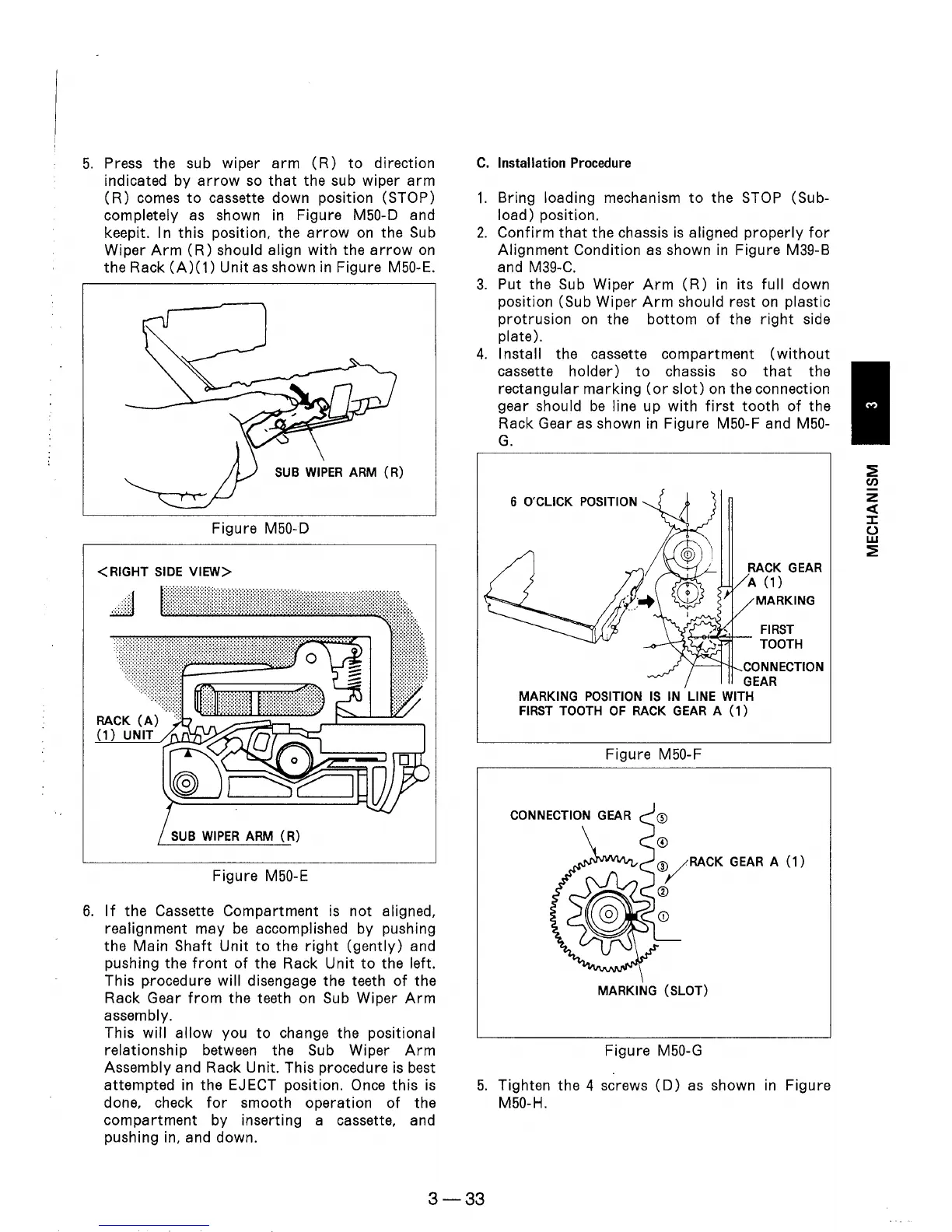
5.
Press the sub wiper
arm
(R)
to
direction
indicated by
arrow
so
that
the sub wiper
arm
(R)
comes
to
cassette down position (STOP)
completely as shown
in
Figure M50-D and
keepit. I n this position, the
arrow
on
the Sub
Wiper
Arm
(R)
should align with the
arrow
on
the Rack
(A)(1)
Unit as shown
in
Figure M50-E.
Figure M50-D
< RIGHT
SIDE
VIEW>
.:::::
,;','
...
: . :
~ ~
:
::
:.:.':
'.'
....
::::.:
SUB
WIPER
ARM
R)
Figure M50-E
6.
If
the Cassette Compartment is not aligned,
realignment may
be
accomplished by pushing
the Main Shaft
Unit
to
the
right
(gently)
and
pushing the
front
of
the Rack
Unit
to
the left.
This procedure will disengage the teeth
of
the
Rack Gear
from
the teeth
on
Sub Wiper
Arm
assembly.
This
will
allow
you
to
change the positional
relationship between the Sub Wiper
Arm
Assembly and Rack Unit. This procedure is best
attempted
in
the
EJ
ECT
position.
Once
this
is
done, check
for
smooth operation
of
the
compartment
by inserting a cassette, and
pushing in, and down.
C.
Installation Procedure
1.
Bring loading mechanism
to
the STOP (Sub-
load) position.
2.
Confirm
that
the chassis
is
aligned
properly
for
Alignment Condition
as
shown
in
Figure M39-B
and M39-C.
3.
Put the Sub Wiper
Arm
(R)
in
its
full
down
position (Sub Wiper
Arm
should rest
on
plastic
protrusion
on
the
bottom
of
the
right
side
plate).
4.
Install the cassette compartment
(without
cassette holder)
to
chassis so
that
the
rectangular
marking
(or
slot)
on
the connection
gear should
be
line up with
first
tooth
of
the
Rack Gear
as
shown
in
Figure M50-F and M50-
G.
6 O'CLlCK POSITION
MARKING
~~":!l--
FIRST
TOOTH
'I------'I'-IL
CONNECTION
GEAR
MARKING
POSITION
IS
IN
LINE WITH
FIRST
TOOTH
OF
RACK
GEAR
A
(1)
Figure M50-F
o
CD/RACK
GEAR
A
(1)
CV
MARKING (SLOT)
Figure M50-G
5.
Tighten the 4 screws
(D)
as
shown
in
Figure
M50-H.
3-33











 To Next Page