176
Playback Functions
7
Comparing Images
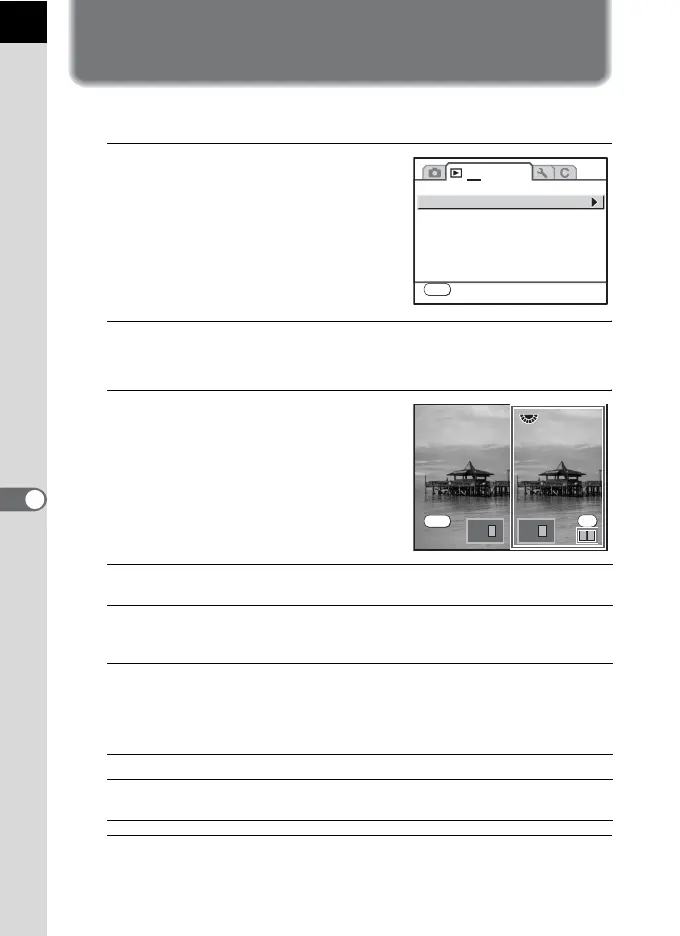
You can display two images side-by-side.
1
Select [Image Comparison] in the
[Q Playback 1] menu.
2
Press the four-way controller (5).
The last image displayed/captured will be displayed twice side-by-side.
3
Turn the e-dial to select an image
to compare.
You can change the display with the
following procedures.
4
Press the 3 button.
The camera returns to the normal playback mode.
4 button The selection frame changes to right image, both images,
and left image each time the button is pressed.
Four-way
controller
(2345)
Moves area to enlarge. When the selection frame is
selecting both images, you can operate both images at the
same time.
e-dial When the selection frame is selecting the left or right
image, the previous/next image is displayed.
When the selection frame is selecting both images, you
can enlarge or reduce both images simultaneously in the
same magnification.
M button Switches information display On/Off.
i button When the selection frame is selecting the left or right
image, the selected image is deleted.
1 2
MENU
Exit
Image Comparison
Slideshow
Digital Filter
Resize
Cropping
Protect
DPOF
100-0046
100-0046100-0046
100-0046
OK
MENU
Exit



 To Next Page
 Loading...










