87
Shooting Functions
4
You can set the sensitivity to suit the brightness of the surroundings.
The sensitivity can be set to [AUTO] or within a sensitivity range equivalent
to ISO 100 to 3200. The default setting is [AUTO].
1
Press the four-way controller (5) in Capture mode.
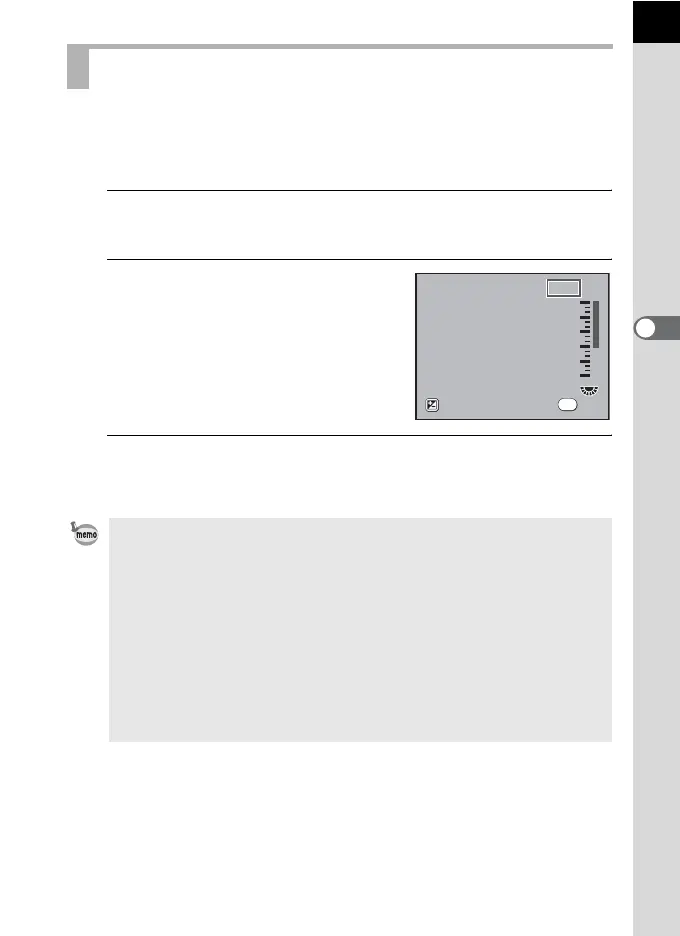
The [Sensitivity] screen appears.
2
Use the four-way controller (23)
to select the ISO sensitivity.
3
Press the 4 button.
The camera returns to the status screen and is ready to take a picture.
Setting the Sensitivity
• [Sensitivity] cannot be used to set the sensitivity when the exposure mode is
set to K (Sensitivity Priority). Turn the e-dial in the status screen to make
the setting. (p.92)
• When n (Stage Lighting) or l (Night Snap) in H (Scene) mode is
selected, Sensitivity is set to AUTO (200-3200) and Expand Dynamic Range
(p.88) is always on.
• Captured images can show more noise if a higher sensitivity is set. You can
reduce image noise by setting [12. High-ISO Noise Reduction] in the
[A Custom Setting 2] menu. (p.89)
• You can set whether to lock the ISO sensitivity adjustment to increments of
1 EV or to coordinate it with the EV Steps (p.105) in [2. Sensitivity Steps] in
the [A Custom Setting 1] menu (p.78).
D-Range
Sensitivity
OK
OK
AUTO
AUTO
100
100-800
200
400
800
1600
3200



 To Next Page
 Loading...










