Before Using Your Camera
1
33
2
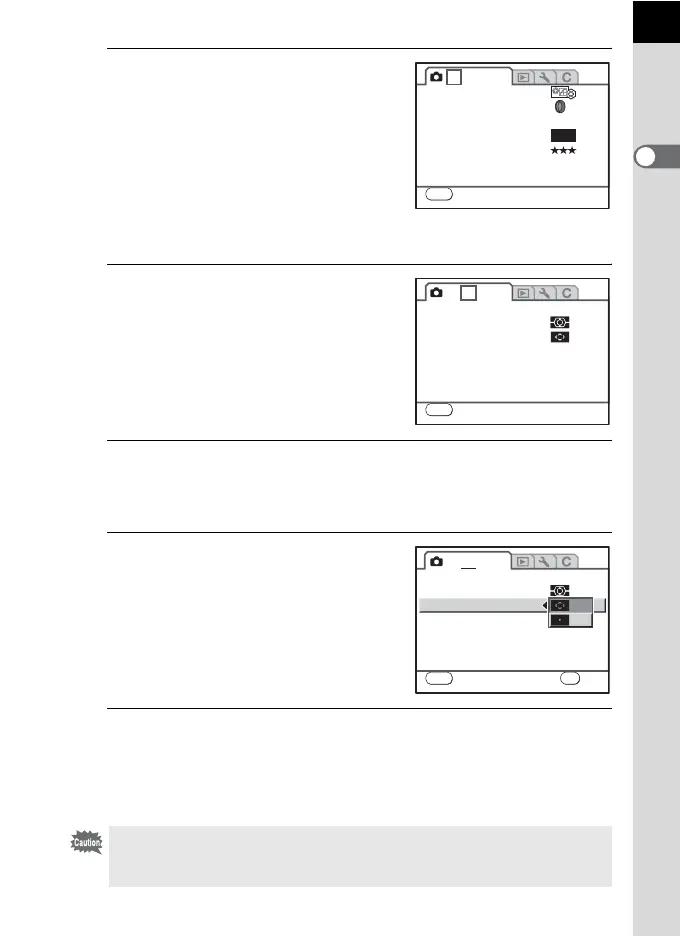
Press the four-way controller
(5).
Each time the four-way controller is
pressed, the menu will change in the
following sequence: [A Rec. Mode 2],
[A Rec. Mode 3], [Q Playback 1],
[Q Playback 2] , [R Set-up 1] ···
[A Custom Setting 4].
You can use the e-dial to switch the menus.
3
Use the four-way controller (23)
to choose an item.
4
Press the four-way controller (5).
Available settings are displayed.
Press the four-way controller (
5
) to move to the pop-up menu if there is one.
5
Use the four-way controller (23)
to select a setting.
6
Press the 4 button.
The camera returns to the menu screen. Next, set other items.
Press the 3 button to exit the menu and return to the previously
displayed screen.
Even after you press the 3 button and close the menu screen, your
settings will not be saved if the camera is turned off improperly (such as by
removing the battery while the camera is on).
1 2 3
MENU
Exit
Custom Image
Digital Filter
File Format
JPEG Rec. Pixels
JPEG Quality
RAW file format
Color Space
JPEG
PEF
sRGB
10M
OFF
1 2 3
MENU
Exit
AF.A
AF Mode
AE Metering
Select AF point
Instant Review 1sec
MENU
Cancel
1 2 3
AF.S
AF Mode
AE Metering
Select AF point
Instant Review
OK
OK



 To Next Page
 Loading...










