User Guide – PERC2000 System Controller
Publication 81-9059-0605-0, Rev. B
November 2010
Proprietary Information of
PESA 5-3
If the factory programmed address causes a conflict, or the host PC can not communicate with the
card due to different subnet settings, it will be necessary to create a direct Ethernet connection
between a PC that has been isolated from the network and the controller card. Set the isolated PC
to an IP address that will allow it to communicate using the default base IP address of the
controller card and use the Windows configuration function to change the base IP address of the
controller to an address that will allow it to be discovered on the facility Ethernet. If you are
installing two controller cards for redundancy, use this process to set both controller cards to the
same base IP address.
5.4 N
ETWORKED
H
OST
PC
AND
S
YSTEM
C
ONTROLLER
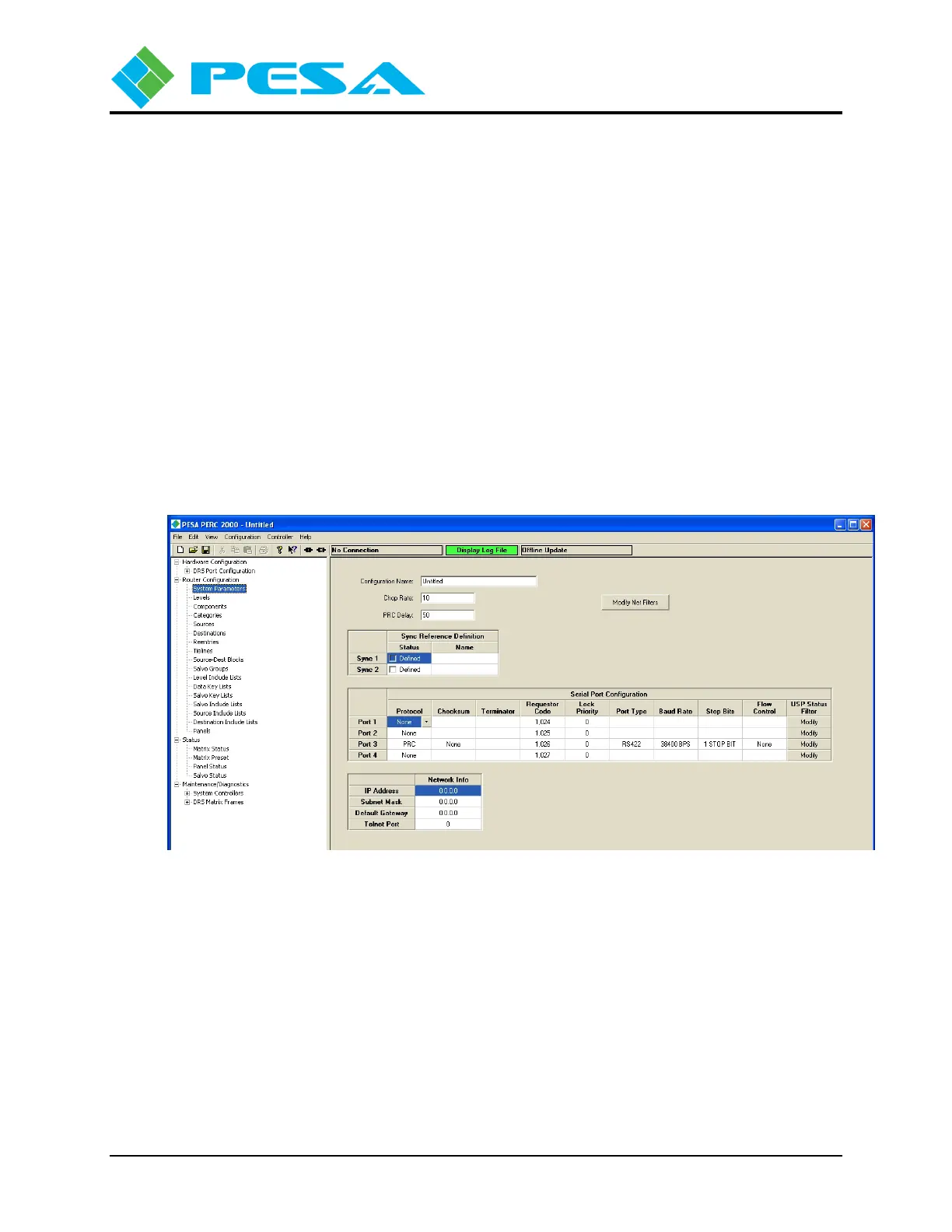
Once you have the PERC2000 software loaded and the system controller hardware configured to
communicate on the network, start the application by double-clicking on the desktop PERC2000
icon. The main screen, as shown by Figure 5-1, is displayed. When the software is started, it
immediately begins the discovery process to locate PESA controller devices on the network.
Discovered devices are listed by category under the Maintenance/Diagnostics Menu entry as
shown by Figure 5-2.
Figure 5-1 PERC2000 Main Screen



 To Next Page