User Guide – PERC2000 System Controller
Publication 81-9059-0605-0, Rev. B
November 2010
Proprietary Information of
PESA PESA 8-31
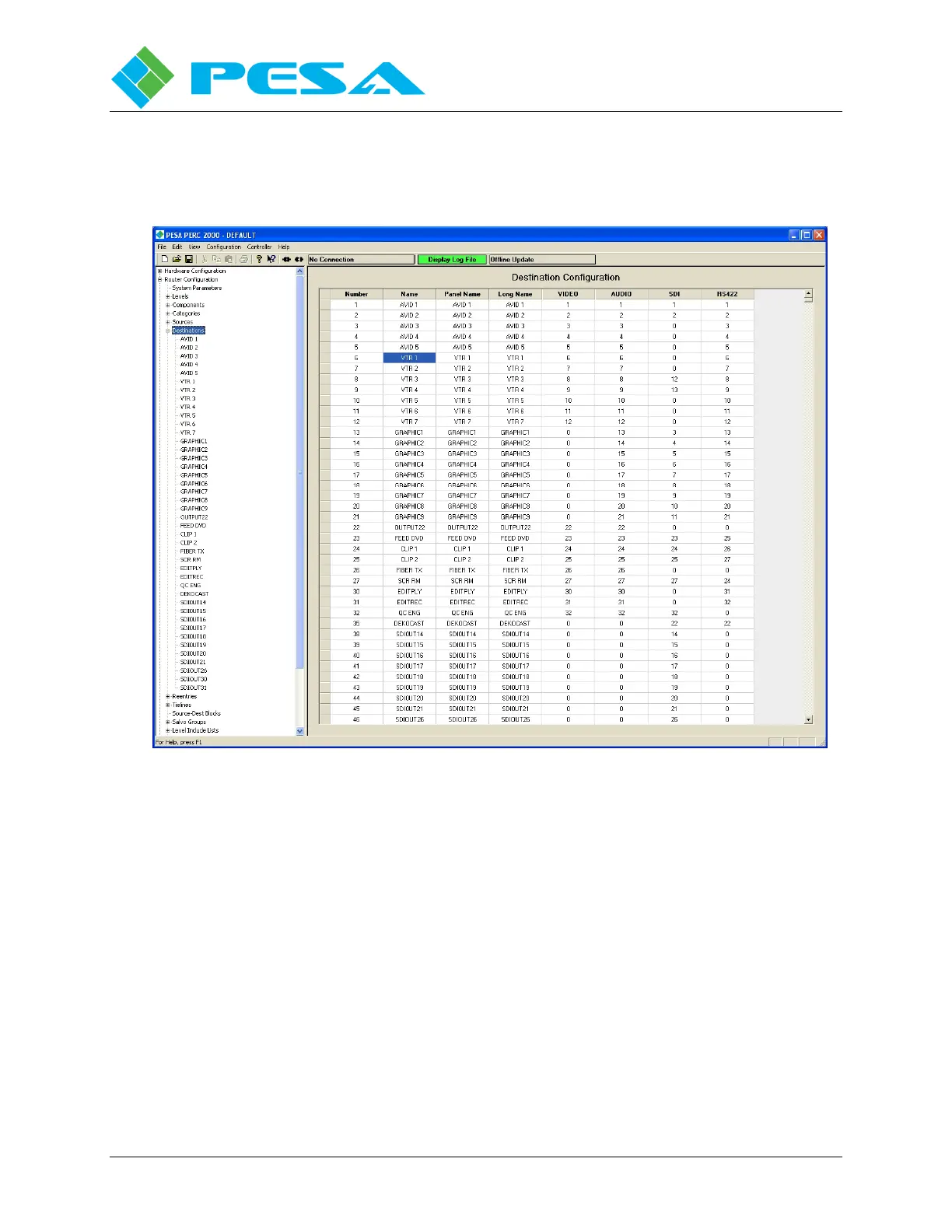
Long Name – This column is essentially a free text space where you may enter a name up to 32
characters in length for the destination. This name is only displayed on this configuration
screen and may be used to more clearly identify an external device or system.
Figure 8-31 Destinations Configuration Screen
8.9.6.3 Switching Levels
To the right side of the three name columns you will see columns corresponding to each
assigned system level. The entry (in most cases a number) in the columns on each row assigns
the actual physical output from the switching device associated with the switching level for
each destination.
For example, look at entry number 6 in Figure 8-31 labeled VTR 1. Assume this nomenclature
is assigned to a VTR with analog video, stereo analog audio and time code inputs. The video is
derived from the VIDEO level, the two audio outputs (left and right) are each components
(AUDIO1 and AUDIO2, respectively) of the AUDIO level and the time code output is derived
from the RS422 level. Assume further that each input signal type to the VTR (video, audio and
time code) is physically switched through a separate switcher frame. For discussion purposes
assume the video is switched through a Cheetah video matrix switcher, audio is routed through
a Cheetah DRS frame and the time code signal is routed through a PESA Tiger switcher.



 To Next Page