User Guide – PERC2000 System Controller
Publication 81-9059-0605-0, Rev. B
November 2010
Proprietary Information of
PESA PESA 8-51
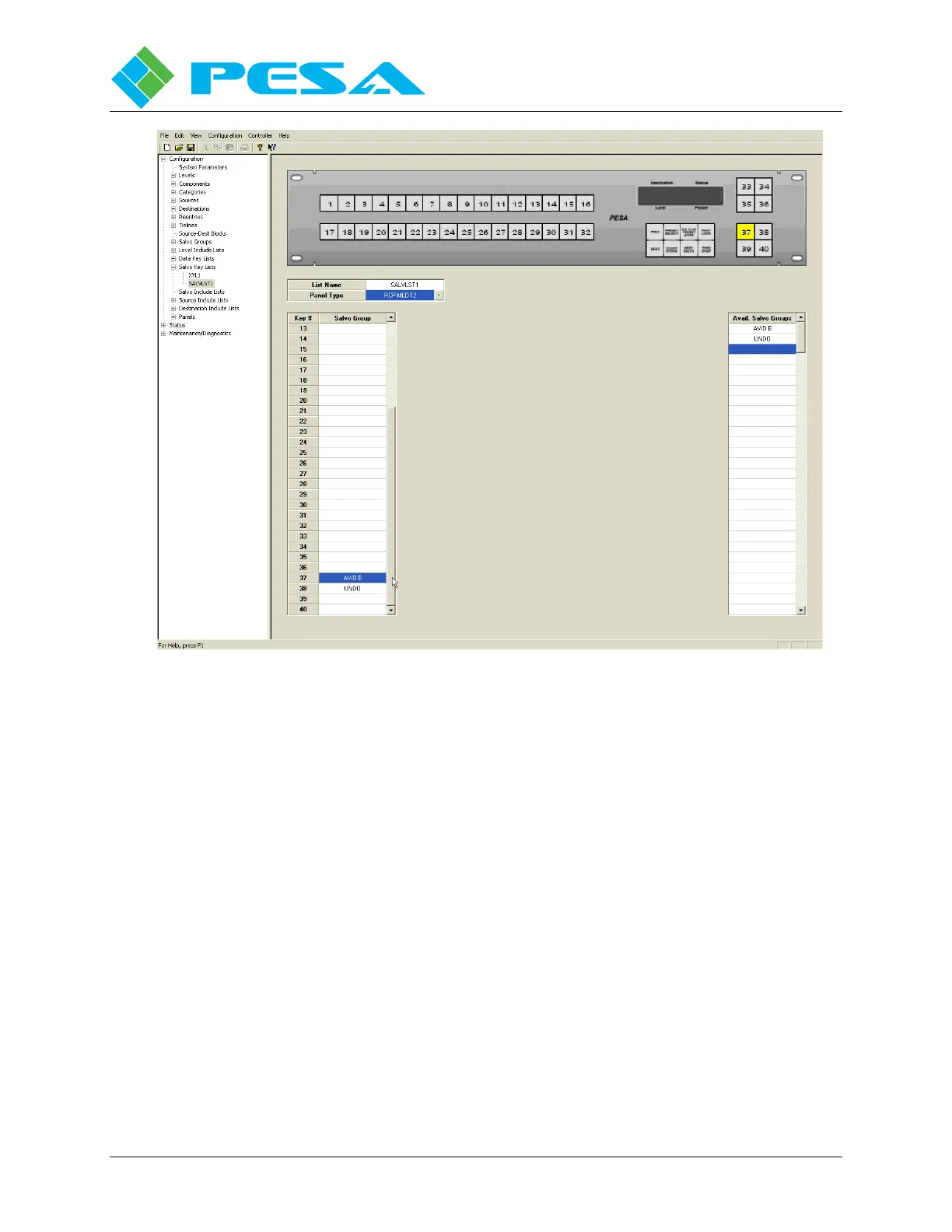
Figure 8-51 Salvo Key Lists Data Key Programming Example
Move the cursor to the column labeled Type on the row for Key #37. You can do this either by
clicking in the cell or by mouse clicking button number 37 on the graphic image.
Locate the Salvo Group you wish to assign to button number 37 in the available salvo groups
listing and double click. The cursor will advance to the row for Key # 38. Continue locating
and clicking salvo groups until the panel keys are assigned as desired. For our example we
double click on the UNDO label in the group listing to associate that function with button 38.
In order to access a salvo group name the remote control panel must be operating in the salvo
mode. This is done in different ways for different panels and you should consult the technical
manual for the specific panel being used. In our example panel you would press and hold the
key labeled DESTN/SALVO until the lamp in the key starts to flash. In this mode when you
press a key assigned a salvo group that group name will appear on the panel display ready to be
activated.
Expanding the tree under the Salvo Key Lists parent header in the command tree window opens
a listing of named salvo key lists. If you wish to access the configuration screen for a specific
salvo key list, click on the name in the column listing. If you wish to add a salvo key list, right
mouse click on the Salvo Key Lists parent header in the command tree window to access a
blank configuration screen.



 To Next Page