User Guide – PERC2000 System Controller
Publication 81-9059-0605-0, Rev. B
November 2010
Proprietary Information of
PESA PESA 8-25
8.9.5 S
OURCES
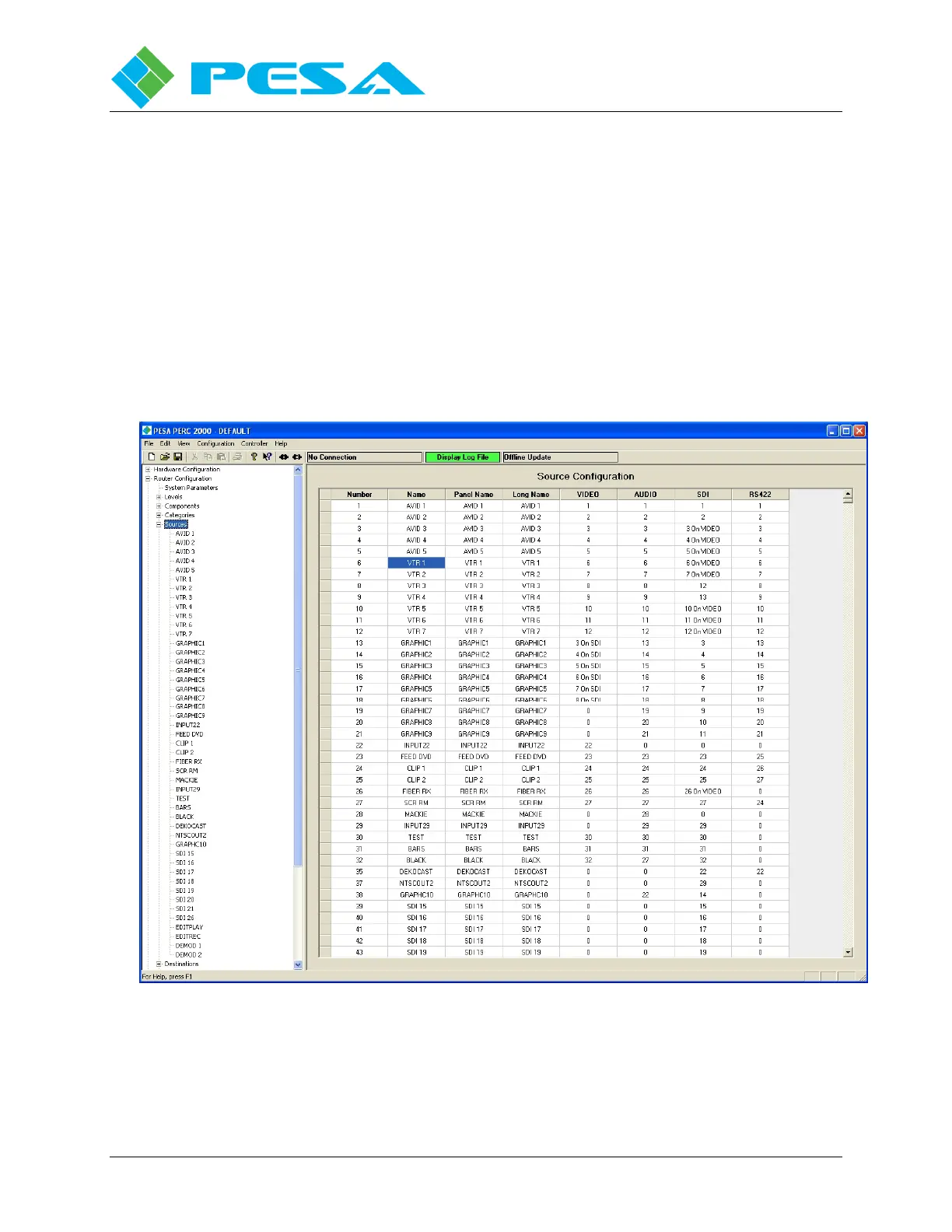
Click the Sources header on the Configuration Command Tree to access the Source
Configuration Screen, Figure 8-26. This screen allows you to define all of the sources in the
router configuration. From this screen each physical input to the system is assigned a name, a
panel designator and linked to a physical input of a router frame. In router terminology, this
screen essentially maps each physical source (input) to the router to its logical input in level and
panel designator nomenclature.
Note the Sources Screen is in the form of a database spreadsheet with data entries for each
source made on individual rows from left to right. Each area of the Sources set-up screen is
introduced in the following paragraphs:
Figure 8-26 Sources Configuration Screen
8.9.5.1 Number
The left-most column is labeled NUMBER and is numerically sequential and automatically
filled in as sources are added. You can not change the entry in the Number column.



 To Next Page