User Guide – PERC2000 System Controller
Publication 81-9059-0605-0, Rev. B
November 2010
Proprietary Information of
PESA PESA 8-6
Auto Increment
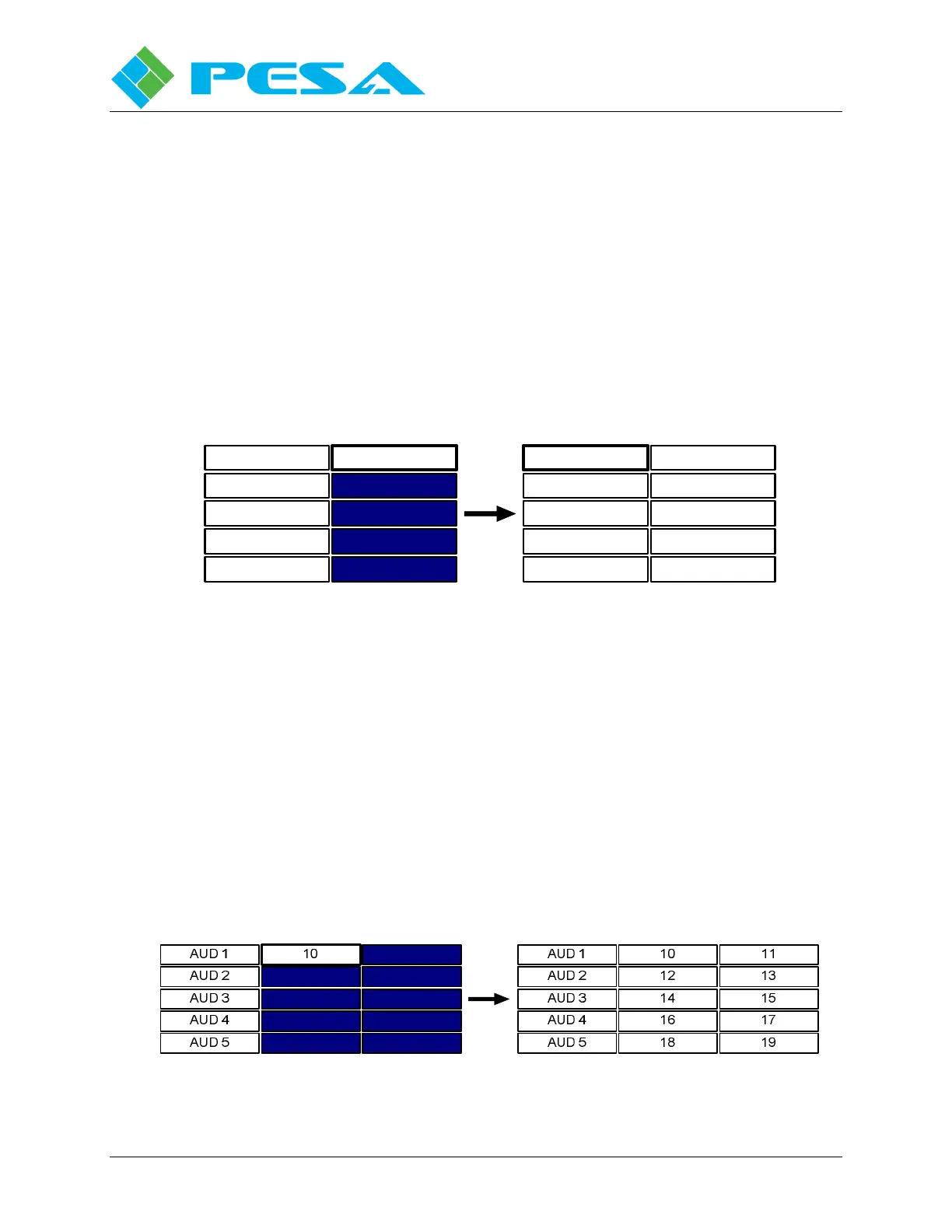
The Auto Increment function increments the numerical value of a starting entry into the fields
of a user-defined fill block located below and in the same column as the starting entry. You
must choose a starting field from a numerical entry field in any of the switching level columns
when defining the fill block, as shown by Figure 8-5. Numerical values in the selected column
will be incremented by one in each successive field, as shown. The Auto Increment function
will only add numerical values if every line of the fill block already has a name, such as
assigned to a source or destination, associated with the level.
Numerical values under the selected switching level column will be incremented by one up to
the maximum number of physical inputs or outputs defined for the level. If the fill block
contains additional lines after any switching level column reaches the maximum number, any
successive fields in that column will be filled with zeros.
DEMOD 1
DEMOD 2
DEMOD 3
DEMOD 4
DEMOD 5
10 DEMOD 1
DEMOD 2
DEMOD 3
DEMOD 4
DEMOD 5
11
12
13
14
10
Figure 8-5 Auto Increment Function
Auto Increment Block
Auto Increment Block is very similar to the Auto Increment function, the difference being that
it allows the fill block to consist of multiple switching level columns, as shown by Figure 8-6.
Auto increment block always uses the field in the upper left corner of the fill block as the
starting value entry, and fills successive fields with numerical values, incremented by a value of
one, from left to right and top to bottom. The Auto Increment Block function will only add
numerical values if every line of the fill block already has a name, such as assigned to a source
or destination, associated with the level.
Numerical values filled in the switching level columns will be incremented by one up to the
maximum number of physical inputs or outputs defined for the level in the starting entry field.
If the fill block contains additional fields after any field in the block reaches the maximum
number, any successive fields in the remainder of the fill block will be filled with zeros.
Figure 8-6 Auto Increment Block Function



 To Next Page