User Guide – PERC2000 System Controller
Publication 81-9059-0605-0, Rev. B
November 2010
Proprietary Information of
PESA PESA 8-12
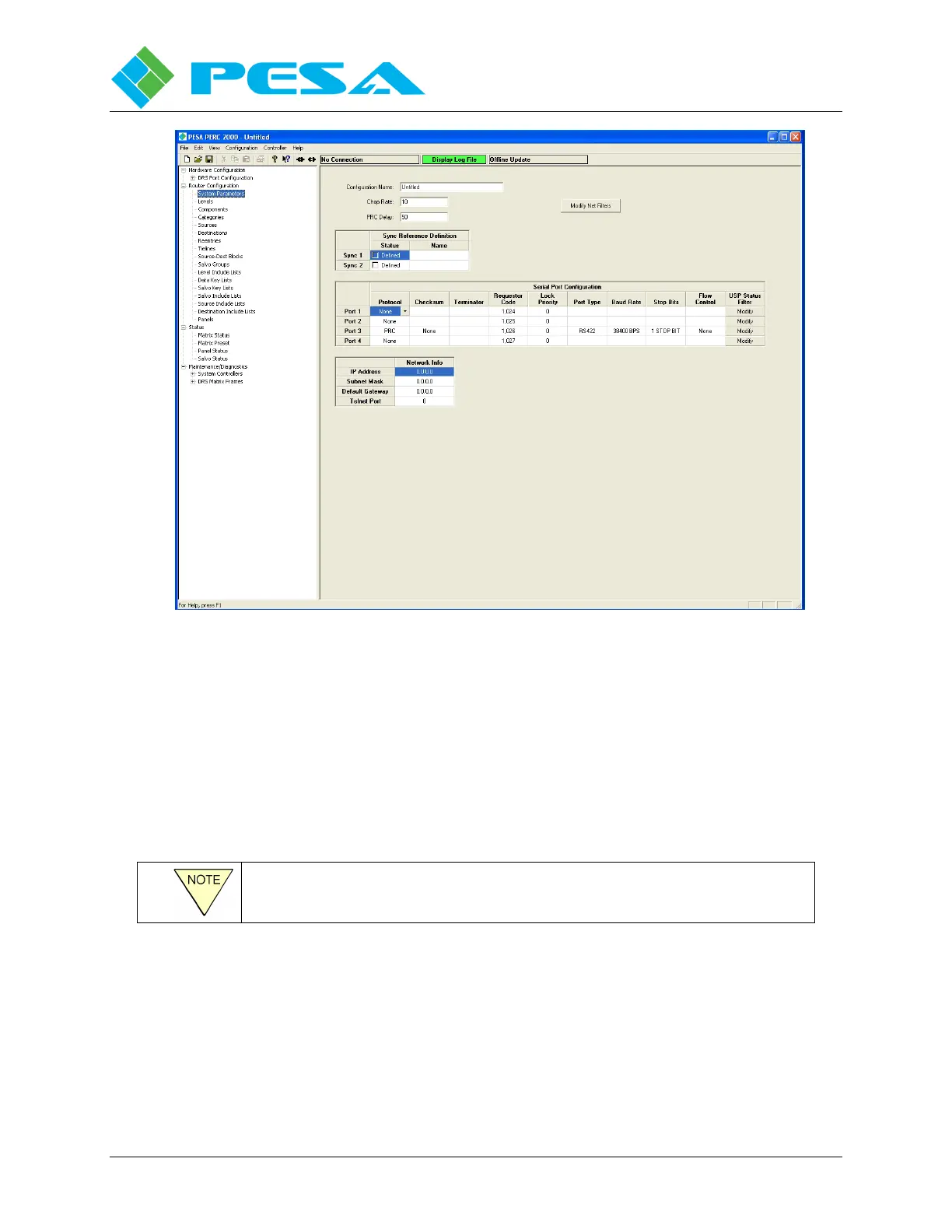
Figure 8-14 System Parameters Screen
From the System Parameters Screen, you configure the serial ports and other operational
parameters of the configuration. Each area of the System Parameters screen is introduced in the
following paragraphs:
8.9.1.1 Configuration Name
This field allows you to name the configuration file. Type the desired name in the
Configuration Name box. Configuration names may have up to 32 alphanumeric characters.
You can query this name from the P2K System Controller.
The Configuration Name may be different from the File Name.
8.9.1.2 Chop Rate
Chop Rate indicates the frame rate of switches used by the Chop mode of operation. To change
the chop rate, enter the desired value in the Chop Rate box. Any desired Chop Rate between 1
and 255 frames is supported by the P2K Control System. Default value of this parameter is 10
frames.


 To Next Page