User Guide – PERC2000 System Controller
Publication 81-9059-0605-0, Rev. B
November 2010
Proprietary Information of
PESA PESA 8-9
8.6 E
STABLISH
C
OMMUNICATION WITH THE
S
YSTEM
C
ONTROLLER
C
ARD
Once the GUI application is launched you may establish a communication connection between
the GUI and the P2K Hardware System Controller Card as follows:
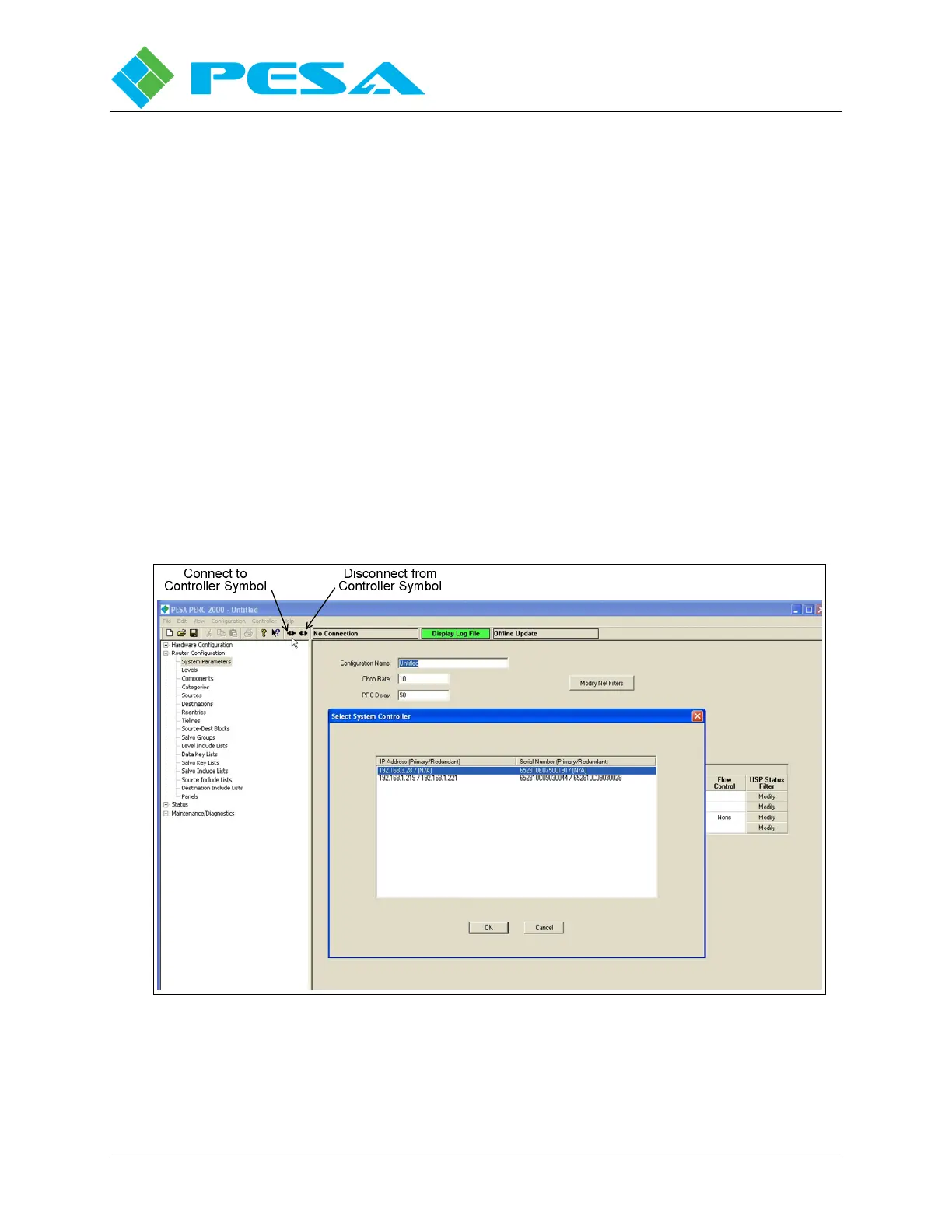
• Click on the “Connect to Controller Symbol,” Figure 8-11, to bring up a box with all P2K
controllers listed by IP address. In most applications there will only be one controller listed.
• Select the P2K controlling the router system from the list, by IP address, and click to
activate the connection between the GUI and the controller.
• Once activated, and communication is established, the IP address of the P2K appears in the
box to the right of the connection symbols and the box is highlighted green to indicate the
connection is functional.
• In order to disconnect the GUI from the P2K, click on the “Disconnect from Controller
Symbol” as shown in Figure 8-11. The display box will return to a non-highlighted
background and the message “No Connection” is displayed.
Figure 8-11 System Controller Selection


 To Next Page