User Guide – PERC2000 System Controller
Publication 81-9059-0605-0, Rev. B
November 2010
Proprietary Information of
PESA 5-4
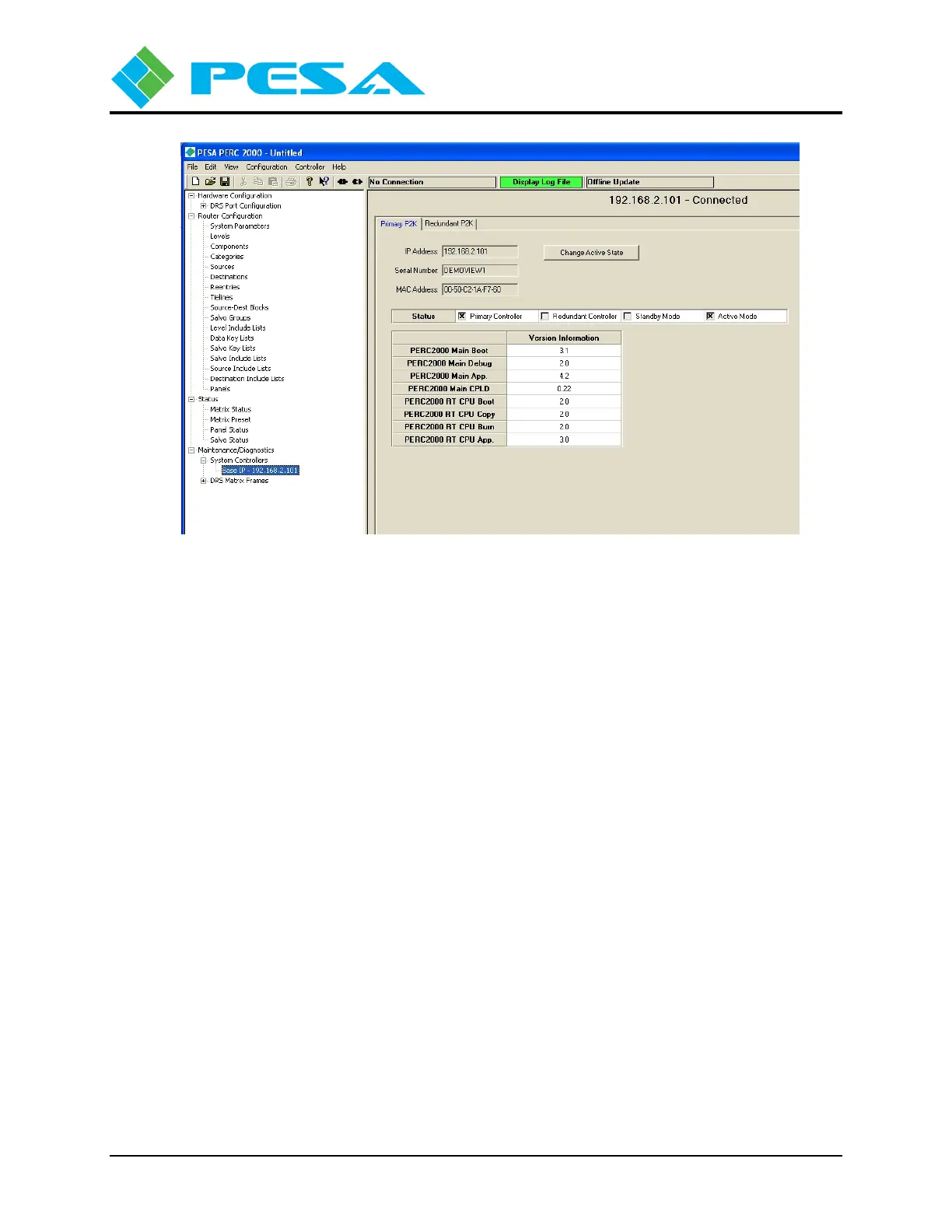
Figure 5-2 System Controllers Configuration Screen
Locate and expand the Maintenance/Diagnostics tree in the left pane of the GUI display, then
expand the System Controllers tree; this action expands the tree to display a listing of
PERC2000 controllers discovered on the network, identified by the base IP address of the
controller device(s). In most installations, there is only one controller for the entire PESA routing
system, therefore there will only be one entry under the System Controllers menu. If for some
reason your installation does contain multiple, independent PESA routers controlled by separate
PERC2000 system controllers, the base IP address of each controller installation is listed under
this menu entry.
Click on the list entry to select and highlight the system controller. The main display screen
shows real-time status and setup information for the selected controller. For our example screen,
the system controller resides at base IP address 192.168.2.101.
The base IP address of the controller is displayed at the top of the pane, along with a notation that
the GUI is connected to and communicating with the PERC2000 hardware. The main display
area has tabs at the top for each controller hardware device associated with the base IP address.
Note in our example screen from left to right there are tabs for a Primary P2K circuit card and a
Redundant P2K circuit card. The display presented when a tab is highlighted provides operating
parameters for the selected device. As an example we have highlighted the tab for the Primary
P2K controller operating at the base IP address 192.168.2.101.
The displayed data identifies the system controller hardware by its unique IP address (which for
the primary controller is the same as the base IP address), serial number and MAC address. Just
beneath the serial number and MAC address display is a box labeled Status which identifies the
location and operational status of the selected controller. In our example screen, status identifies
the selected controller as the P2K installed in the Primary Controller slot of the frame and shows
it is currently the active system controller. The Version Information box displays the revision
numbers of the currently loaded firmware modules for the selected system controller device.


 To Next Page