User Guide – PERC2000 System Controller
Publication 81-9059-0605-0, Rev. B
November 2010
Proprietary Information of
PESA PESA 8-44
and spaces. The first character must be a letter. PESA highly recommends that you choose a
name which is somewhat descriptive of the function of the level include list.
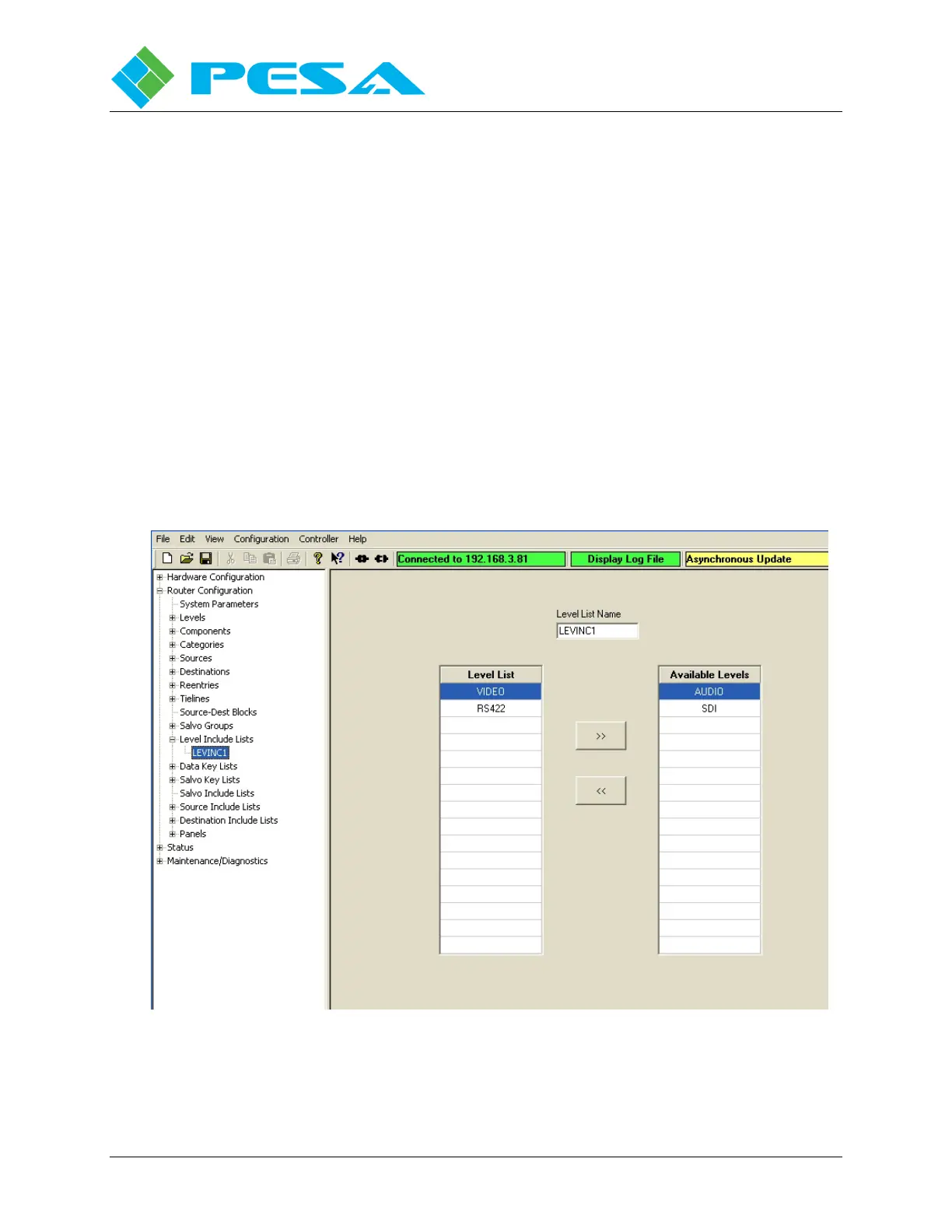
Level List – Levels listed in this column are accessible by remote control panels functioning
under the named level include list.
Available Levels – This column contains a listing of all levels which may be included in the
level include list.
Initially, all levels are listed in the Available Levels list box. Listed levels are moved between
the two list boxes using the two arrows between the boxes. In order to move a level from the
available list to the level include list, highlight the level you want to include in the list and click
the arrow pointing from the available list to the include list. In order to disallow a level from
the include list, highlight and move the level name from the include list to the available list
using the arrow pointing to the available list.
Expanding the tree under the Level Include Lists parent header in the command tree window
opens a listing of named level include lists, Figure 8-45. If you wish to access the
configuration screen for a specific level include list, click on the name in the column listing. If
you wish to access a blank Level Include Lists configuration screen, click on the Level Include
Lists parent header in the command tree window.
Figure 8-45 Level Include List Data Entry


 To Next Page