User Guide – PERC2000 System Controller
Publication 81-9059-0605-0, Rev. B
November 2010
Proprietary Information of
PESA PESA 8-7
Fill-Down
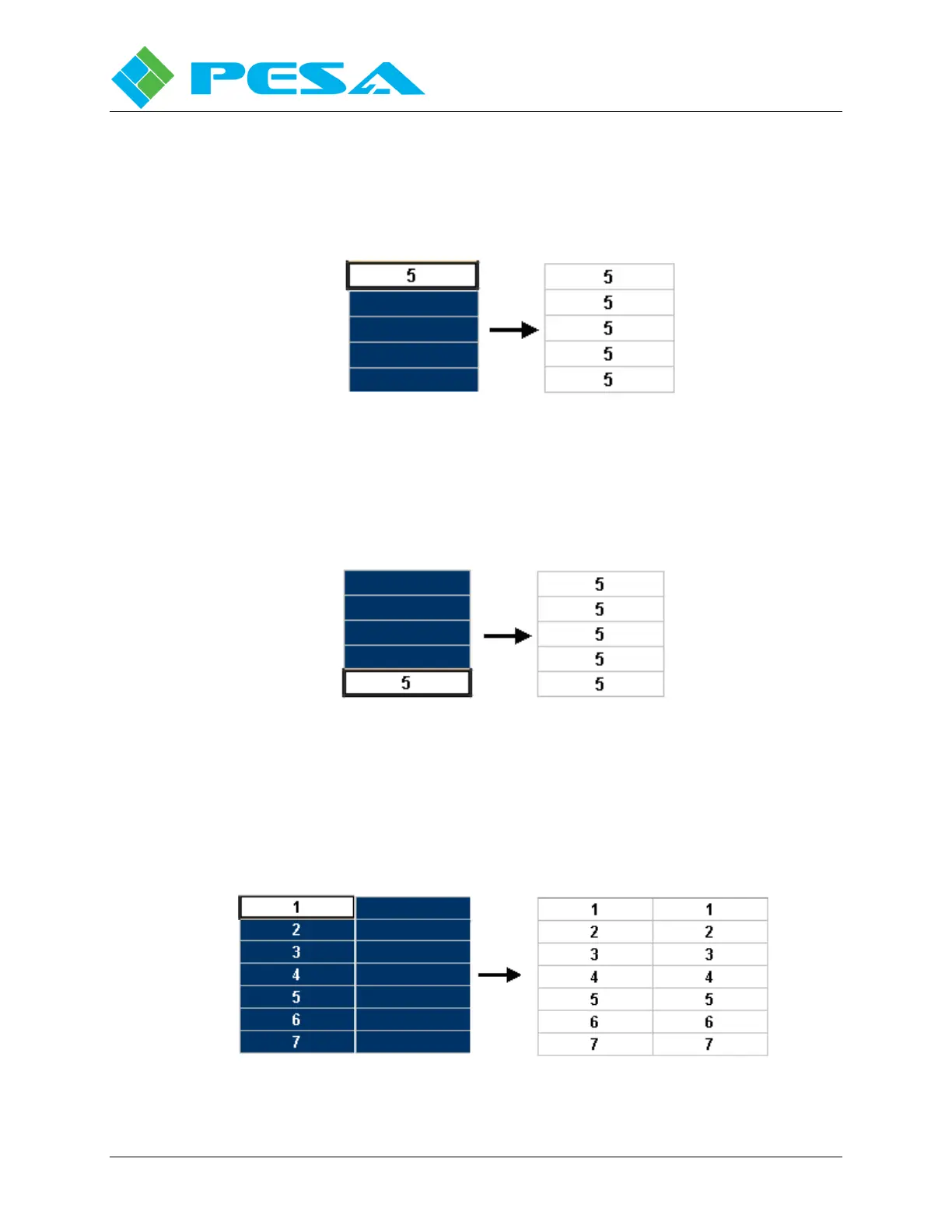
Fill-Down fills in the fields below a selected field with the selected number. First, select the
field with the number you want to duplicate and then, select the fields below it. Right-click and
select Fill-Down to fill in the fields with the selected number, Figure 8-7.
Figure 8-7 Fill-Down Command
Fill-Up
Fill-Up fills in fields above a selected field with the same information. First, select the field
with the number you want to duplicate and then, select the fields above it. Right-click and
select Fill-Up to fill in the fields with the selected information, Figure 8-8.
Figure 8-8 Fill-Up Command
Fill-Right
Fill-Right fills in the fields to the right of a selected field with the selected number(s). First,
select the fields with the numbers you want to duplicate and then, select the fields to the right.
Right-click and select Fill-Right to fill in the fields with the selected numbers. You can select
either one field or several fields with this function, Figure 8-9.
Figure 8-9 Fill-Right



 To Next Page