Printing postage on envelopes
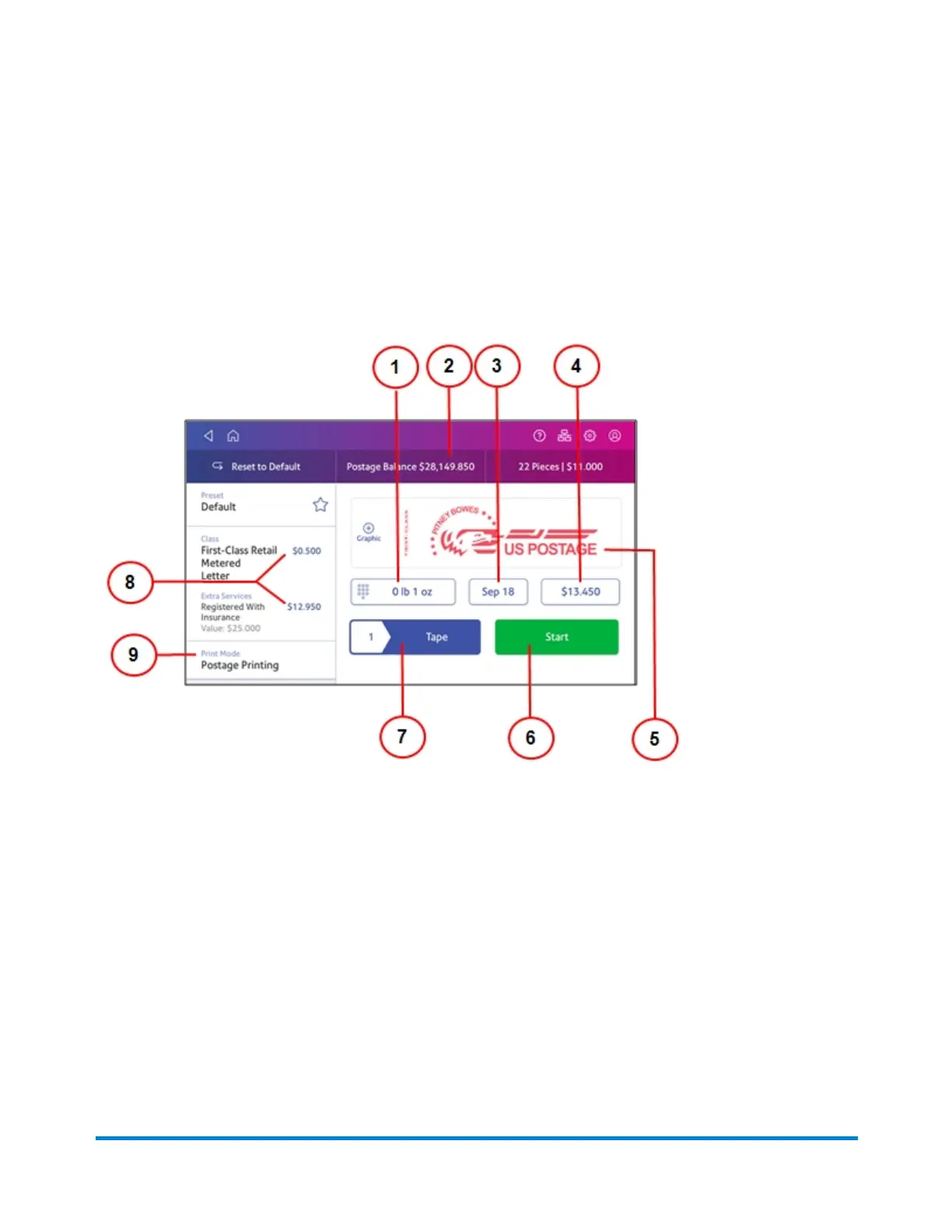
The Envelope Printing or Print on Envelopes screen is the starting point for printing postage on an
envelope or tape. It also allows you to change what you print.
To open the Envelope Printing screen, tap Envelope Printing or Print on Envelopes.
On this screen, you can:
1. Tap the weight icon to view the weighing options (enter weight manually or using a scale).
2. View the balance of funds you have remaining in your device.
3. Tap the date to view the date options.
4. View the total postage amount.
5. Preview or add graphics.
6. Tap Start to begin feeding and printing postage on the envelopes loaded on the feed deck. The
Start button is only present on SendPro C models equipped with an automatic feeder.
7. Tap Tape to begin printing postage on tape. To print more than one tape, tap on the number in the
Tape button and enter the number of tapes. The Tape button is only present on SendPro C
models equipped with an automatic feeder.
Printing on envelopes
Pitney Bowes Operator Guide February 2021 115













 To Next Page