33
Section 5 Operating Instructions
5.1 Data Entry
5.1.1 Function Keys
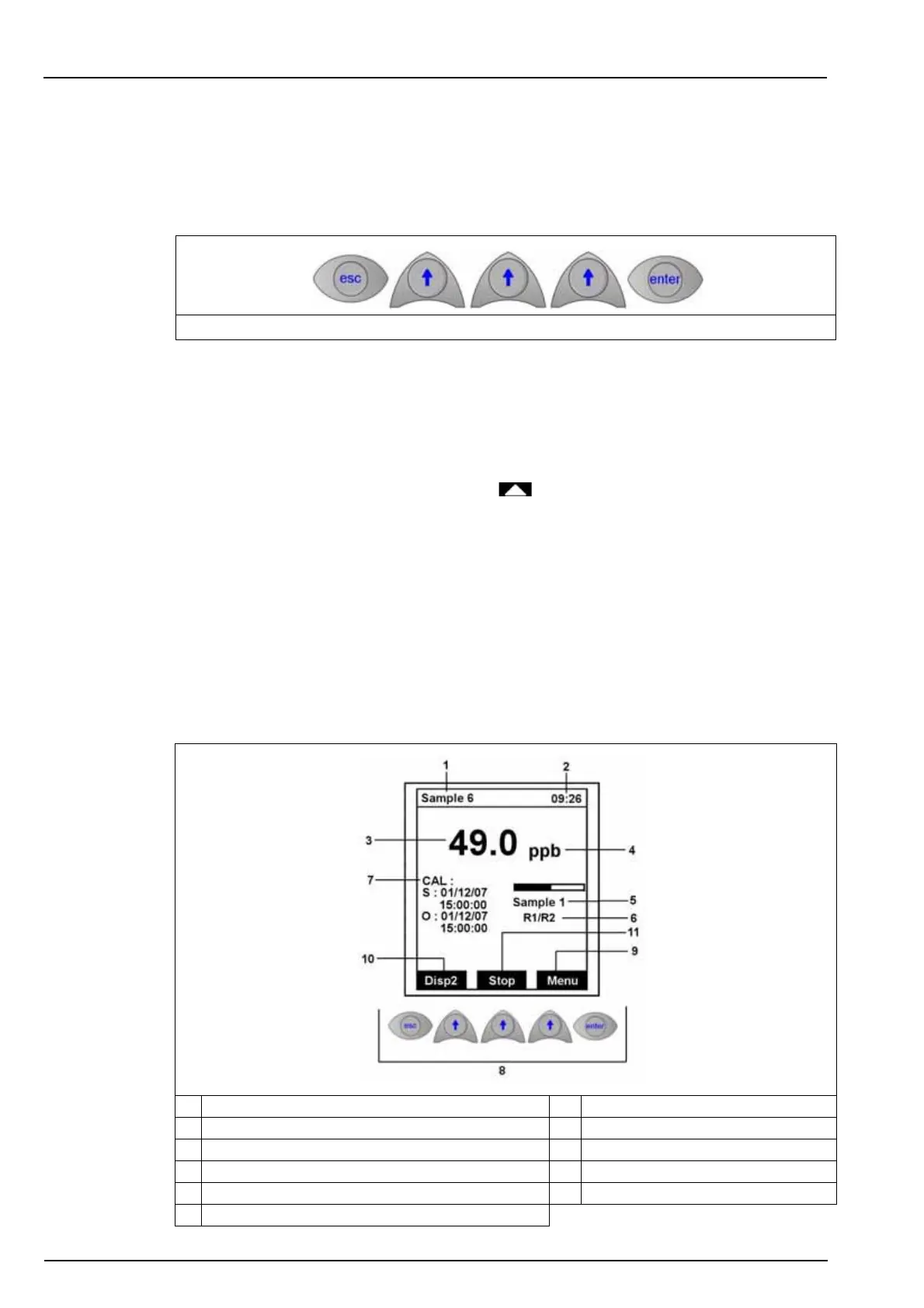
The display panel of the 9210 has 5 function keys (illustrated below) to allow menu option
selection, field selection, and data entry options.
• The Esc key cancels data input or goes back to the previous screen.
• The Enter key validates the input and goes on to the next step.
• The Up Arrow keys select the option displayed immediately above them on the screen.
5.1.2 Modification of a value
The highlighted digit may be modified with the key. Each digit can then be modified by
pressing the Enter function key. Repeat for each digit.
• On the first digit: possible to enter the " - " sign
• On the other digits: possible to enter a decimal point
Note: If you do not use the keyboard for at least 10 minutes, the analyzer returns to the measure mode
except during the calibration and maintenance options. An access code may be required for the calibration,
programming and service menus (see Code on page 38).
5.2 Measurement screens
5.2.1 Main screen
Figure 12 Function Keys
1. Name of last measured sample 7. Display of the last calibration data
2. Current time 8. Function keys
3. Concentration of last measured sample 9. Access to the main menu
4. Concentration units 10. Go to display 2
5. Sample being analyzed (bar graph indicates progress) 11. Start or stop the measurement
6. Measurement activity



 To Next Page