47
User Setup
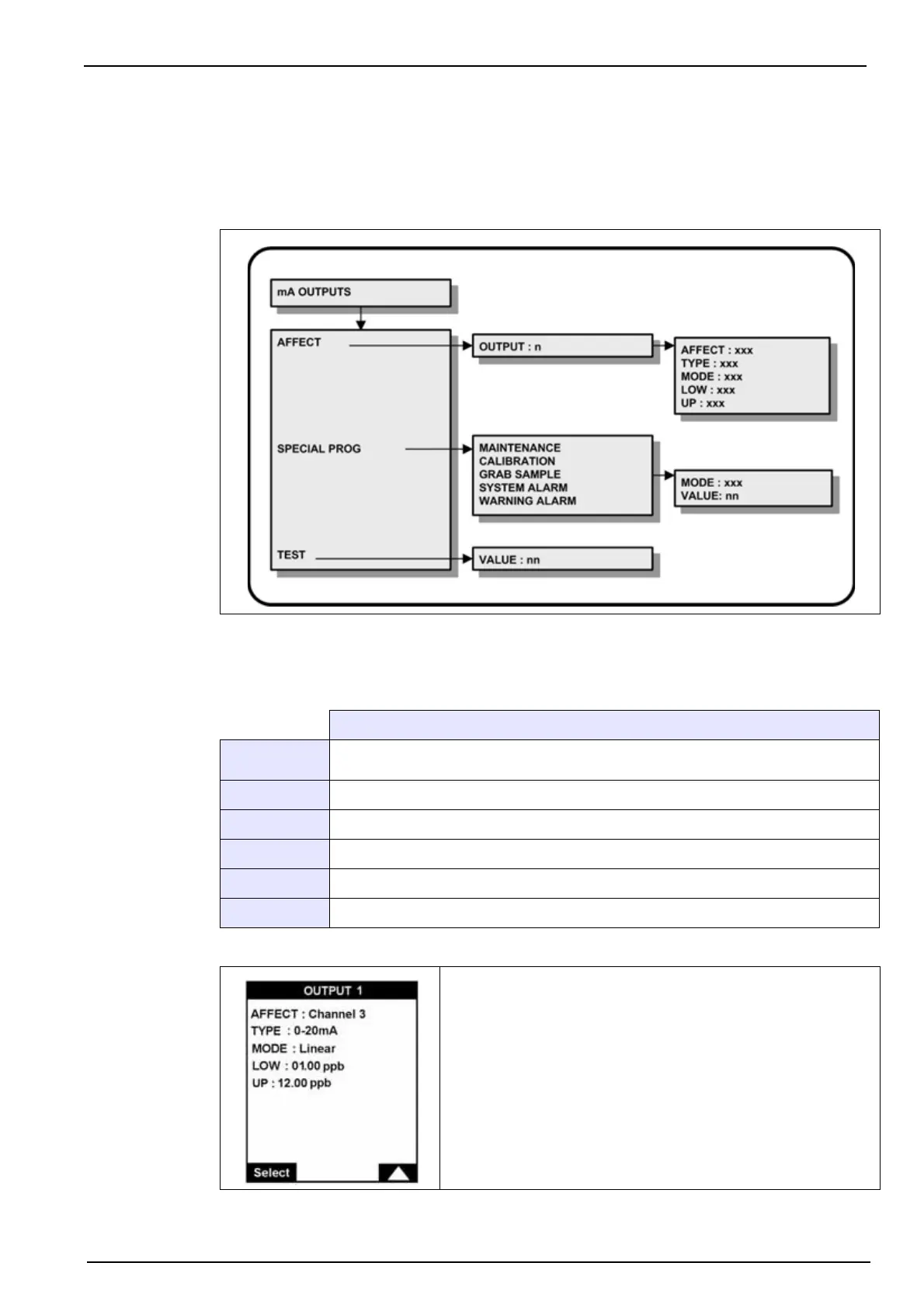
7.3 mA outputs menu overview
Select the mA OUTPUTS option from the main menu to set the analog output parameters.
Note: If a PROGRAMMING password has been set (see Code on page 38 for details on how to do this),
you will be required to enter a password to gain access to the main menu.
7.3.1 Affect
Select the AFFECT option and then each output (1-6) in turn.
Description
AFFECT
Define the measurement channel (1-6). The measurement on this channel will be
carried over the selected analog output
TYPE Define the analog output scale (0-20 or 4-20 mA)
MODE Select between linear or dual (see graph in Figure 14)
LOW Value corresponding to the low end of the scale
MIDDLE Value corresponding to the mid-point of the scale (only available in dual mode)
UP Value corresponding to the upper end of the scale
Define the analog output parameters.



 To Next Page