69
Section 10 Troubleshooting
10.1 Possible sources of the problem
This list gives you an idea of where to look for problem solving if you are having problems with
your analyzer.
10.2 Possible solutions
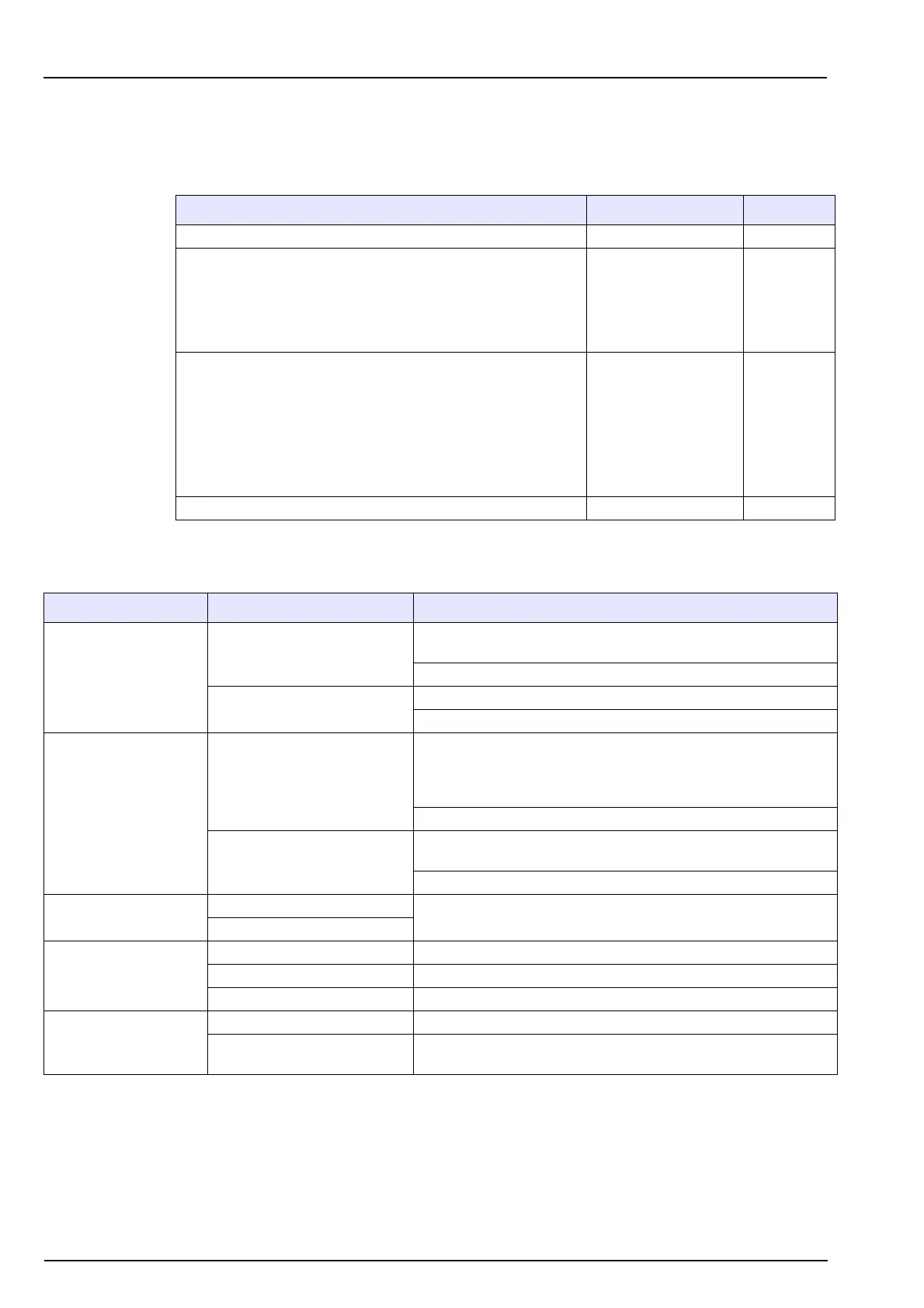
Problem Possible cause Problem N°
The system does not run Start / Stop 1
The measurement is not stable, too high or too low
Sample
Tubes
Photometer
Valves
Pump
5
3
8
4
2
Incorrect calibration
Pump
Tubes
Valves
Calibration solution
Calibration program
Reagents
Photometer
2
3
4
6
7
7
8
The photometer does not run or measure correctly Photometer 8
Problem Symptom Solution
1. START / STOP
Analyzer stopped
System alarm: Rectify the problem according to the message
displayed (see Table 2 on page 46).
Start up the analyzer by pressing the Start key.
Mains power cut off
Connect the analyzer to the mains power.
Check the fuse.
2. PUMP
Does not run
Test the pump. In the MAINTENANCE / PUMP - OTHERS menu
the number of pulses is automatically set to 1,000. Start each
pump one after the other and verify that the volume obtained per
pump is between 2.5-3 mL (corresponding to 2.5-3 μL/pulse).
Change the pump.
Irregular
The analyzer may have been stopped without cleaning the tubes.
Using a syringe, flush the pump with clean water.
Change the pump.
3. TUBES
Defective tube
Change the tube.
Clogged tube
4. SOLENOID VALVES
Solenoid valves leak Remove, test and clean.
The solenoid valves can't open Stuck membrane; cleaning required.
The solenoid valves can't close Blocked outlet; cleaning required.
5. SAMPLE
Dirty Disconnect the sample lines from the sample block.
Diminution of the flow
Verify and adjust the flow (10 L/h), change the sample tube if it is
clogged.



 To Next Page