63
Maintenance
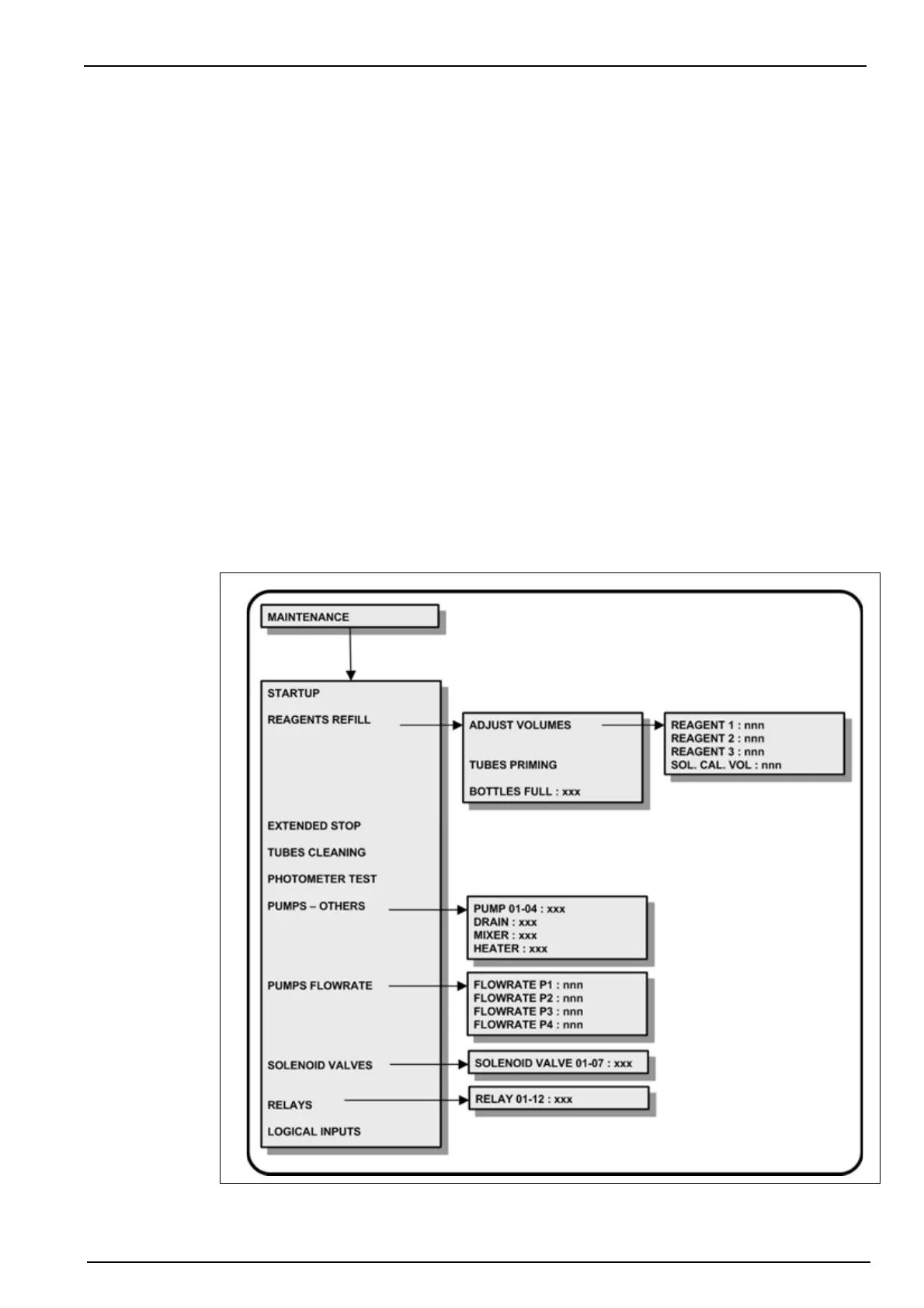
9.6 Maintenance menu overview
There are a number of maintenance and diagnostic procedures that can be performed using the
analyzer software.
Select the MAINTENANCE option from the main menu.
Note: If a PROGRAMMING password has been set (see Code on page 38 for details on how to do this),
you will be required to enter a password to gain access to the main menu.
9. Re-connect power to the analyzer. Once the measurement screen is displayed, select
the Menu option and then MAINTENANCE. Then select the REAGENTS REFILL option
and then the TUBES PRIMING option. This will purge and refill the new calibration and
reagent tubing, and will take about 20 minutes to complete.
At the end of the process press Esc to return to the menu at which stage the new
reagent tubes should be full of reagent.
10. Return to the measurement screen and press the Start function key to begin
measurements. Leave the analyzer to run for a period of two hours after which the
measurements will have stabilized.
11. Once stable, press the Stop function key to stop measurements. Then select the Menu
option and then CALIBRATION. Perform a manual ZERO+SLOPE calibration.
After a successful calibration the analyzer is ready to resume measurements. Return to
the measurement screen and press the Start function key.



 To Next Page