Powered by Safety
®
25
Usage
01.4IB.48041
Ch 5 Usage
A. uSer interfAce overvieW
1) LCD Interface
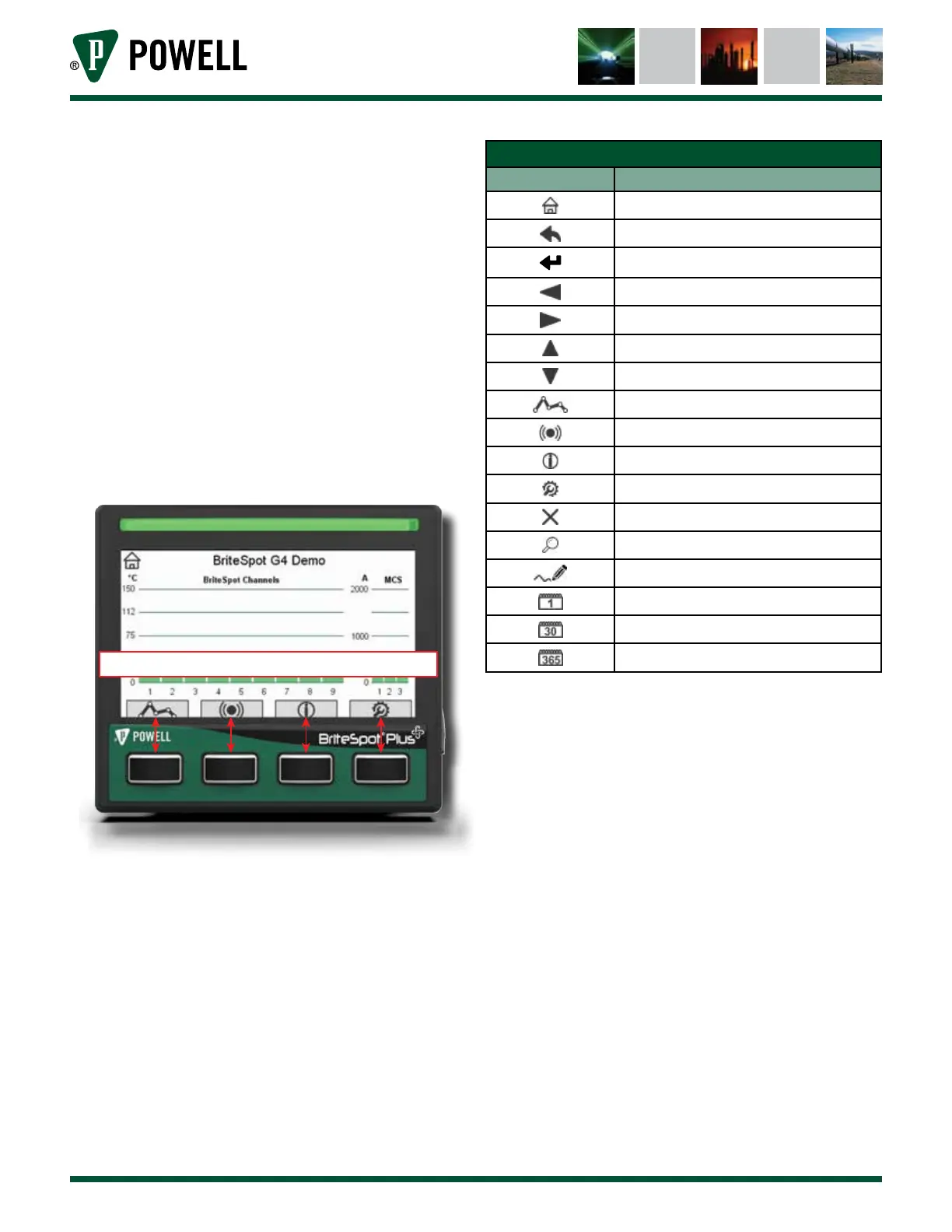
The BriteSpot® Plus conversion module is
equipped with an LCD and four buttons
which allow for data display and some
configuration. The buttons correlate to the
functions displayed on-screen as shown
in Figure 28. Table E Button Icons outlines
general button functions.
Figure 28 LCD Interface Navigation
Button Function Icons Correlate to Buttons
Table E Button Icons
Icon Meaning
Go Home
Go Back
Enter
Scroll Left
Scroll Right
Scroll Up
Scroll Down
Trending
Alarms
Information
Settings
Clear Alarm
Details
Edit
Single Day View
Single Month View
Single Year View
The BriteSpot® Plus user interface is
intuitively navigated. See Table F for
menu navigation. To reach any of the
four main menu screens, one of the four
corresponding buttons should be pressed
from the home screen. The main menus
are:
• Trending
• Alarms
• Information
• Settings



 To Next Page