Powered by Safety
®
38
Usage
01.4IB.48041
BriteSpot® Plus
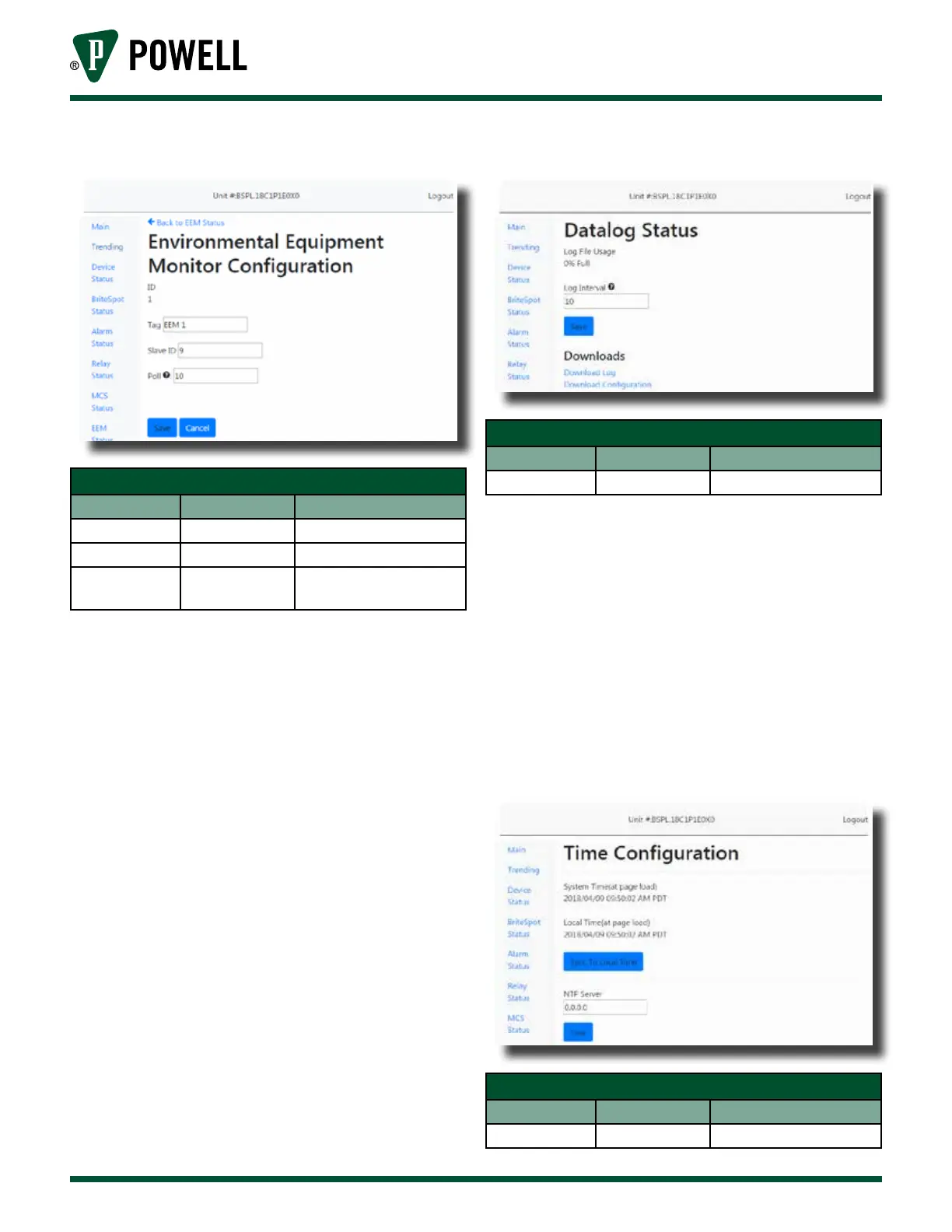
Figure 50 EcoVisor™ Configuration Web Page
Table P EcoVisor™ Configuration Web Page
Parameter Default Value Range/Options
Tag EcoVisor x 32 Characters
Slave ID 0 0 = disabled, 1-247
Poll 15 s
0 = disabled, any integer
number of seconds
xi. Datalog
The Datalog page (Figure 51) can be
accessed from the navigation bar at
the left of the web page. This page
allows the user to configure the
logging interval and to download
both the log file and the device
configuration file.
Note: Once the BriteSpot® Plus has been
configured, it is advised that the
configuration file be downloaded
should the settings need to be restored
in the future.
Figure 51 Datalog Web Page
Table Q Datalog Web Page
Parameter Default Value Range/Options
Log Interval 10 minutes Any Integer
xii. Time Configuration
The time configuration page
(Figure 52) can be accessed from the
navigation bar at the left of the main
page. This page allows the user to
sync the RTCC (Real Time Calendar/
Clock) to local time and select a NTP
Server, which may be any routable
IP address.
Figure 52 Time Configuration Web Page
Table R Time Configuration Web Page
Parameter Default Value Range/Options
NTP Server 0.0.0.0 Any IP Address



 To Next Page