Powered by Safety
®
33
Usage
01.4IB.48041
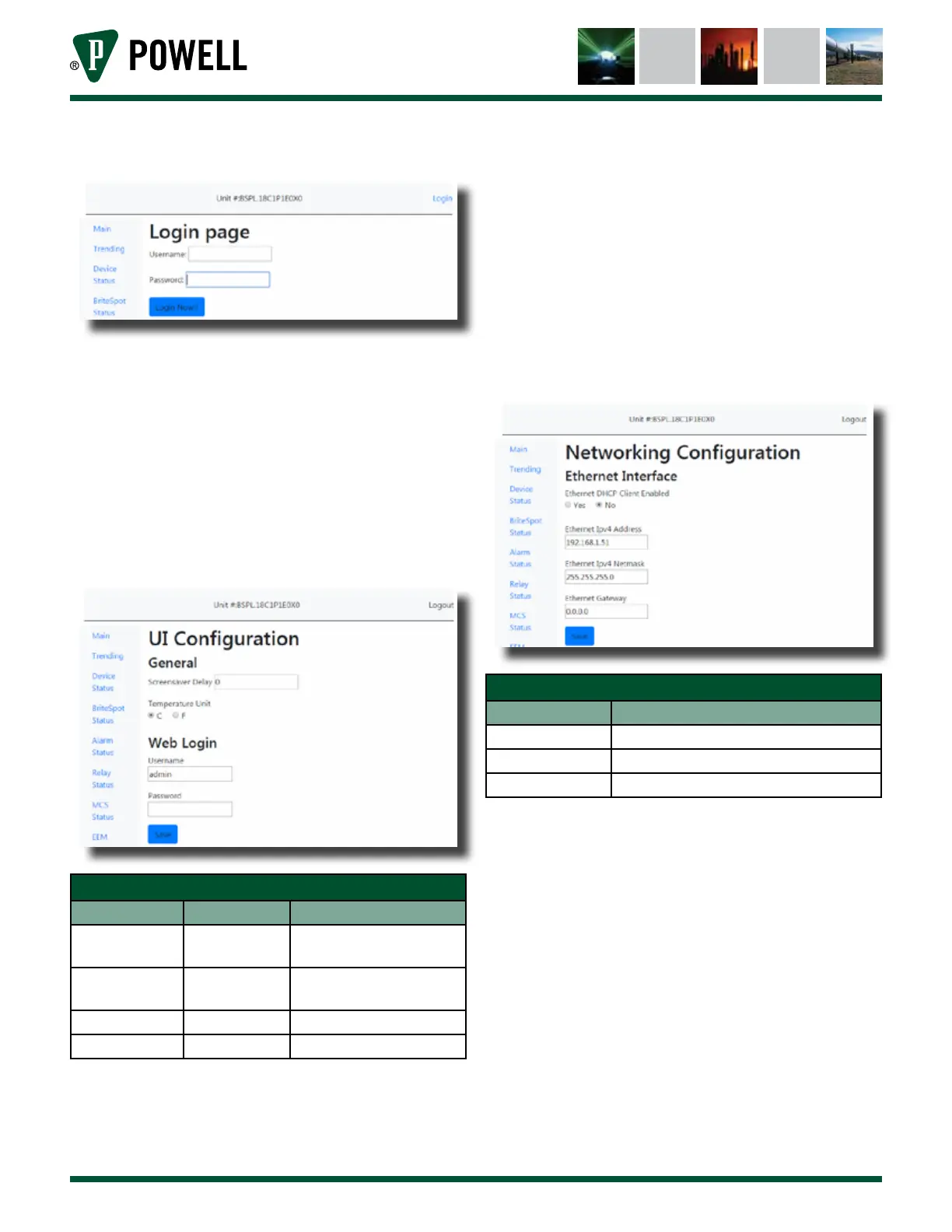
Figure 40 Credential Validation Screen
ii. UI Configuration
As seen in Figure 41, the UI
configuration page allows the user
to set the Screensaver delay for
the device, the device units, as well
as setting a new username and
password (recommended).
Figure 41 UI Configuration Web Page
Table G UI Configuration Page Settings
Parameter Default Value Range/Options
Screensaver
Delay
0
0 = disabled, any integer
number of minutes
Temperature
Unit
°C °C/°F
Username admin 16 characters
Password admin 16 characters
iii. Network Configuration
Figure 42 shows the network
configuration page which allows
the user to configure the device’s
Ethernet connection parameters.
Any changes to the network
configuration settings require the
user to reboot the system.
Figure 42 Network Configuration Web Page
Table H Network Configuration Page Settings
Parameter Default Value
IP Address 192.168.1.51
Gateway 192.168.1.1
Subnet Mask 255.255.255.0
iv. Control Protocol Parameters
The MODBUS parameters can be
configured by navigating to the
“Control Protocol” page (Figure 43
and Figure 44). This page allows
the user to configure either
MODBUS RTU or MODBUS TCP
communication with the BriteSpot®
Plus.



 To Next Page