I
I
I0
I
I
I
I
I
I
IO
I
I
I
I
I
I
I,
I0
I
Monitoring and Controlling UPS Operation
After you
star-l
the UPS, no operator intervention is necessary except for periodic checks of
the UPS status. Manual operation is required only during routine maintenance or
setice.
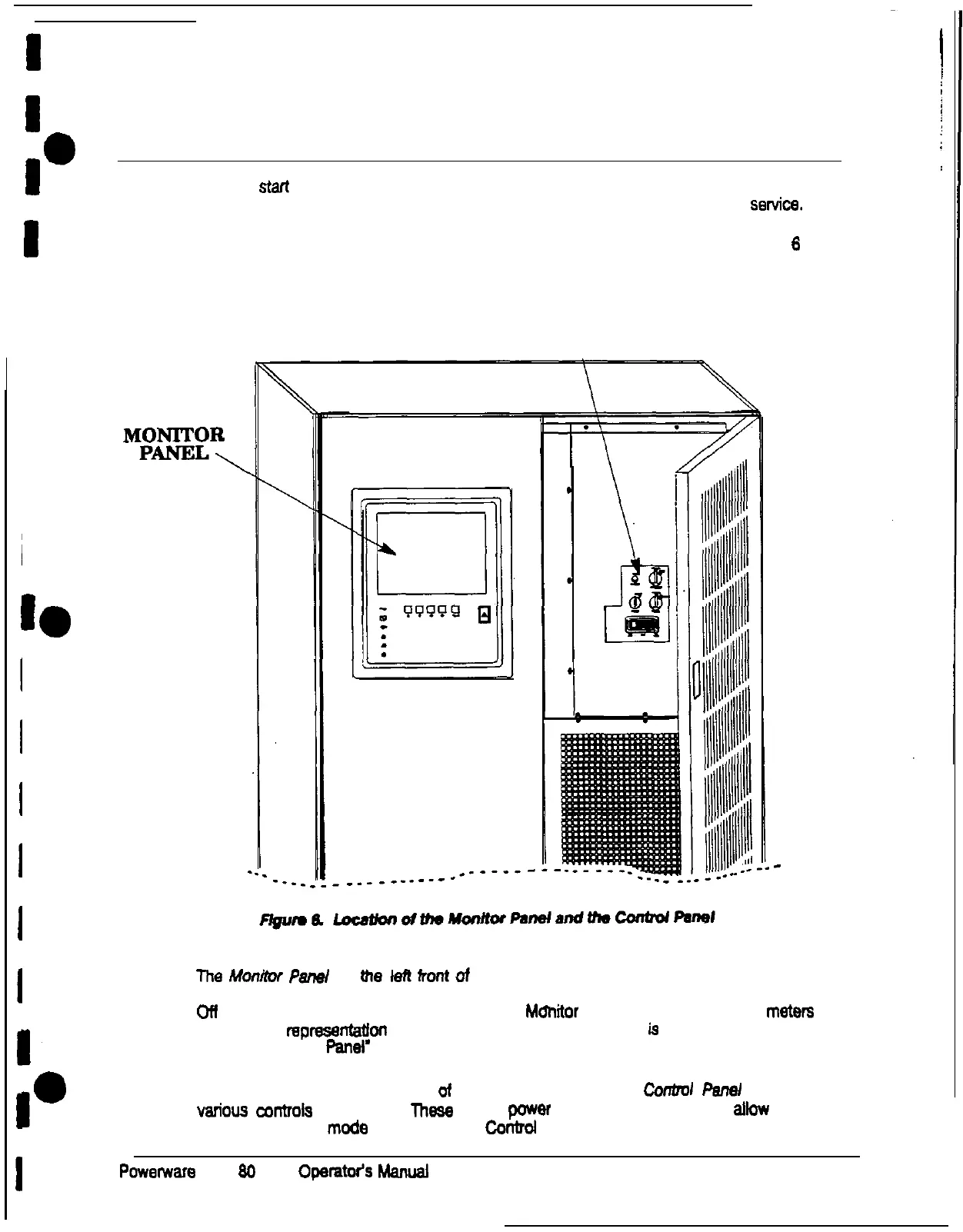
You use the Monitor Panel and the Control Panel to monitor and control the UPS. Figure 6
shows the location of these two panels on the front of the UPS.
CONTROL PANEL
\
MEEi?
\
The
Monitof Panel on Ihe
left
froni
of
me UPS continually indicate8 me present mode of
UPS operation. This panel contains an LCD screen, backlit status indicators, and the Load
Ofl button. You can use the LCD screen on the Mdnitor Panel to view performance
meten
or a graphic representatfon of UPS operation.
The Monitor Panel
is
described in detail in
‘Using me Monitor Panel’ on page 19.
When you open me right front door ot the UPS. you can see the Corrtml Perml containing
various
wntroh
and switches. These control power to and from me UPS, and allow you
to
change me UPS
mode
manually. The
Contrcd
Panel is dii in the following chapter.
Powerware
Plus
80
UPS
Operatw’s
h4anual
13











 To Next Page