Using the Menu Options
The UPS menus allow you to display data in the information area to help you monitor and
control UPS operation. These menus and options are available:
l
Metem
Displays UPS performance maters for the system or
critical toad.
l
Eventa Displays the list of Active System Events and a historical
log of system events.
l
Statfstlca
Displays statisttcal information about UPS operations for
the battery, load, or line.
l
Graphioe
Displays a real-time graphic representation of the flow of
current mrough the internal UPS components.
*setup
Allows you to set up the UPS communications port and
set the date and time for the timestamp.
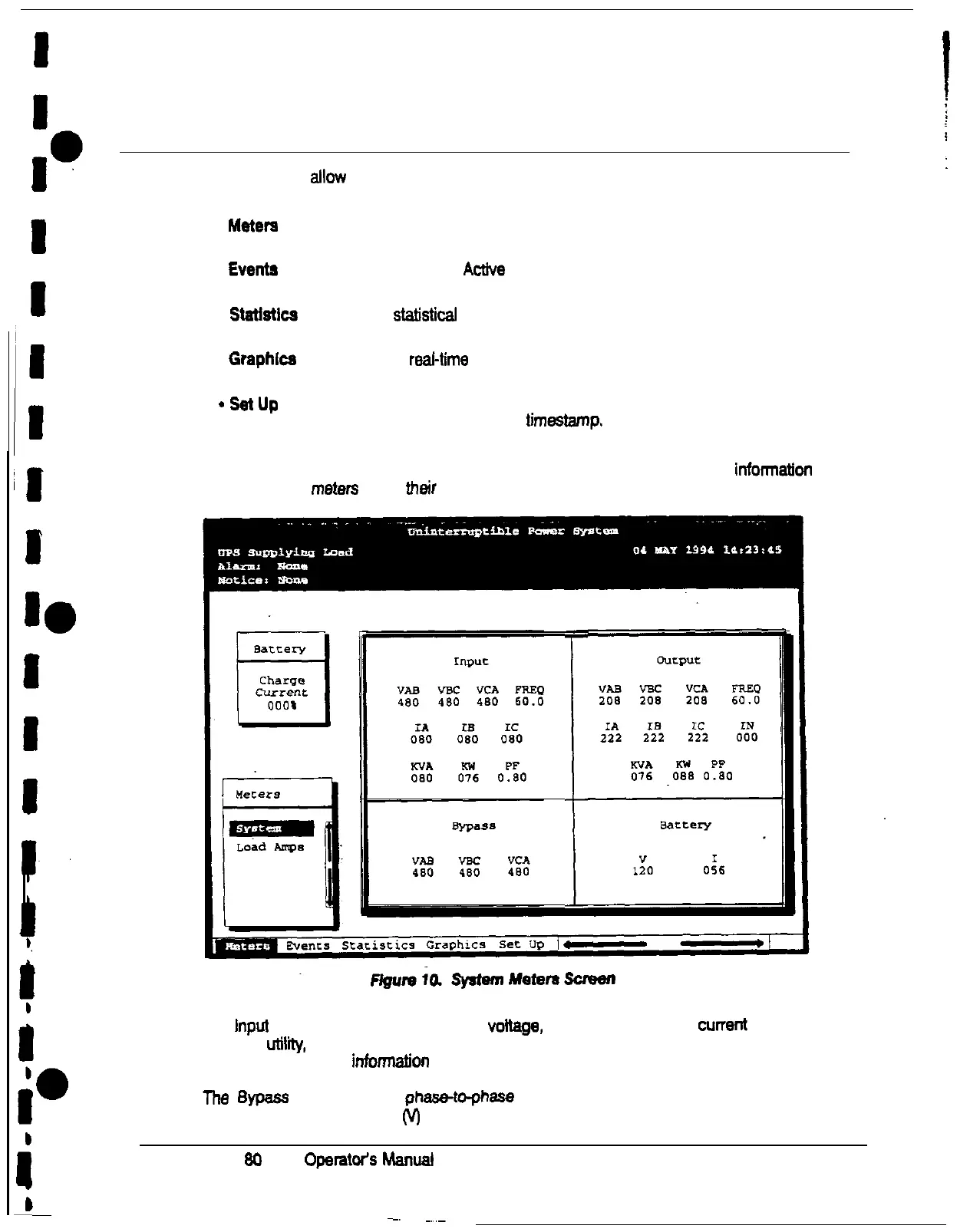
Figure 10 shows the LCD screen as it appears when you first start the UPS. The Meters
menu is displayed in the menu box, with the System option highlighted. In the informatton
area, the system metem
show meir current
readings.
-
I
The Input area shows the phase-to-phase voltage, frequency, and phase current of the
incoming utility, followed by the KVA. KW, and power factor measurements. The output
area shows the same informagon for me power being output by the UPS.
The
&pass
area shows the
phaa&o-phase
voltage of the bypass source. The Battery
area displays the DC voltage
(V)
and the DC current (I).
Power-ware Plus
SO
UPS
OpamWS
Manual
23











 To Next Page