I
I
I0
I
I
I
:I
~1
I
Using the LCD Screen
The LCD screen at the top of the monitor panel is your means of communicating with the
UPS.
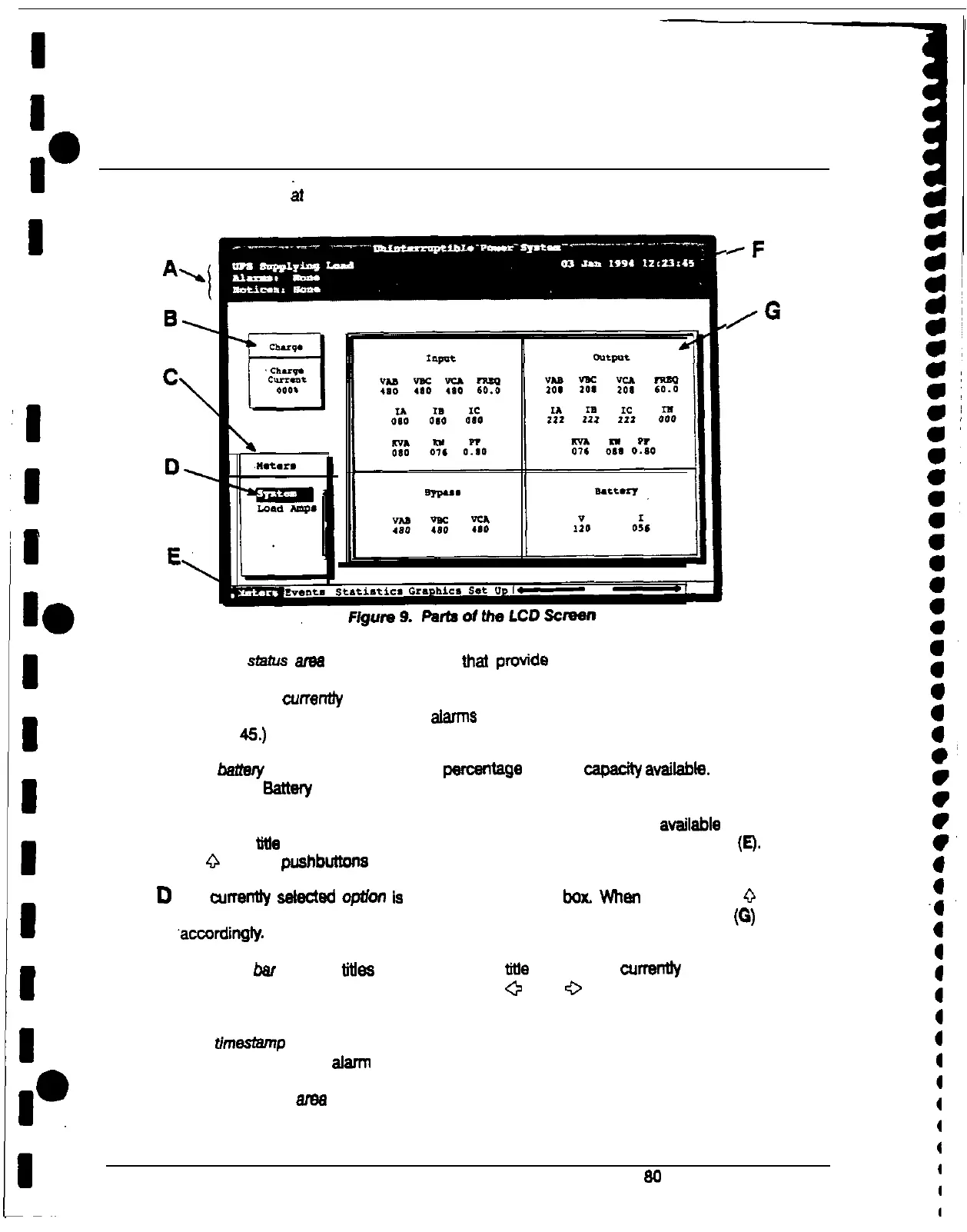
Figure 9 identifies the parts of the LCD screen discussed in the following sections.
RF
/G
A
The UPS sfafus ame contains three lines that provide information about the current state of the
UPS. The first line shows the present operational mode of the UPS. The second line shows
me highest level currentfy
active alarm,
and the third line shows any notices the UPS has
posted. (For more information about atam’ts and notices, see ‘Responding to System Events’
on page 45.)
B The
hamy
charge box
shows me percentage of battery capachy avaitable. When the UPS is
operating in Sattery mode. this box displays how much battery time remains.
C
The menu box shows me currently selected menu and lists me options avaltable on that
menu. The tttte at the top of the menu box is also shown below on the menu bar
(E).
Press
me
0
and
V
pushbuttone to scroll up and down through the options in the menu box.
D
The currentfy selected
optfor?
ls
highlighted in me menu box. Whan you press the
0
and
V
pushbuttons to move the highlight up or down, the data in the information area (0) changes
‘accordingfy.
E
The menu bsr lists the titles of me menus. The We of me menu current& displayed in me
menu box is highlighted. When you press the
+
and
0
pushbuttons to move the highlight
left or right, the data in the menu box and the information area changes accordingly.
F
The timesfemp shows me current date and time. This date and time are recorded in the Event
Log when a notice or alarm is activated.
G
The information
wee
contains data about UPS status and operations. When you select a
menu option, the information area displays statistics or graphics pertaining to the option you
selected.
20
Powerware Plus 80 UPS Operator’s Manual











 To Next Page