1
I
p
Connecting Equipment to a Serial Port
1
I
I
I
1
1
Ia
I
!I
‘I
iI
1
1
:
I
I0
I
You can connect a wide variety of terminals, printers, and computers to each port. and
configure the UPS as the Oata Communication Equipment (OCS). Set up the remote
equipment using the appropriate parameters for the mode you select. The following
section provides more information about configuration.
The cables you use for connection depend on the equipment you are connecting to the
UPS. Cables should be no longer than
-m
(SO
fl). The connectors for Port
1
and Port 2
on the customer interface panel in the UPS are female, so the cables should be male.
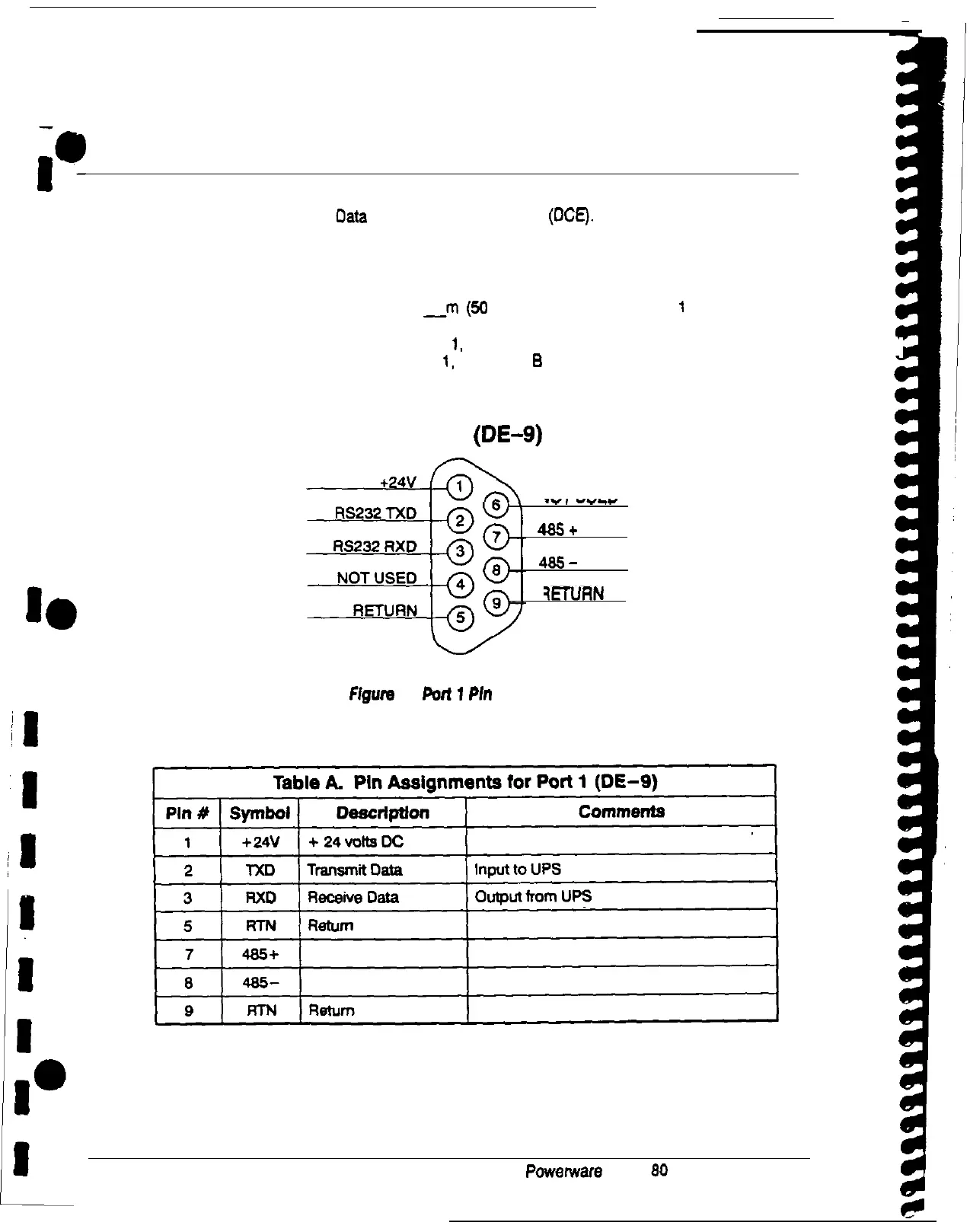
Figure 2 shows the pin assignments for Port
1,
and Table A describes them. Figure 3 on
page 5 shows the pin assignments for Port
1,
and Table
B
on page 5 describes them.
PORT 1 (DE-g)
NOT USED
..e,
1-w1
4&5+
IS+
485-
185-
RETURN
ETURN
FIgwe
2.
Port
1
Pk
Assignments
4
Powerware Plus 80 UPS Communications
i











 To Next Page