L
I
10
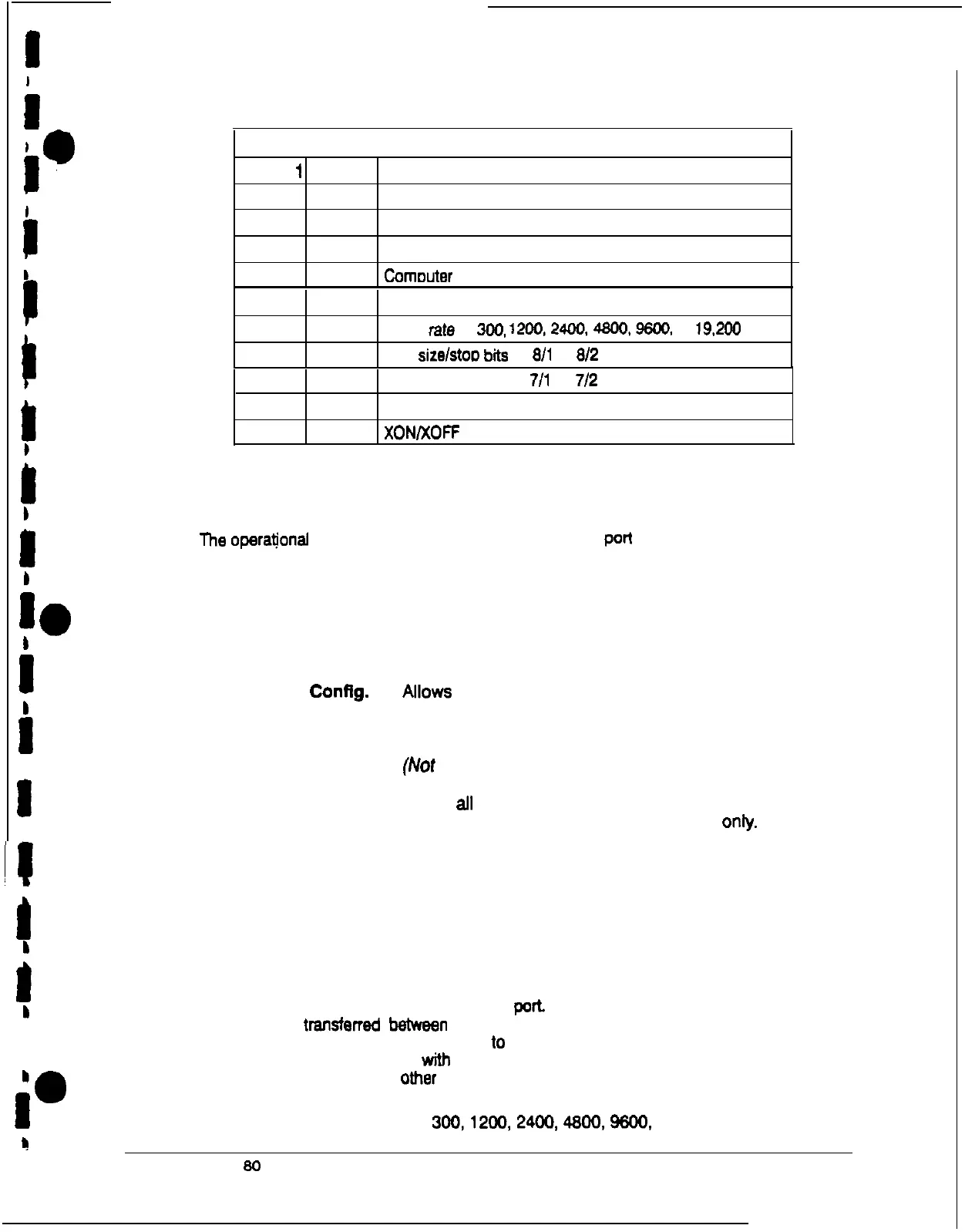
TABLE C. Options Available for Each Communication Port
I.
Port
I
Port2
Options
X X
Terminal mode
I
c
Calibration mode
X X
Alarm Configuration
I
r
X X
Cornouter mode
X
Remote Monitor mode
X X
c
Saud
rate
of
300.
1200,2400.4800.9600.
or
19.2@I
X X Data size/stoD bits Of
811
Or
812
X
Data size/stop biis of
711
or
712
8
X X
Disabled handshaking
X X
XON/XOFF handshaking
I
1
b
Mode
I
The
operational
mode of the port. Each communications
port
operates in
one of these
modes:
b
10
Terminal mode
System events are logged immediately as they
occur.
b
I
b
I
I
#i
1
Calibration
Used only by service personnel.
Alarm Config.
Allows you to set up building alarms.
(Not yet implemented)
Computer
Allows you to use Binary Computer Mode (BCM).
(Not yet implemented)
Remote Monitor
Sends all system event information to a remote
monitor panel (RMP). Available for Port 1 only.
Port 1 and Port 2 cannot be placed in the same mode simultaneously; they must
always be operating in different modes. The modes are described in the following
chapter.
b
1
Rate
b
The baud rate of the equipment connected lo this
poh
The baud rate determines the
1
speed of data transterrad between the UPS and the connected equipment. For Remote
Monitor mode, the baud rate must be sat
10
300. All other modes should operate with a
the highest baud rate available witI? the connected equipment. 300 baud is not
i”
recommended for any mode
omer
than Remote Monitor.
You can select a baud
rate of
300,1200,2400,4800.%00.
or 19,200.
?
I
Powemare Plus 80 UPS Communications
7
.











 To Next Page