360 Adjustments
53
3.6 Checking the lowering process of the internal reference weights (SCS only)
1. Ensure the balance is levelled and set to the factory mode according to chapter 3.2.
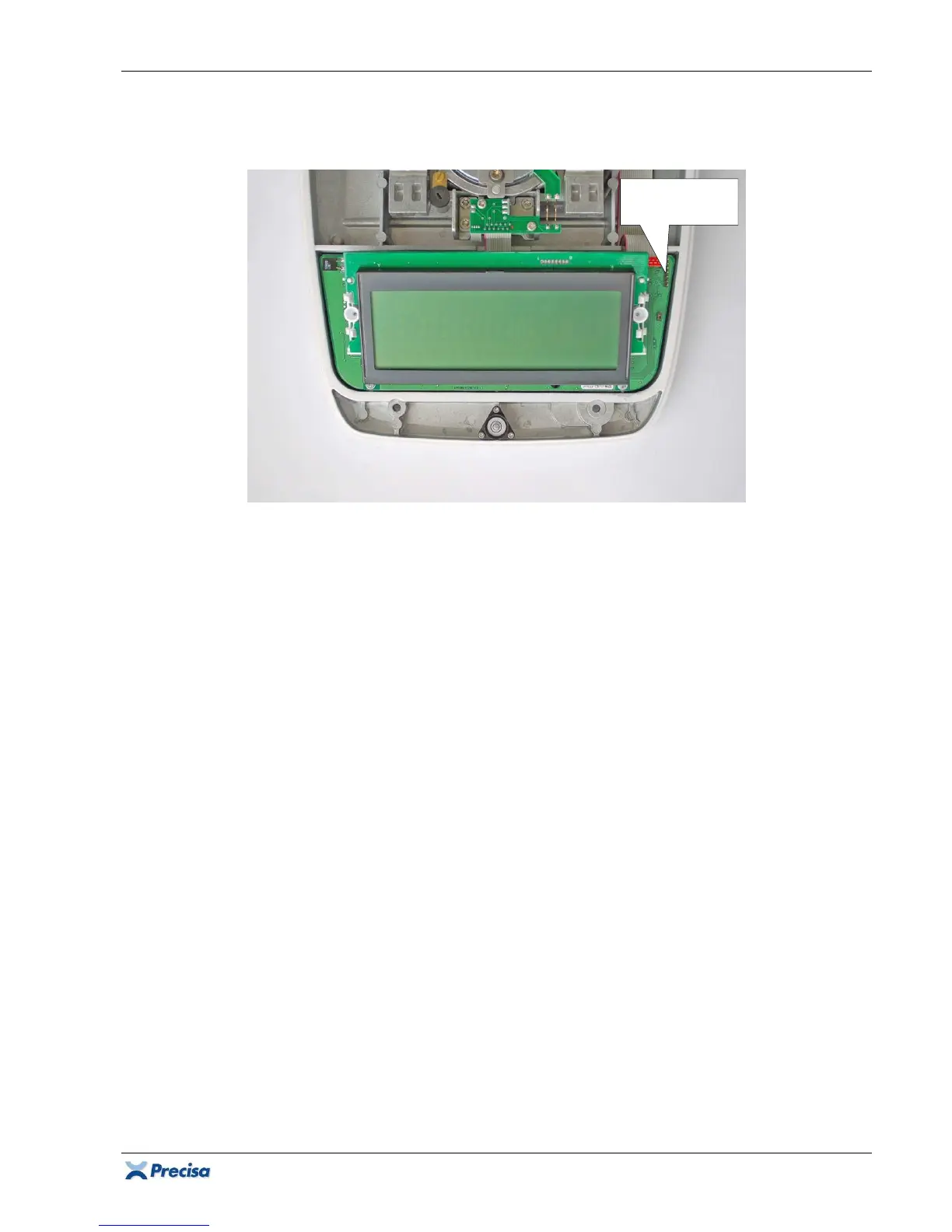
2. Place the upper part of the housing on the right alongside the lower part of the housing and
connect the membrane keypad to the pin header S3.
3.6.1 Checking the lowering process of the internal reference weights (graphic version only)
1. Switch the service menu by pressing MENU and call up "Test program".
2. Lower the weights with {Down} and lift them with {Up}.
3. If the weights don't run cleanly into their bearings, re-align the reference weight module.
3.6.2 Checking the lowering process of the internal reference weights (10-Key version only)
1. Hold
F
until "TESTPROG 1" appears.
2. Lower the weights with {DOWN} and lift them with {UP}.
3. If the weights don't run cleanly into their bearings, re-align the reference weight module.
3.6.3 Checking the lowering process of the internal reference weights (5-Key version only)
1. Hold MODE until "TESTPROG 1" appears.
2. Lower the weights with {DOWN} (Hold REF until "FKT-KEY 4" appears) and lift them with {UP}
(hold REF until "FKT-KEY 3" appears).
3. If the weights don't run cleanly into their bearings, re-align the reference weight module.
Pin header S3
for keypad













 To Next Page