130
MBOX® USER MANUAL
d. Min and Max: These values can be used to limit the travel of a linear control used for scenic tracking to a
specic number of pixels; so as to keep the screen object or its applied texture from moving too far when
incoming tracking data values exceed the expected limits. Min and max value may not be necessary with
controls that don’t deal with movement or rotation (e.g. opacity or color), as the scale/counts value for
these controls tend to be automatically limited.
e. Offset: The Offset value is used to set a value for a control that does not respond to external data. Offset
is typically used with the Repeat controls, but can be used to move or rotate a screen object by a xed
amount. When using an offset value the Scale value should be set to zero (0).
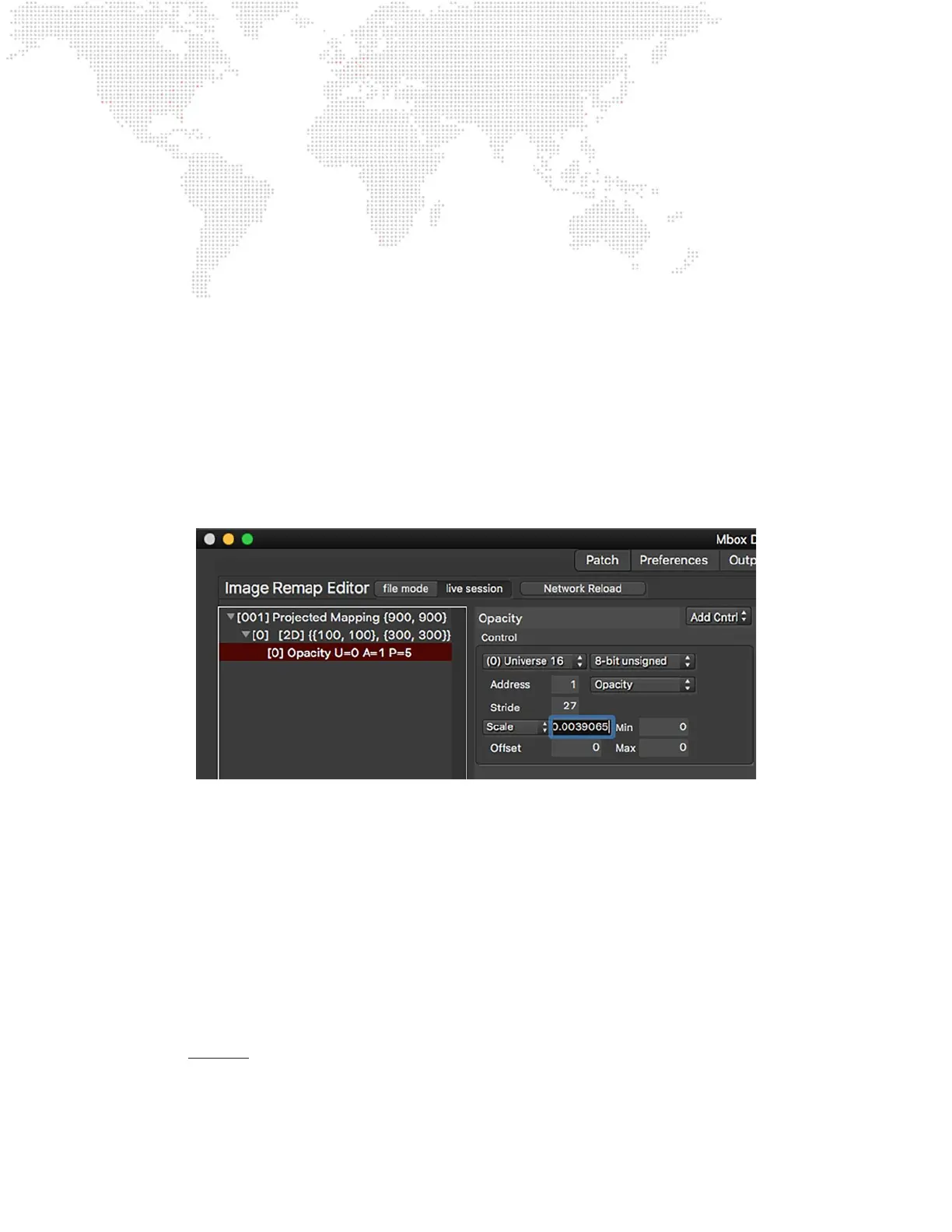
Step 13. The opacity control that was added in Step 11 now needs to be congured to respond to some control data
and also to have the appropriate scale. First of all, click on the universe pop-up and make sure that “(0)
Universe 16” is selected. Leave the address value set to 1.
Step 14. Choose “8-bit unsigned” for the data format, and “Opacity” for the control type. To gure out the stride
value some math is required. Assuming per screen object uses three channels (opacity, X position, and Y
position), and nine screen objects, 3 x 9 = 27. Therefore the stride value should be 27. Finally for the scale
of the opacity parameter, there’s a bit more math. An 8-bit control has a range of 0-255 (256 steps), and the
opacity parameter has a range of 0.0-1.0 so divide 1 by 256 = 0.00390625. No offset, min, or max values
are needed.
Step 15. After adding the opacity control the X and Y position controls can be added. Here’s where using copy and
paste can speed things up. Make sure that the opacity control is highlighted in the conguration list, then
press [⌘C] and then [⌘V], and a copy of the opacity control will be created. Rename it “tX position.”
a. For the Texture X position control, the universe is the same, the address should be changed to 2, the data
type is “8-bit 127”, and stride is still 27. Two complex decisions remain though. Should the control type
be Texture X Pos or just X Position? And what should the control’s scale value be?
b. For this particular screen object in this conguration (using projected mapping), select “Texture X Pos” as
the control type because the intention is to move the texture around on the screen object, not to move
the screen object on Mbox’s screen. Imagine an LED screen moving left and right on-stage. Projected
mapping doesn’t need to move the corresponding screen object onscreen. If the screen object were to
move onscreen (on Mbox’s output), it would move away from the area that the LED processor is mapping
to that particular LED screen. To keep projected mapping correct only the texture needs to move, but in
the opposite direction to the screen’s apparent movement.



 To Next Page