PathMaster® Manual Rev. H 6/03
- 39 -
NOTES: Playback is only allowed if the Dispensing System is currently in Manual/Jog/Teach mode.
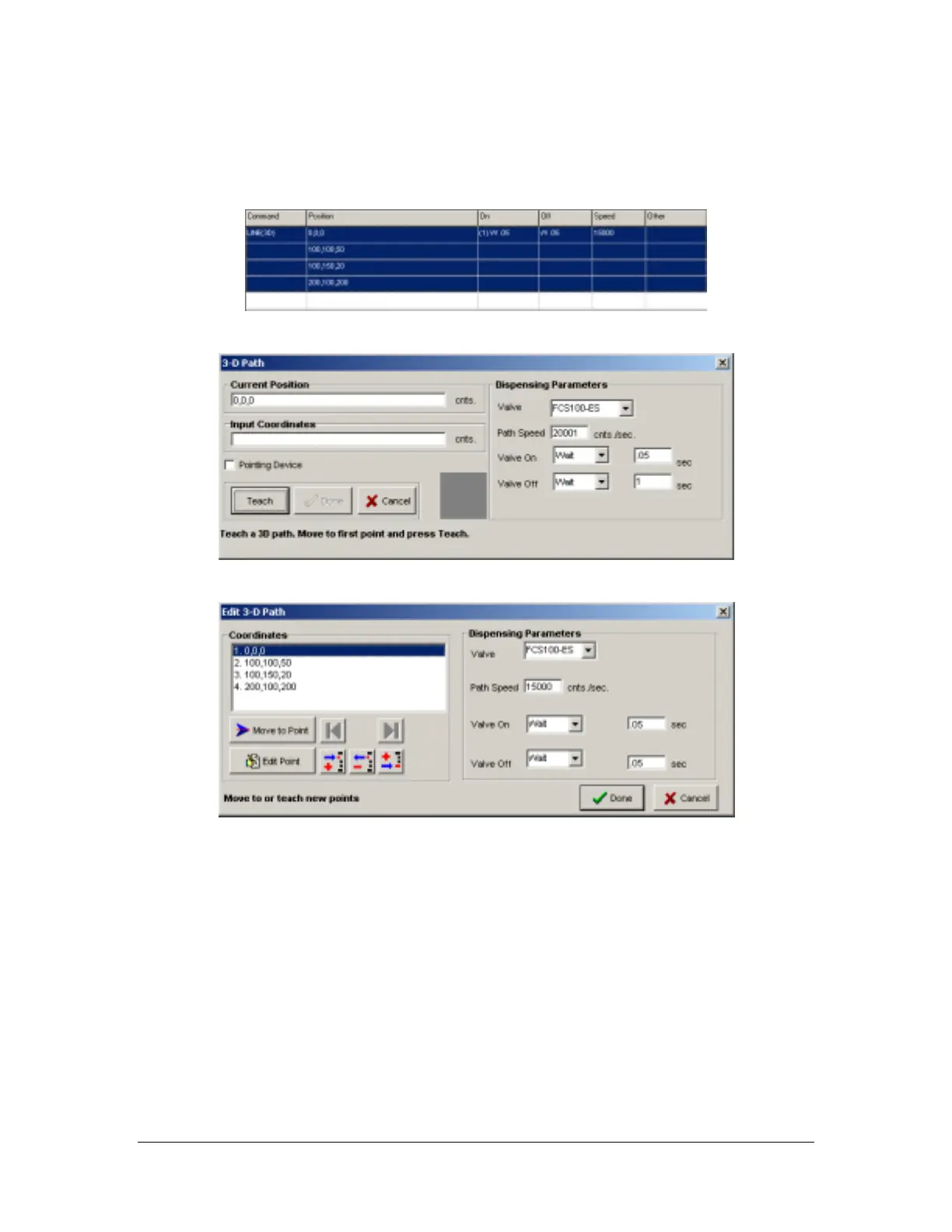
3D Path
Programmed
Teach Screen
Edit Screen
This tool teaches 3D path segments.
• Current Position – If there is communication established with the controller, the current position
appears in the text box. Use the trackball on the Dispensing System to change the position.
• Input Coordinates – Manual entry of target position.
• Dispensing Parameters – Select appropriate parameters for the current dispense, including the active
valve.
Valve On Time – The pause after turning the valve on but before starting the dispense path.
Valve Off Time – The pause after finishing the path and turning the valve off but before
moving to the next point.
Valve On Distance – Distance the path traveled before turning the valve on.
Valve Off Distance – Distance the path traveled when turning the valve off, before the path
finishes.
• Teach – Record the current point. Equivalent to the F2 key on the Dispensing System.
• Done – Add to the program.
• Cancel – Quit without altering the program.



 To Next Page