•
Mozilla Firefox version 3.6 or later
•
Apple Safari version 5 or later
•
Opera version 11 or later
Procedure
1. Open any of the supported internet browsers and enter the system's IP address.
For example, http://1.2.3.4/.
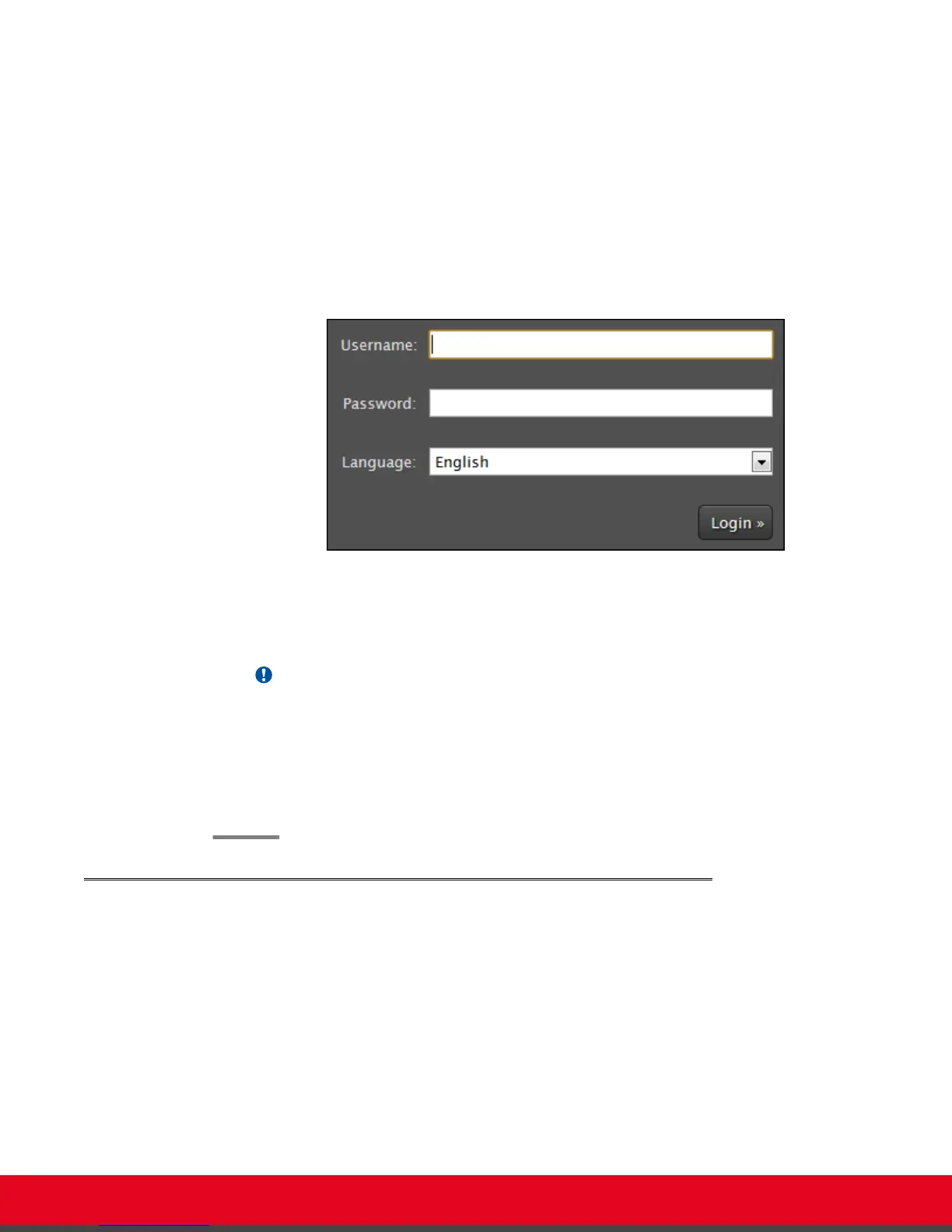
The XT Series login page opens.
Figure 8: Logging into the XT Series web interface
2. Enter the username and password.
The default username for the web interface is Admin and the default password is 1234.
Important:
We recommend changing the default credentials after logging in for the first time, as
described in the Administrator Guide for Scopia XT Series.
3. (Optional) Select the web interface language from the Language list.
4. Select Login.
Accessing the Main Menu of the XT Series
About this task
After switching on the XT Series, the main menu appears and you can do the following:
•
Make audio and video calls
•
View contacts in the phone book
•
Start sharing content from your computer
•
Adjust the camera position. You can also store the position to retrieve it later.
•
Record your videoconferences
User Guide for Scopia XT5000 Series Version 3.2 Getting Started | 15


 To Next Page