Hardware Installation
PixelStor 5000 User Manual
Rev. 1, May 2013
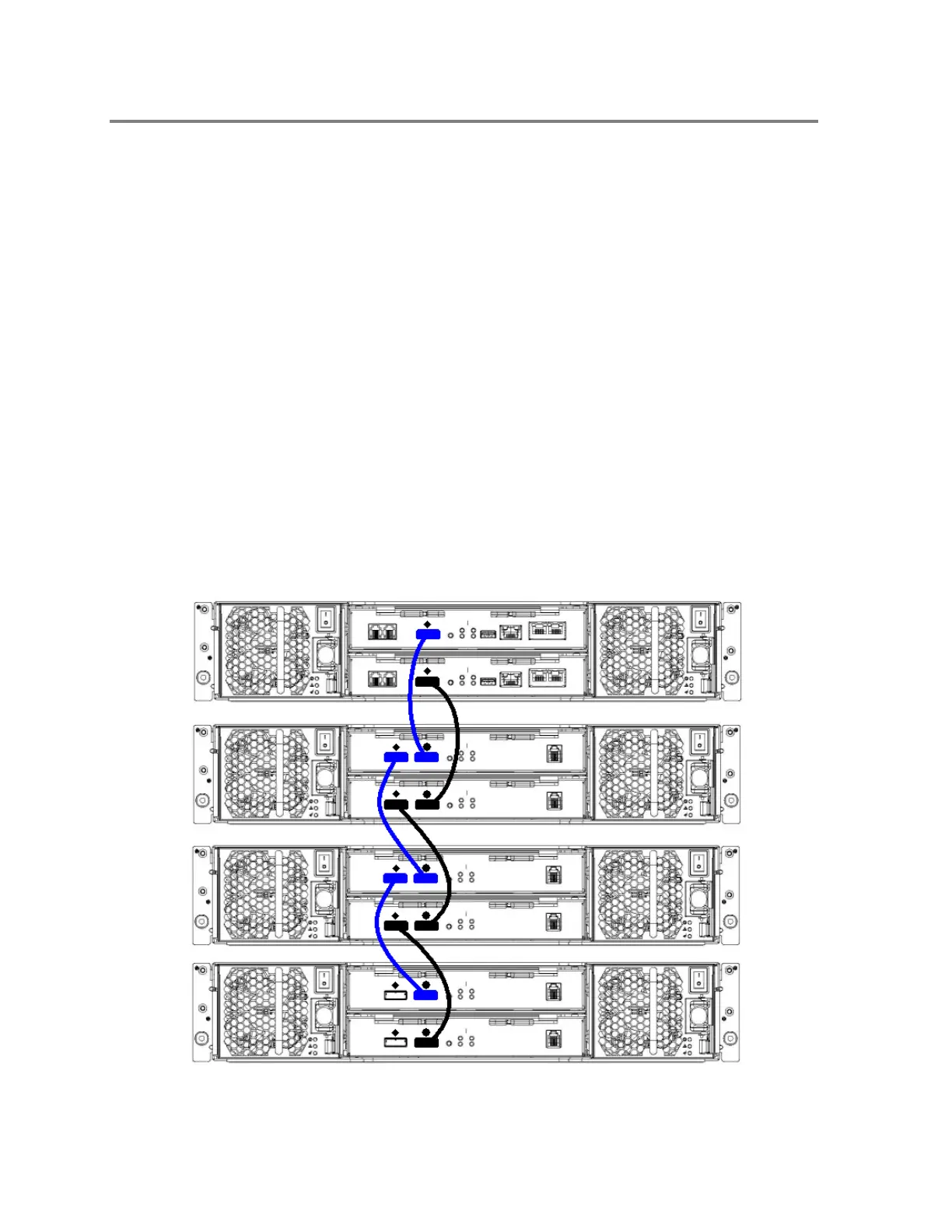
marked with a icon on SAS IO module 0 of the 1st PixelStor 100e/312/324e.
3. For a dual controller configuration, follow the same exact process described above to
connect RAID controller 1 on the PixelStor 5000 to SAS IO module 1 on the 1
st
312e/100e. You have now properly connected the PixelStor 5000 RAID system to the
1st 300e expansion enclosure.
4. If you have additional 100e/312e/324e enclosures to add to this RAID system, follow the
rest of these steps to daisy chain them to the 1st 100e/312e/324e.
5. Connect one end of another of the included SAS cables to the SAS connector marked
with an icon on the SAS IO module 0 of the 1st 100e/312e/324e expansion chassis.
Connect the other end of the SAS cable to the SAS connector marked with an icon on
SAS IO module 0 of the 2nd 100e/312e/324e expansion enclosure.
6. Follow the same exact instructions above for connecting SAS IO module 1 on the 1st
300e expansion enclosure to SAS IO module 1 on the 2nd 300e expansion enclosure.
You have now properly connected a 2nd 100e/312e/324e expansion enclosure to the
first 300e enclosure.
7. To add additional 100e/312e/324e.expansion enclosures to this RAID array system,
repeat steps 5 and 6.
Figure 3-21 SAS Cable Connections



 To Next Page