Gilat Satellite Networks | Confidential and Proprietary Information | 57
LNB (Low Noise Block) in the interface should be understood to
mean BDC (Block Down Converter).
[
Configuring Satellite Settings
You can manage the internal satellite database.
To access and work with Satellite pages:
1. In the IDU Configuration page, click the Satellite menu option.
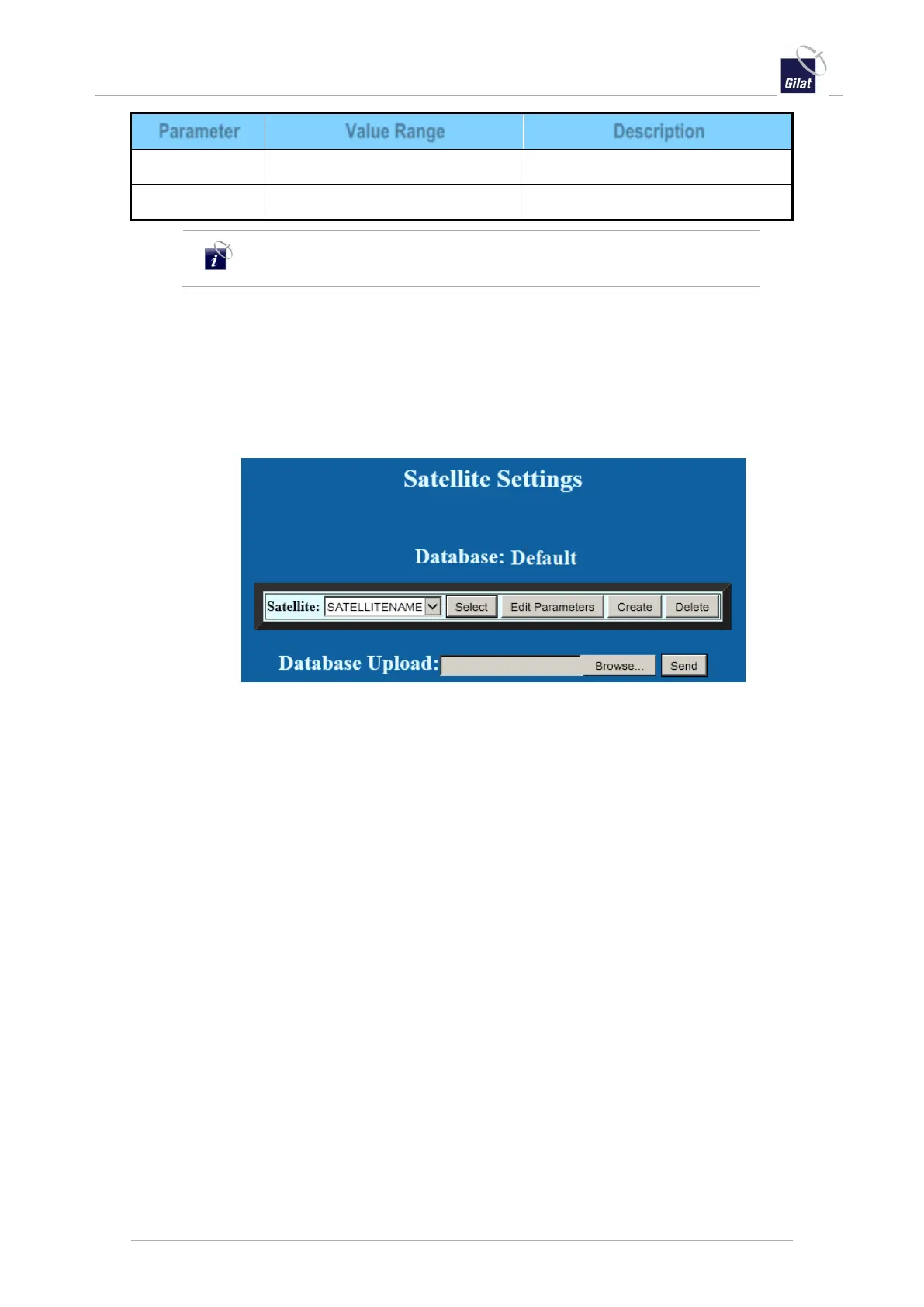
The Satellite Settings page is displayed.
Figure 59: Satellite Settings
You can perform the following actions on satellites:
Select a satellite to be tracked by the antenna - see page 57
Create a new satellite in the database – see page 58
Edit the parameters of the selected satellite in the database – see page 60
Delete the selected satellite from the database
Upload a satellite database file
Selecting a Satellite to Track
This section describes how to select the satellite to be tracked by the antenna.
To select a satellite to track:
1. Access the Satellite Settings page – see Configuring Satellite Settings, on page 57.
2. From the Satellite drop-down list, select a satellite, and click Select.
The ACU starts searching the selected satellite.
Once the satellite has been found, the ACU starts tracking it.


 To Next Page