MANUAL – REFLEX EZ-TRAC™ | 43
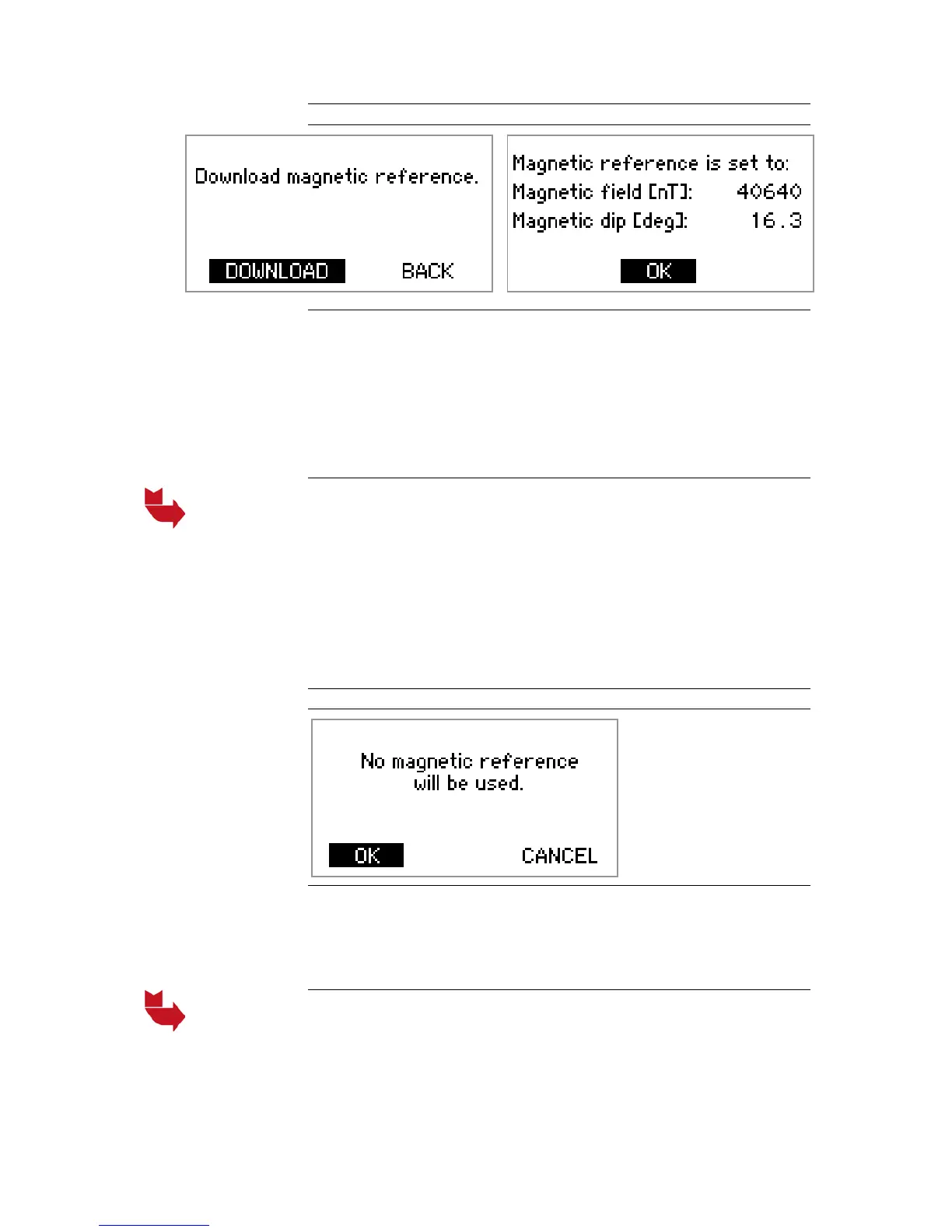
Figure 36 Download magnetic reference
Download magnetic reference
1. Direct the IR port of the REFLEX™ EZ-COM unit towards the IR port
of the instrument and select DOWNLOAD.
2. The values of the measured magnetic reference are displayed on
the screen.
3. Select OK to return to the MAGNETIC REFERENCE menu.
4. Use the LEFT key to return to the SETTINGS menu.
The measured total magnetic field value should be compared with
information from the national Land Surveyor about the local total
magnetic field. If there is a major difference, there might be magnetic
rock under the surface. Another reference point should be selected,
and a new magnetic reference should be registered.
If a reasonable magnetic reference cannot be registered, the
magnetic verification function can be disabled by setting the magnetic
reference to ‘No Reference’.
Figure 37 No reference
No reference
1. From the MAGNETIC REFERENCE menu, select No reference.
2. Select OK to remove the magnetic reference.
3. Use the LEFT key to return to the SETTINGS menu.
If ‘No Reference’ is selected, magnetic interference verification will
not be performed.


 To Next Page