53
Reading the Display
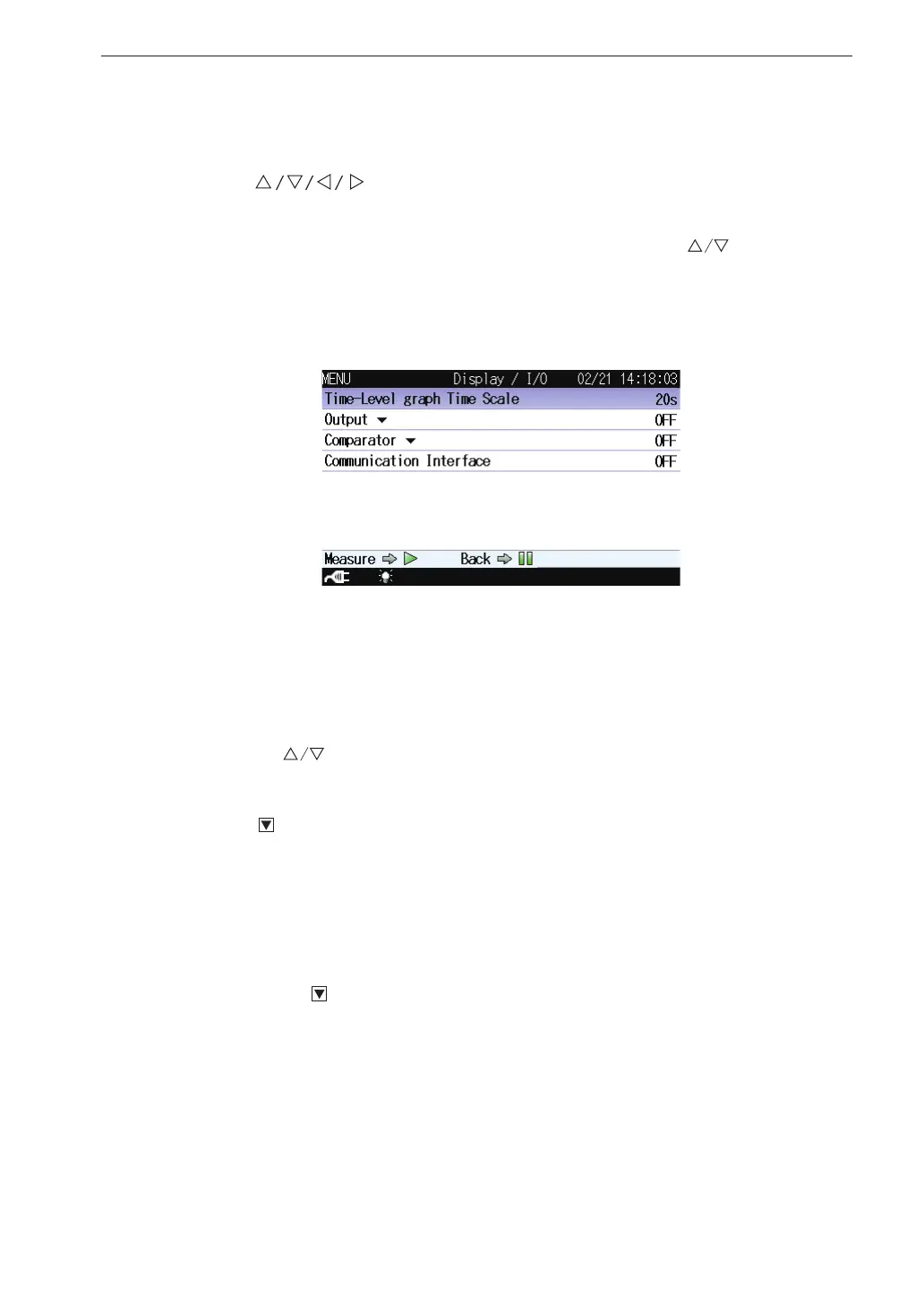
Display / I/O
This screen sets the type of output signal etc.
Use the
keys to select [Display / I/O] and press the MENU/
ENTER key. The display / I/O screen appears.
Each item of the display / I/O screen is selected using the key.
Pressing the PAUSE/CONT key switches back to the menu list screen.
Pressing the START/STOP key switches back to the measurement screen.
Time-Level graph Time Scale
Displays the screen to select the time scale of the time-level graph.
Select [Time-Level graph Time Scale] and press the MENU/ENTER key.
The Time-Level graph Time Scale setting screen appears.
Use the keys to select the time scale (20s, 1min, 2min) and press
the MENU/ENTER key.
Output
Displays the screen to select the signal output from the OUTPUT con-
nectors of the unit.
Select [Output] and press the MENU/ENTER key. The output screen
appears (see page 72).
Comparator
Displays the screen to set the comparator signal output (open collector
output can be used to control external equipment) from the I/O connector
of the unit.
Select [Comparator] and press the MENU/ENTER key. The comparator
screen appears.



 To Next Page