119
Cleaning : Preventing
Defective Prints
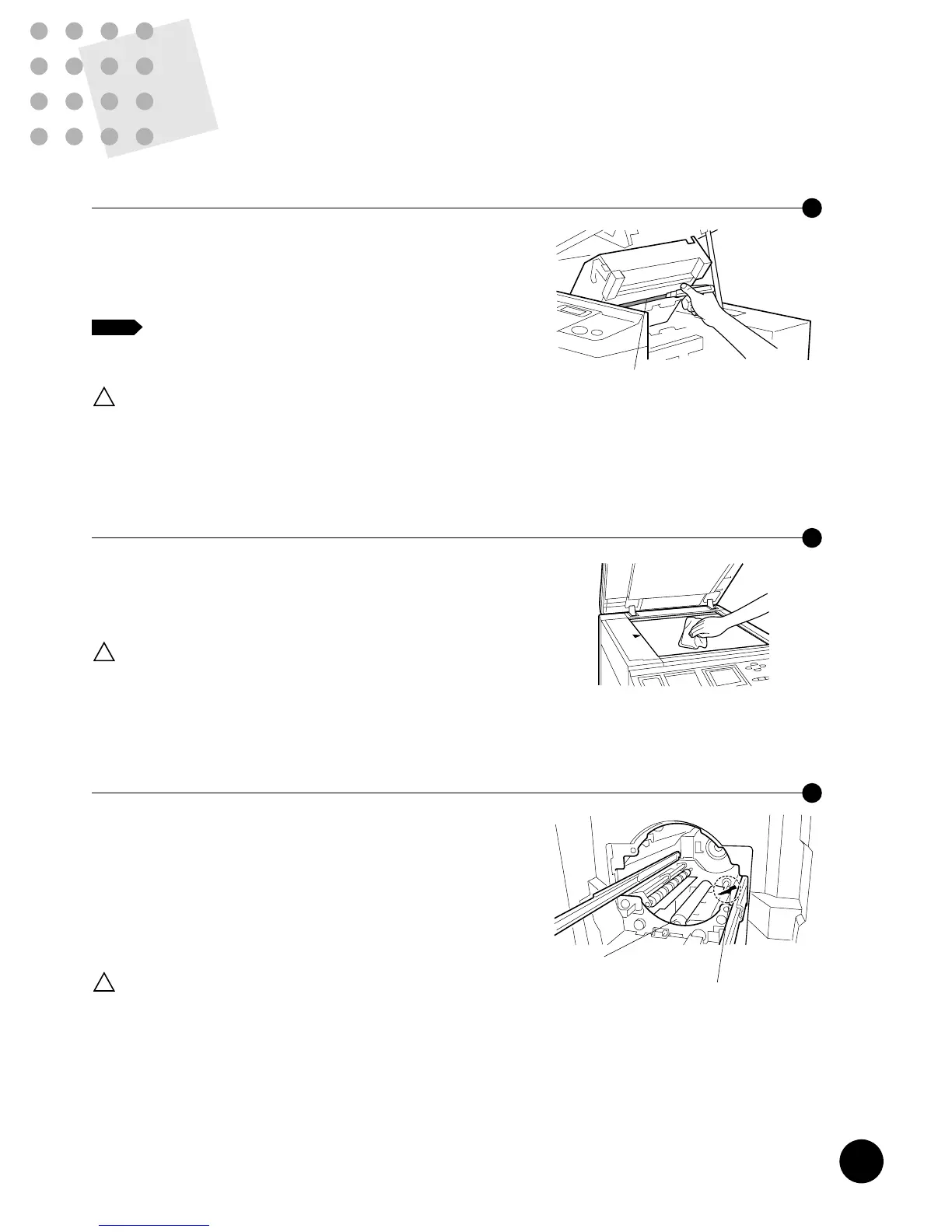
Cleaning the Thermal Print Head
Clean the Thermal Print Head after every two Master rolls.
Lift up the Scanner table and open the Master making unit.
Then gently wipe the Thermal Print Head (inside the unit)
several times with a soft cloth or tissue.
For more effective cleaning, dampen a soft cloth
or tissue with a small amount of alcohol before
wiping the Thermal Print Head.
Since the Thermal Print Head is very
delicate, avoid shocks or scratching
with a hard object.
Caution
!
NOTE
Thermal Print Head
If the Stage Glass and/or Stage Cover is stained,
imperfections may appear on prints.
Wipe them gently with a soft cloth or tissue.
Since the Stage Glass is very delicate,
avoid shocks or scratching with a hard
object.
Caution
!
Cleaning the Stage Glass and Stage Cover
If the rubber Pressure Roller [that presses printing paper
against the Print Cylinder (Drum)] is stained, smudged
strips may appear on the back sides of copies.
In such a case, wipe the Pressure Roller thoroughly with a
soft cloth dampened with alcohol, or pass used paper with
a blank master loaded on the Print Cylinder (Drum) using
the Confidential feature.
Take extra care not to hurt your hand
by the sharp tip of the Paper
separation hook when wiping the
Pressure roller.
Caution
!
Cleaning the Pressure Roller
Pressure Roller
Paper Separation Hook
118
Safety Guides
- Maintenance
WARNING [ To Avoid Personal Injury ]
• DO NOT allow unauthorized persons to make adjustments or repairs.
• DO NOT remove any fixed covers.
• CALL your dealer immediately if you suspect any dangerous situations or have
questions or problems with the unit.
• When you want to move the unit, contact your dealer.
Caution [ To Avoid Mechanical Problems ]
• Precision parts and driving mechanisms are contained in the unit. Do not perform
actions other than those described in this manual.
• Don't make any modifications to the unit or remove parts.
• Neither RISO nor its dealer is responsible for maintenance service performed by
non-RISO-authorized personnel.
The lithium battery in your machine should last about five
years.
When the battery has lost most of the power, however, the
message to the right appears in the Main Display. In this
case, call your authorized service representative and
request to replace battery.
!
!
Replacing the Lithium Battery
!!Battery Replacement!!
Call Service
(To Continue, Press Key)
The lithium battery must be replaced
by a trained and authorized service
representative.
Caution
!











 To Next Page