20
Preparing to Print
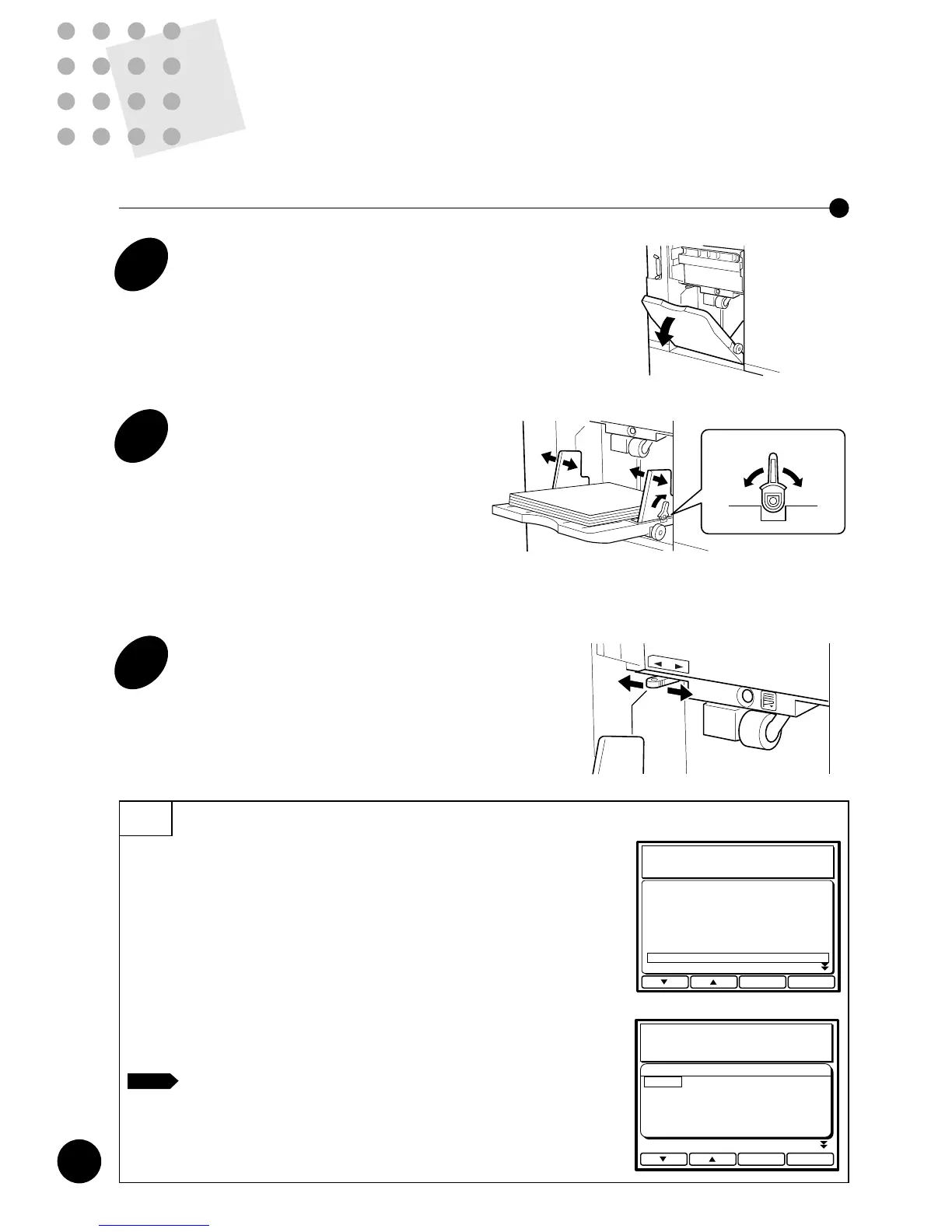
Setting Up the Paper Feed Tray
1
Open the Paper Feed Tray.
2
Load printing paper and slide the
Feed Tray Paper Guides to fit the
paper width.
Push down the Feed Tray Paper Guide Lock
Levers to lock the guides.
Important!
Do not mix printing paper of different sizes.
3
Set the paper feed pressure.
Position the Paper Feed Pressure Adjustment
Lever at either "NORMAL" or "CARD," according
to the paper to be used.
• NORMAL Standard paper
• CARD Thick paper such as card stock
Tips
Selecting the paper feed mode
You can adjust the paper feed range according to paper type as well.
It may improve the paper feed conditions with certain types of paper.
To adjust the paper feed range, open the Custom Initial setting window in
the Main Display and proceed to [Paper Feed Mode].
Then select an appropriate item according to paper type. ☞ p.70, 73
• Standard Standard paper
• Card Stock Thick paper such as card stock
• Light-weight Light-weight paper
• Custom Paper for which special adjustment is required in feeding
For detailed information about the “Custom” paper feed mode,
consult your service representative.
NOTE
Close OK
Custom Initial Settings
Multi-up Interval None
Enargy Saving Mode OFF
Enargy Save Timer 10 minutes
Auto Idle Period 12 hours
Semi-Auto>Master OFF
Minimum Print Quantity 1
Paper Size Display Legal
Paper Feed Mode Standard
Paper Feed Mode
Cancel OK
Card Stock
Light-Weight
Custom
Custom Initial Settings
Standard
GG
etting Ready to Use
Your RISOGRAPH
This section describes how to set your RISOGRAPH
for initial use, with basic information on printing paper
and originals.
Paper Recommendations
Originals and Processing
Preparing to Print
18
19
20
17











 To Next Page