AUTO IDLE
CONFIDENTIAL
REDUCE
ENLARGE
1 : 1
ZOOM
PRINT POSITION
DENSITY
LIGHT DARK
DUO
LINE
START
STOP
AUTO IMAGE
PROCESS
TEST
PRINT
RESET
PHOTO PRINT
MASTER
MAKING
AUTO
PROCESS
SLOW FAST
CENTER
PROGRAM
MEMORY
NORMAL
NORMAL
SPEED
CUSTOM
SETTING
SCANNING
CONTRAST
MULTI-UP
PRINT
DOT
PHOTO
BOUND
ORIGINAL
DATA
PC/SCAN
67
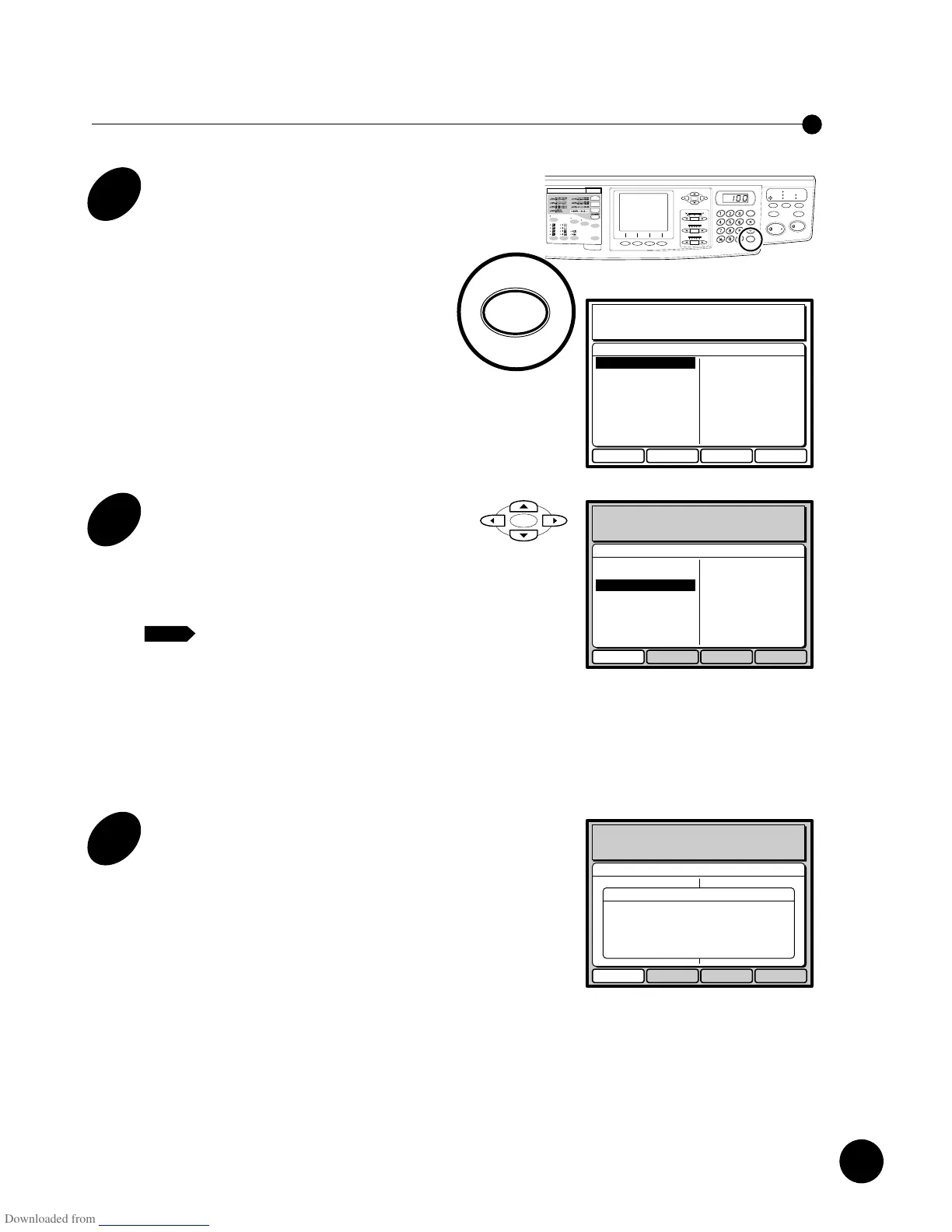
Storing Settings in Memory
Erasing a Saved Print Job Setting
1
Press the MEMORY key.
The Print Job Memory window appears in the
Main Display.
Personal2
RISO JOB
Personal4
Personal5
Personal6
Personal7
Personal8
Personal9
Personal10
Personal11
Personal12
Personal13
Personal14
Personal15
Personal16
Rename Close RegisterErase
Job Entry/Job Call
Personal1
Print Job Memory Mode
2
Select the print job setting to be
erased.
Highlight the job register name of the
corresponding print job setting in the list with the
cursor keys.
• When the job register name is dimmed,
no print job setting is saved under it.
• To cancel this operation, press the
o function key.
The Print job memory window is then
closed.
• It is recommended that you maintain a
list of job register names and their
associated settings.
Personal2
Personal4
Personal5
Personal6
Personal7
Personal8
Personal9
Personal10
Personal11
Personal12
Personal13
Personal14
Personal15
Personal16
Rename Close RegisterErase
Job Entry/Job Call
Personal1
Print Job Memory Mode
RISO JOB
3
Press the d function key.
The confirmation message box appears.
Personal2
Personal3
Personal4
Personal5
Personal6
Personal7
Personal8
Personal9
Personal10
Personal11
Personal12
Personal13
Personal14
Personal15
Personal16
CancelErase
Job Entry/Job Call
Personal1
Print Job Memory Mode
RISO JOB
To Erase the Selected Item,
Press Erase Key Again
(To Exit, Press Cancel Key)
AUTO IDLE
CONFIDENTIAL
REDUCE
ENLARGE
1 : 1
ZOOM
PRINT POSITION
DENSITY
LIGHT DARK
DUO
LINE
START
STOP
AUTO IMAGE
PROCESS
TEST
PRINT
RESET
PHOTO PRINT
MASTER
MAKING
AUTO
PROCESS
SLOW FAST
CENTER
PROGRAM
MEMORY
NORMAL
NORMAL
SPEED
CUSTOM
SETTING
SCANNING
CONTRAST
MULTI-UP
PRINT
DOT
PHOTO
BOUND
ORIGINAL
DATA
PC/SCAN
66
Storing Settings in Memory
Calling Up a Saved Print Job Setting
1
Press the MEMORY key.
The Print Job Memory window appears in the
Main Display.
You can apply a desired print job setting saved in the memory to any print job
whenever desired only by calling it up from the memory.
Personal2
RISO JOB
Personal4
Personal5
Personal6
Personal7
Personal8
Personal9
Personal10
Personal11
Personal12
Personal13
Personal14
Personal15
Personal16
Rename Close RegisterErase
Job Entry/Job Call
Personal1
Print Job Memory Mode
2
Select a desired print job setting.
Highlight the job register name of a desired print
job setting in the list.
• When the job register name is dimmed,
no print job setting is saved under it.
• To cancel this operation, press the
o
function key. The Print job
memory window is then closed.
• It is recommended that you maintain a
list of job register names and their
associated settings.
Personal2
Personal6
Personal7
Personal8
Personal9
Personal10
Personal11
Personal12
Personal13
Personal14
Personal15
Personal16
Rename Close CallErase
Job Entry/Job Call
Personal1
Print Job Memory Mode
RISO JOB
Personal4
Personal5
3
Press the s function key.
The Print job memory window is closed and the
basic window appears, showing the selected print
job setting.
The indicators on the control panel also light
according to the selected print job setting.
Duo
Image Processing
Reproduction Size
Scanning Contrast
Letter
Paper
Idle Black
Ready to Make Master
Dot Photo
97%
Zoom
2UP











 To Next Page