48
Protecting Confidential
Documents
After printing is complete, the master remains on the Print
Cylinder (Drum). Copies of this master can be printed at
any time by pressing the START key. To protect
confidential documents from unauthorized duplication,
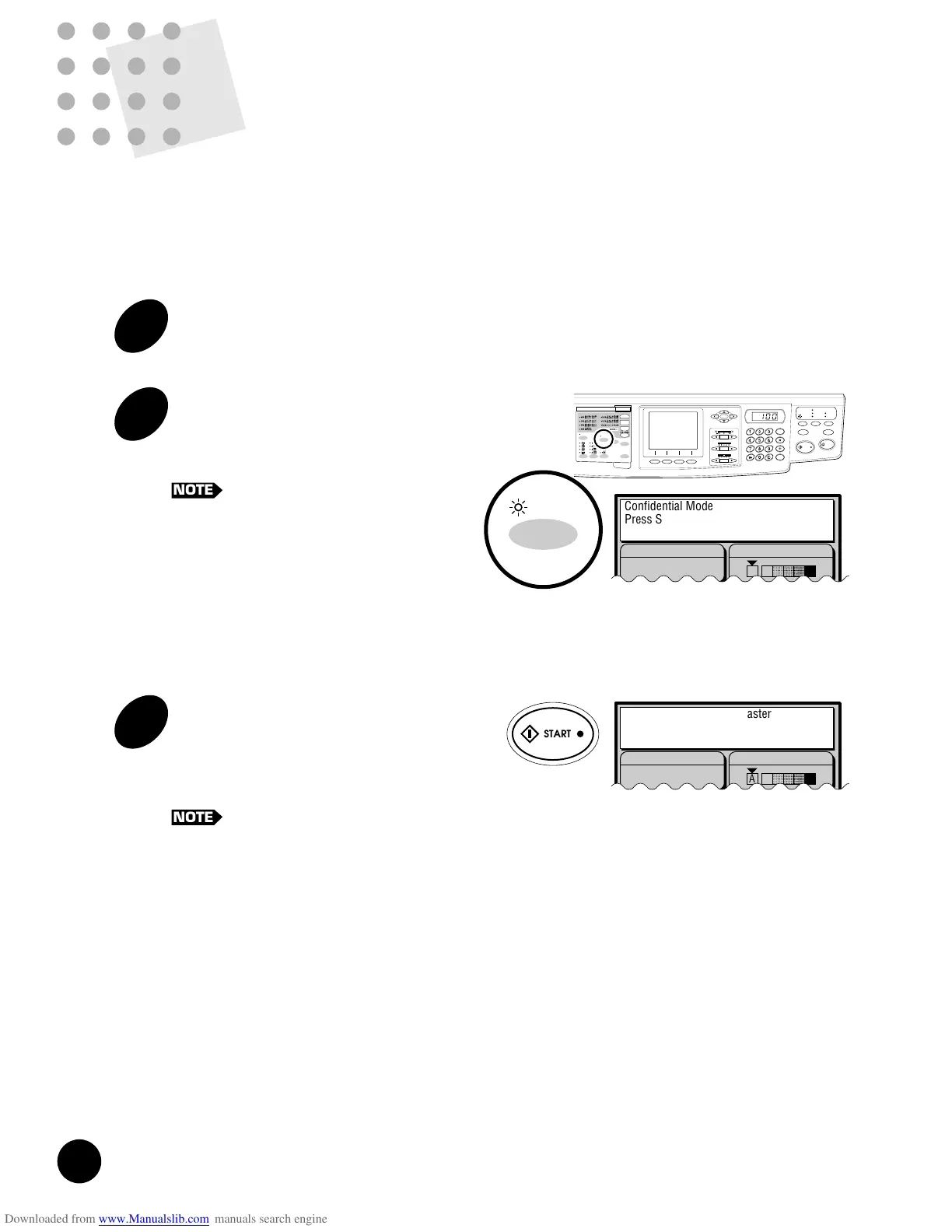
press the CONFIDENTIAL key to discard the master after
printing.
1
Confirm that printing has ended.
2
Press the CONFIDENTIAL key.
The CONFIDENTIAL indicator lights and the
following message appears in the Main Display.
To cancel the Confidential feature, press
the STOP key or the CONFIDENTIAL
key again.
AUTO IDLE
CONFIDENTIAL
REDUCE
ENLARGE
1 : 1
ZOOM
PRINT POSITION
DENSITY
LIGHT DARK
DUO
LINE
START
STOP
AUTO IMAGE
PROCESS
TEST
PRINT
RESET
PHOTO PRINT
MASTER
MAKING
AUTO
PROCESS
SLOW FAST
CENTER
PROGRAM
MEMORY
NORMAL
NORMAL
SPEED
CUSTOM
SETTING
SCANNING
CONTRAST
MULTI-UP
PRINT
DOT
PHOTO
BOUND
ORIGINAL
DATA
PC/SCAN
Line (Auto)
Image Processing Scanning Contrast
Confidential Mode
Press Start Key
To Cancel, Press Stop Key
A
3
Press the START key.
The current master is discarded and replaced with
a blank one. The CONFIDENTIAL indicator goes
out, and the Confidential feature is canceled.
The master is discarded into the Master
Disposal Box.
☞ p.100 ...For strictly confidential documents,
discard the contents of the Master
Disposal Box.
Line (Auto)
Image Processing Scanning Contrast
Disposing Confidential Master
A
45
Printing the Same Original Multi-Up
1
Press the MULTI-UP PRINT key to
select a desired pattern.
The corresponding indicator lights and the
corresponding message appears in the Main
Display when a desired pattern is selected.
To cancel this feature, press the key
repeatedly until the indicators are turned
off.
2
Place an original face-down on
the Stage Glass.
3
Press the START key.
The original is scanned twice or four times and a
sample Multi-Up print is produced.
If a 15-second beep sounds and a copy
is produced that is half or three quarter
blank, change the initial setting of the
Multi-Up printing feature to cancel the
interval time.
NOTE
AUTO IDLE
CONFIDENTIAL
REDUCE
ENLARGE
1 : 1
ZOOM
PRINT POSITION
DENSITY
LIGHT DARK
DUO
LINE
START
STOP
AUTO IMAGE
PROCESS
TEST
PRINT
RESET
PHOTO PRINT
MASTER
MAKING
AUTO
PROCESS
SLOW FAST
CENTER
PROGRAM
MEMORY
NORMAL
NORMAL
SPEED
CUSTOM
SETTING
SCANNING
CONTRAST
MULTI-UP
PRINT
DOT
PHOTO
BOUND
ORIGINAL
DATA
PC/SCAN
Line (Auto)
Image Processing
100%
Reproduction Size
Scanning Contrast
Letter
Paper
Black
Ready to Make Master
A
Idle
2UP
Printing Originals Side by Side
<RN2050/2150>
[2UP / 8UP]
Original Original Size
Placement 2UP 8UP
Direction A4 B5 A5 B6 B5 A5 B6
B4 87% 100% 122% 141% 050% 61% 71%
A4 71% 82% 100% 116% - 050% 58%
B5 61% 71% 87% 100% - - 50%
[4UP / 16UP]
Original Original Size
Placement 4UP 16UP
Direction B4 A4 B5 A5 B6 B6 A6
B4 50% 61% 71% 87% 100% 050% 61%
A4 - 50% 58% 71% 082% - 50%
B5 - - 050% 061% 071% - -
b
b
Printing
Paper
Size
Printing
Paper
Size
NOTE











 To Next Page