BB
asic Features
This section describes the basic operation procedures
and the features which are easy to use even for
inexperienced operators in order to enhance the utility
of your RISOGRAPH.
Safety Guides - Handling and Operation
Basic Processes
Basic Operation
Photo/Half-Tone Processing
Producing Proof Copies
Automatic Printing
24
25
26
30
31
32
23
22
4
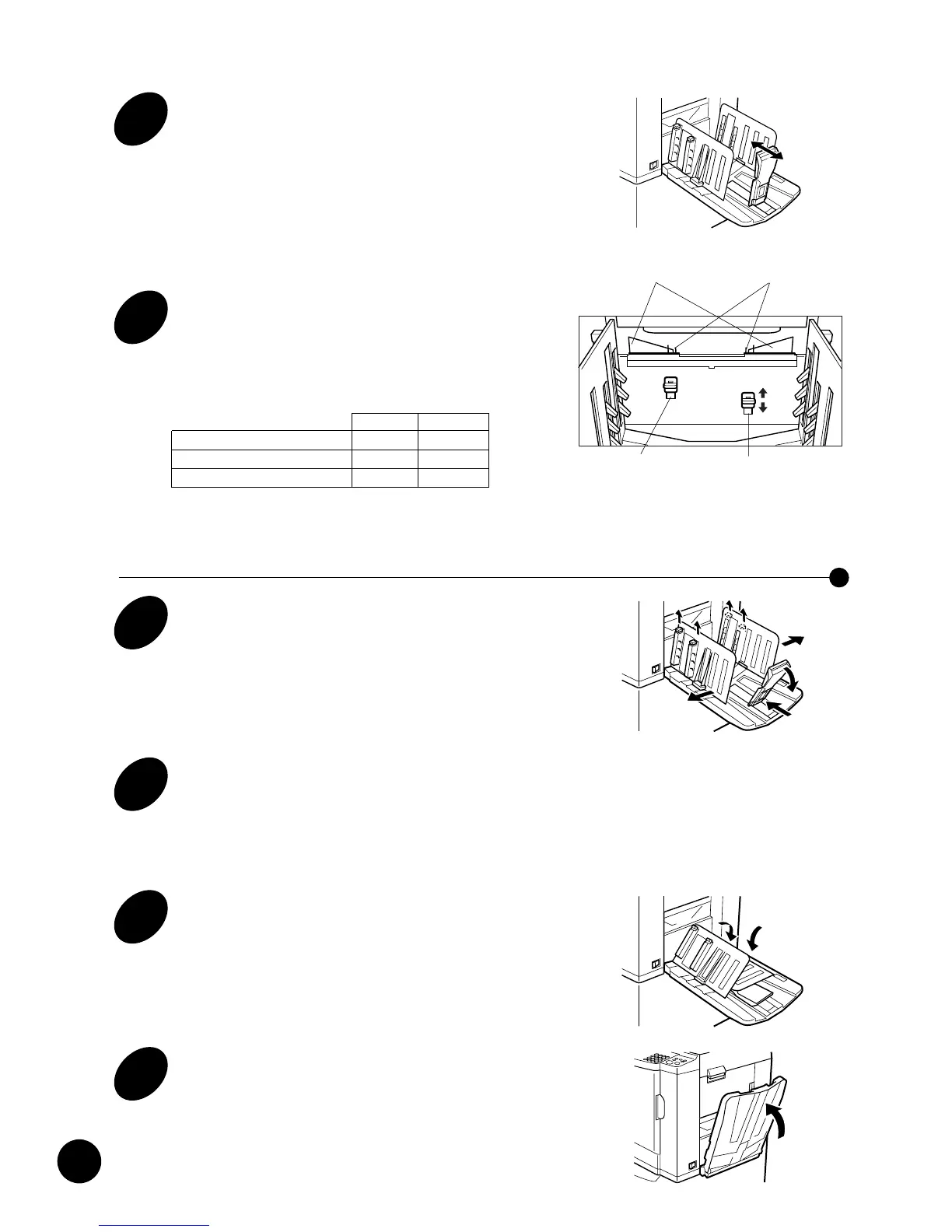
Raise and slide the Paper Stop to
fit paper length.
5
Set the Paper Ejection Wings 1 and
2.
Position the Paper Ejection Wing Adjustment
Levers according to the size and thickness of the
paper to be used, as described below.
Closing the Paper Receiving Tray
1
Slide the Paper Stop inwards and
turn it down and outwards.
Do not let the Paper Stop protrude from the Paper
Receiving Tray.
2
Close all four Paper Arrangers and
spread the Receiving Tray Paper
Guides to the B4 position.
3
Turn down the Receiving Tray
Paper Guides.
4
Close the Paper Receiving Tray.
Preparing to Print
Wing 1 Wing 2
Standard ( Letter-size/A4) Up Up
Standard (> Letter-size/A4) Up Down
Thick paper Down Down











 To Next Page