100
Emptying the Master
Disposal Box
1
Pull out the Master Disposal Box.
Hold the handle of the Master Disposal Box and
pull out the box.
Important!
Make sure that the Paper Feed Tray is lowered
to the bottom. If not, the Master Disposal Box
could not be pulled out or might be damaged
in removal.
2
Discard used masters.
3
Insert the Master Disposal Box into
position.
Holding the handle, insert the Master Disposal
Box into position as far as it will go. Then release
the handle.
Master Disposal Box Handle
97
Replacing the Ink Cartridge
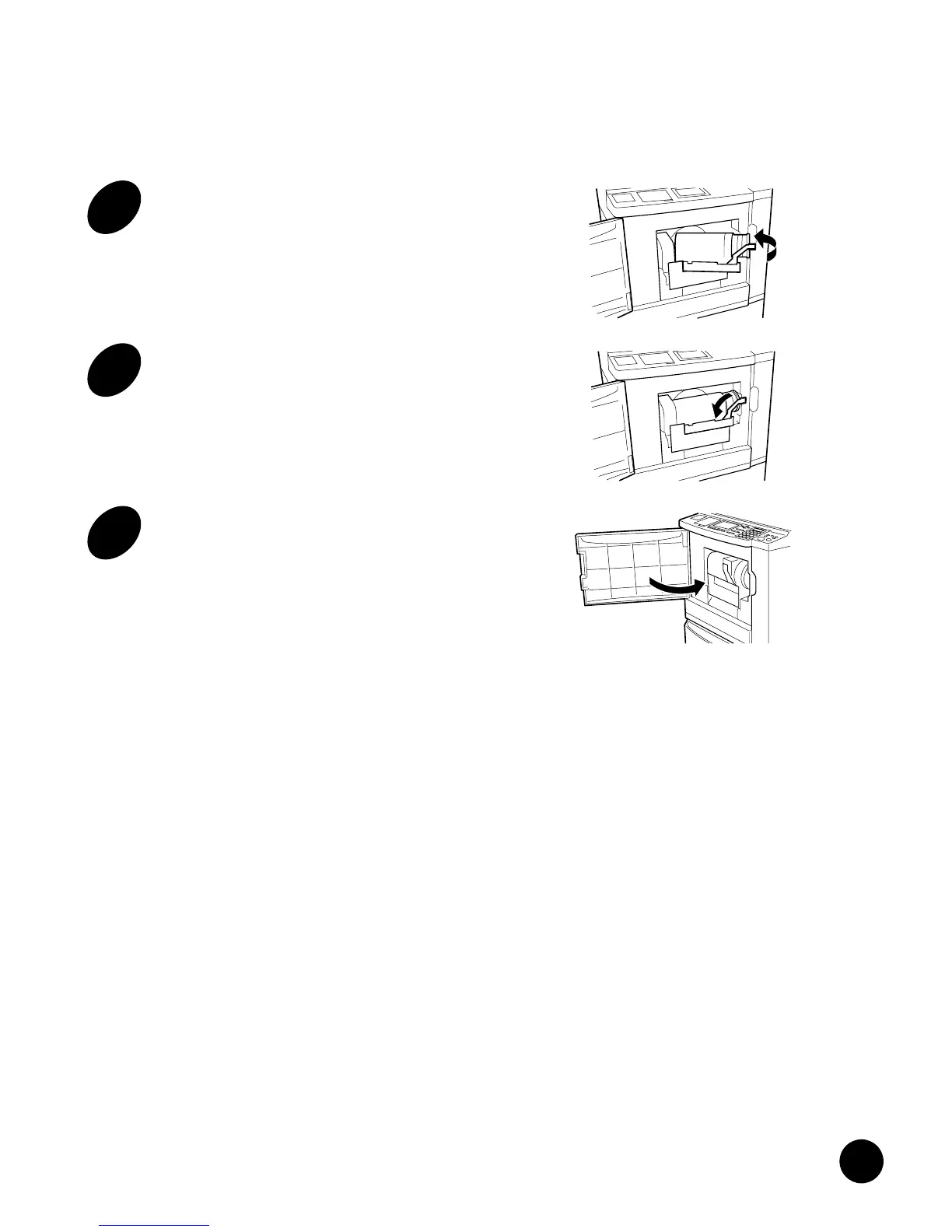
7
Push back the Ink Cartridge
Holder into position.
Push the Ink Cartridge Locking Lever.
8
Turn back the Ink Cartridge
Locking Lever to the left.
The Ink Cartridge is locked.
9
Close the Front Cover.
Important!
• Always use the ink cartridge whose
name's suffix is the same alphabetic
character as of the initial suffix of your
machine name, for "Black".
• Never insert a cartridge of a different
color ink.
Always be sure that the color of the new Ink
Cartridge is the same as that of the old one
being replaced. If you want to change the print
color, you must replace the entire Print Cylinder
(Drum).
• Dispose of the empty Ink Cartridge
following the disposal rule in your
community.
The Ink Cartridge is made of the following
material: Polypropylene and Polyethylene.
Regarding the components of ink, consult your
service representative.











 To Next Page