ORBIT 16
6.11.5. MACHINE STOPPED IN EMERGENCY CONDITION BECAUSE ONE OF THE
LIGHT CURTAINS TRIPPED
If the machine enters an emergency condition because the light curtain tripped, proceed as follows:
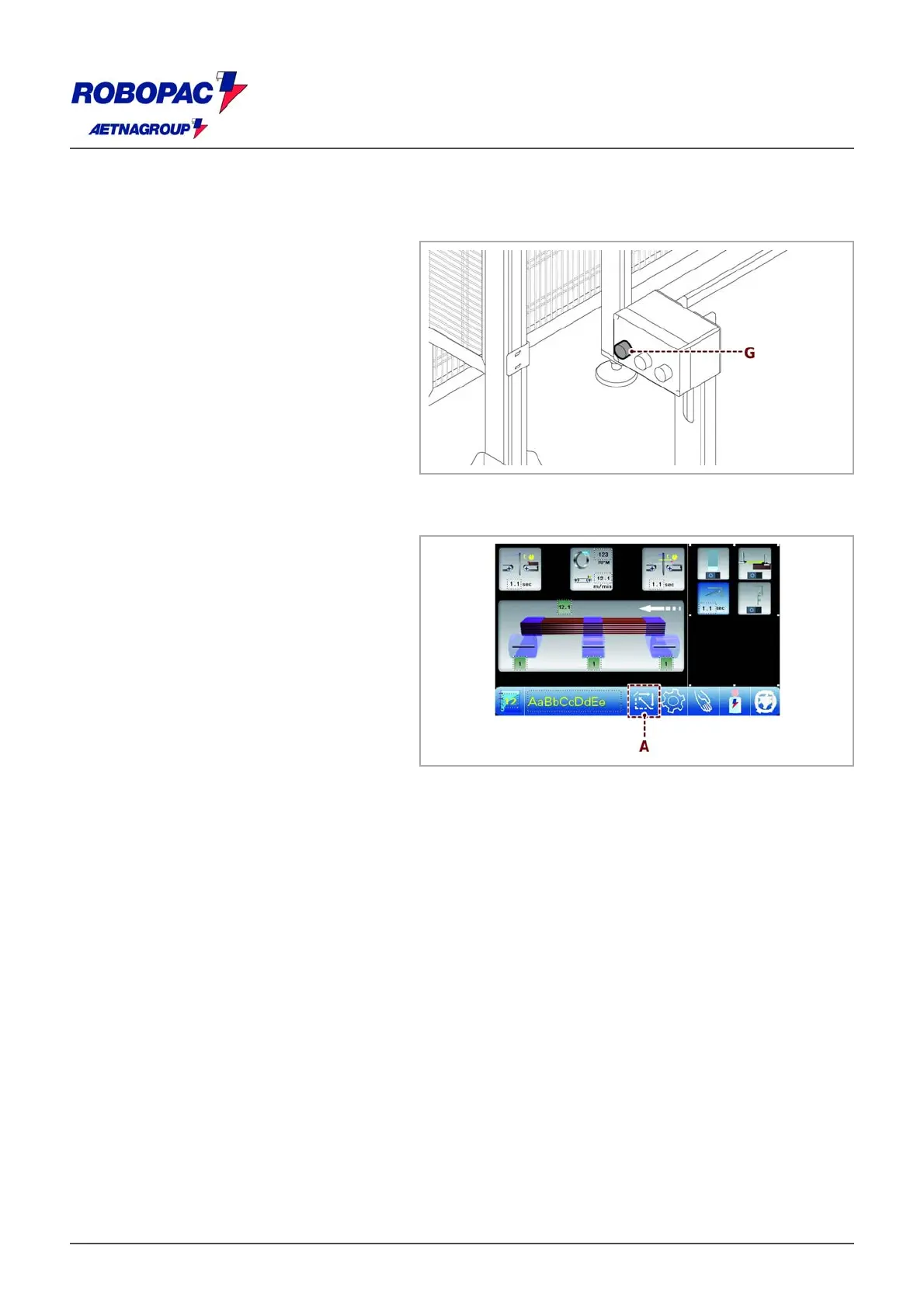
‒ Determine whether the obstacle is
located at machine inlet or outlet by
checking the condition of the green
illuminated push-button switch (G); if the
light is off, the machine is locked.
‒ Turn the Override key selector switch to
disable the light curtains for a preset
time.
‒ If necessary, remove the product from
the machine using the manual controls.
‒ Press the restart push-button (G) to
reset the light curtain.
If you wish to continue the winding that was interrupted, you must press the START button.
If a new operation is to be started, proceed as follows:
1. Remove product from the machine.
2. Press the key (A) to synchronize the
machine or press the "Reset" push-
button.
3. Block the film inside the clamp (see 6.9. “Machine boot” - “Coating insertion inside the gripper”).
he machine is read
for a new wra
in
c
cle.







 To Next Page