Disabling Unused Devices
Ifyouturnoffunuseddevices,batterylifetimewillget
longer.
1
Click Device Manager from Start > Control Panel
> Performance and Maintenance > Systems >
Hardwaretab.
2
Right-clickthedevicesthatyouarenotusingand
select Disabled.
Enabling Battery Calibration
Ifyouchargethebatterytousethathasnotbeenused
up,thegapbetweenactualbatterycapacityandbattery
residualamounthappenstohave.Accordinglythebattery
life may get shorter.
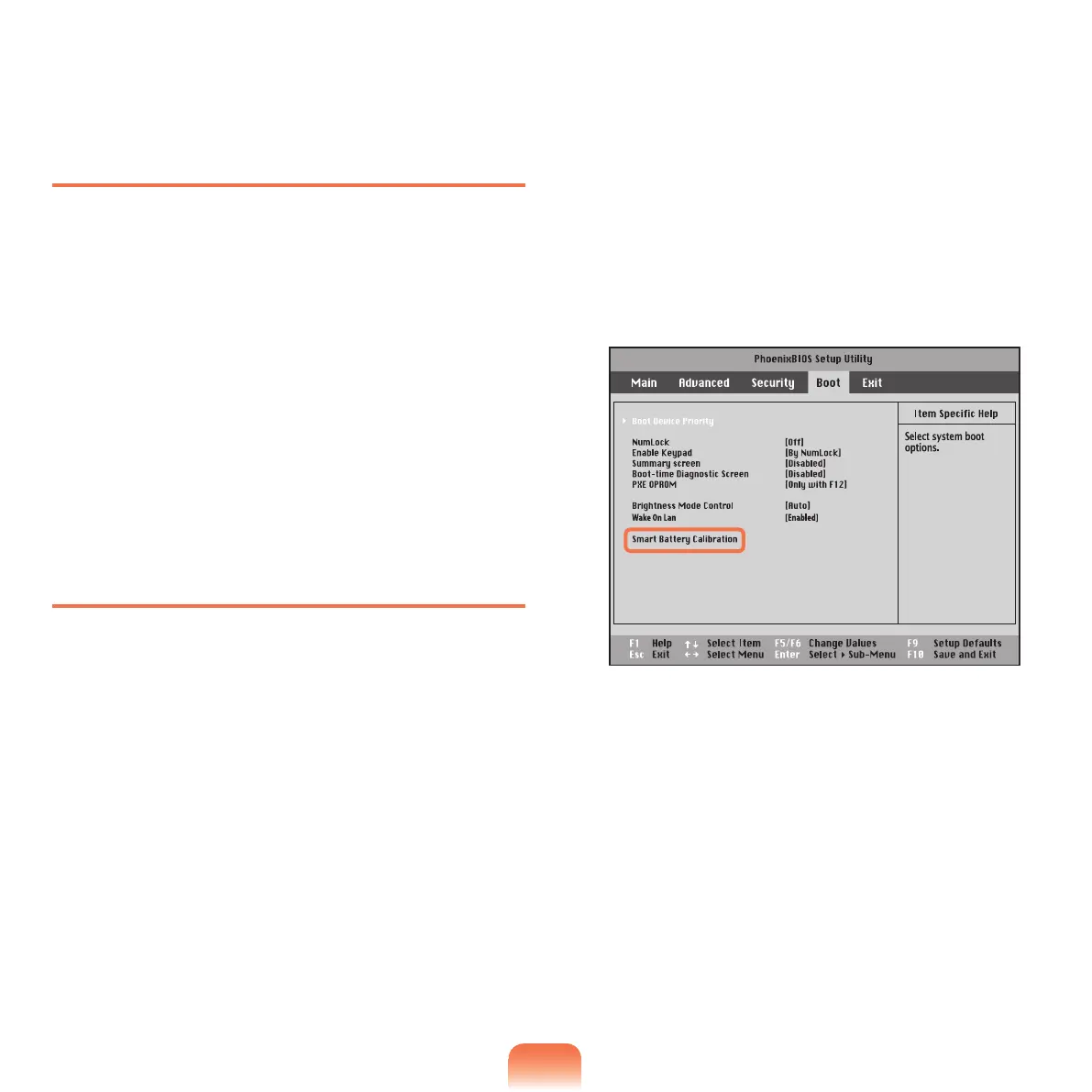
Inthiscase,usetheBatteryCalibrationfeatureto
completelydischargethebatteryandchargeitagain.
Then this gap will disappear.
1
Turn off the computer and remove the AC adapter.
2
Turnonthecomputeragain.WhentheSAMSUNG
logoappears,presstheF2 key to enter the Setup.
3
Select Boot Menu > Smart Battery Calibration and
press the Enter key.
4
Select Yes from the Battery Calibration
Conrmation window and press the Enter key.
TheBatteryCalibrationstarts.Tostopit,pressthe
Esc key.
Ittakesaboutthreetovehoursdependingonthe
batterycapacityandresidualamount.



 To Next Page