56
Adjusting the Volume using the Keyboard
Press the Fn + ( )keycombinationorFn + ( ) key
combinationtoadjustthevolume.
Press the Fn + (
)keycombinationtoturnthevolume
on or off.
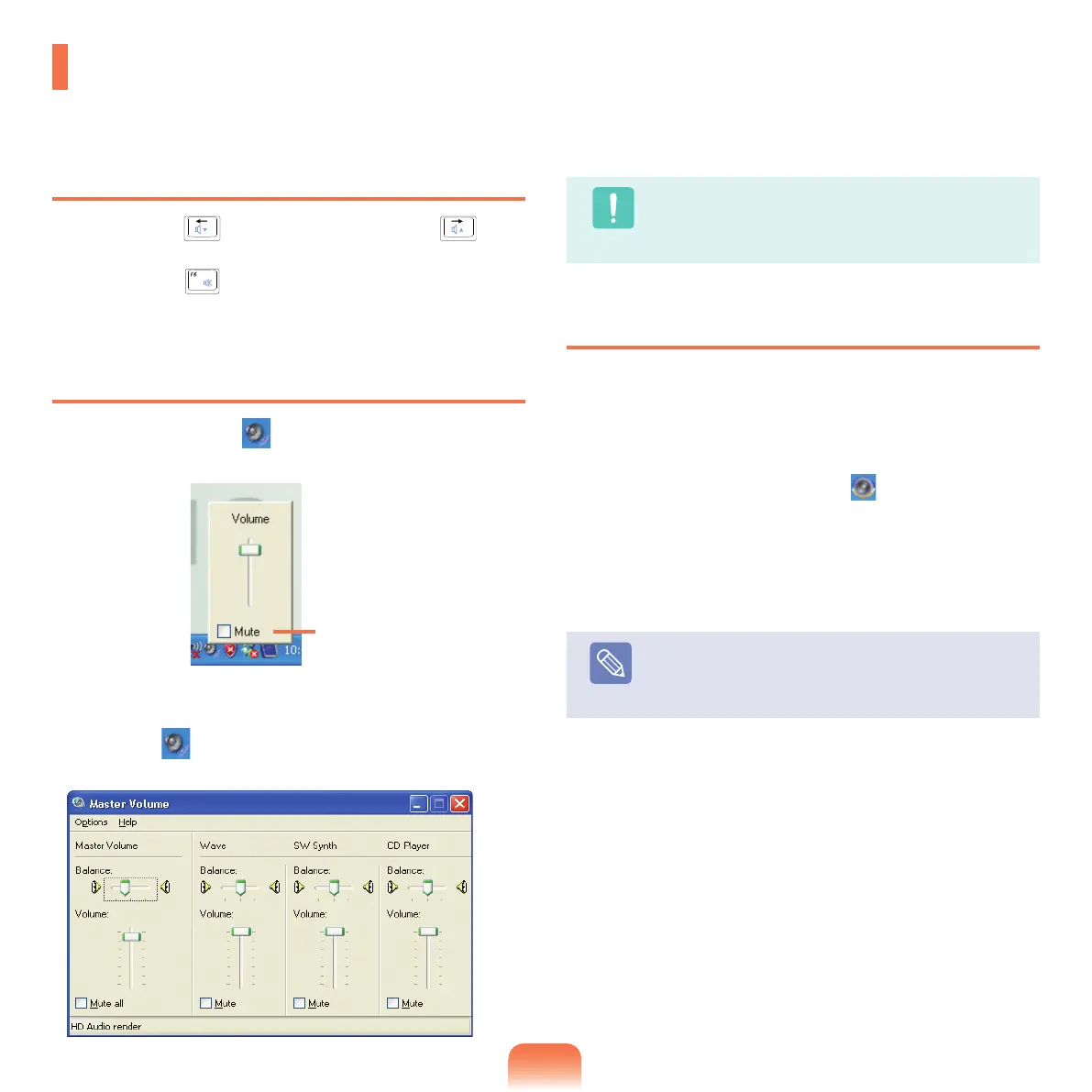
Adjusting the Volume using the Volume
Adjustment Program
Click the Volume icon ( )onthetaskbarandslidethe
volumecontrolbartoadjustthevolume.
Foradvancedvolumecontroloptions,double-clickthe
Volume icon(
),andadjustthevolumelevelinthe
volume control program.
Caution
Whenyouturnthesystemon,abootingnoisemay
occur.
Using EDS
Enableslisteningtosurroundsoundusingstereo
speakers.
Tolistentomorestereophonicsound,clickStart > All
Programs > Samsung > Samsung EDS > Samsung
EDS
ordouble-clicktheEDS icon ( )ontheTaskbar
andselectasurroundmodefromthepop-upmenu.
TodisableEDS,selectEnhancedDigitalSoundOFFfrom
thepop-upmenu.
Note
TodisableEDS,selectEnhanced Digital Sound
OFF
fromthepop-upmenu.
Adjusting the Volume
Youcanadjustthevolumeusingthekeyboardandthevolumecontrolprogram.
Mute



 To Next Page